The best USB-C cables differ sharply in charging power, data speed, length, and display support, even when their connectors look identical. My best overall pick is the Anker 3.3ft 240W USB4 Cable because its 40Gbps transfer rate and 8K display support give it broader utility than charging-focused alternatives. The Anker 60W 2-Pack offers better everyday value for phones, tablets, and lighter laptops, while the Silkland USB4 Thunderbolt 5 Cable targets buyers with hardware capable of using its 80Gbps data rate. The main tradeoff is whether to favor high-speed data and video, practical six-foot reach, or multiple affordable charging cables. Continue reading for the full breakdown and use-case rankings.

Get the latest gadgets delivered free with Prime
- Fast, free delivery on millions of items
- Prime Video, Amazon Music and more included
- Member-only deals all year
Complete the kit



Key Takeaways
- Anker’s 3.3ft 240W USB4 Cable takes the overall spot because it combines 40Gbps data, high-power charging, and display support; most six-foot entries focus mainly on charging.
- The Anker 60W 2-Pack is the strongest value choice for common devices, but its lower power ceiling and basic data role make it less suitable for demanding laptops or fast storage.
- The Silkland 80Gbps cable has the highest advertised bandwidth in the lineup, yet that advantage matters only with compatible next-generation ports and peripherals.
- Among the many six-foot 240W charging cables, connector shape, flexibility, construction, and pack size matter more than the shared wattage figure.
- The lineup exposes a clear length tradeoff: short USB4 cables favor data and display performance, while the Anker 10FT 2-Pack favors reach and charging convenience.





| USB-C cable | Connector type | Length | Maximum Power |
|---|---|---|---|
| Anker Nano USB C Cable | USB-C to USB-C | — | — |
| Anker USB C to USB C Cable | USB-C to USB-C | — | — |
| Silkland USB 4 Thunderbolt 5 C | USB-C to USB-C | — | — |
| Anker USB C Fast Charging Flow | USB-C to USB-C | — | — |
| Anker Prime USB C to USB C Cab | USB-C to USB-C | — | — |
| Belkin USB C to USB C Cable 2- | — | 6.6 feet | 240W |
| Anker USB-C Cable | USB-C to USB-C | 3.3 feet | 240W |
| UGREEN 240W USB C to USB C Cab | USB-C to USB-C | 6.6 feet | 240W |
| UGREEN 240W USB C to USB C Cab | USB-C to USB-C | 3.3 feet | 240W |
| Apple 240W USB-C to USB-C Wove | — | 2 meters | 240W |
| Anker USB C to USB C Cable | USB-C to USB-C | 6 ft (1.8 m) | 100W |
| Anker Prime Thunderbolt 4 Cabl | USB-C to USB-C | 3.3 ft | 240W |
| LISEN USB C to USB C Cable | USB-C to USB-C | 6.6 ft | 240W |
| Anker Zolo USB-C to USB-C Cabl | USB-C to USB-C | 6 ft | 240W |
| Anker USB C to USB C Cable | USB-C to USB-C | 10 ft | 240W |
More Details on Our Top Picks
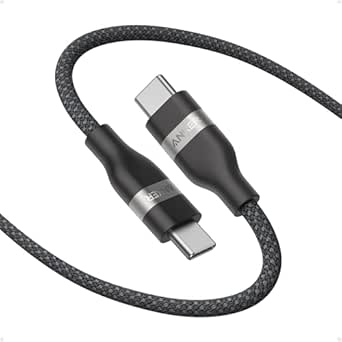
Anker Nano USB C Cable, 240W Fast Charging, 6ft Braided Cord
I rank the Anker Nano USB C Cable first because it balances 240W charging, six-foot reach, and everyday durability without moving into specialist-cable territory. Its 30,000-plus-bend braided construction suits a cable that may travel between a desk, bag, and bedside charger, while the 220-pound load rating adds reassurance against hard pulls. The Anker Prime is far tougher on paper, but that added resilience is more than many buyers need. Silkland’s Thunderbolt 5 cable is the better choice for displays and large file transfers; the Nano does not support screen mirroring and is built mainly for charging. I see this as the broadest recommendation because it delivers high power in a flexible, manageable format, though buyers needing fast data or video should choose a full-featured USB4 cable instead.
Pros:- 240W output can serve compatible phones, tablets, and power-hungry laptops
- Six-foot length offers more placement freedom than four-foot performance cables
- Braided construction is rated for more than 30,000 bends
- Flexible recycled-material design is easier to coil and store
Cons:- Does not support screen mirroring
- USB-C connectors require a compatible USB-C power adapter
- Lacks the extreme bend durability of the Anker Prime cable
Best for: Laptop and phone owners who want one durable six-foot cable for high-power charging at home and while traveling
Not ideal for: Dock, monitor, and external-SSD users who need video output or faster-than-basic data performance
- Connector type:USB-C to USB-C
- Maximum charging power:240W
- Cable length:6 ft
- Exterior material:Braided recycled material
- Bend lifespan:30,000+ bends
- Maximum load:220 lb
- Color:Black
- Video support:No screen mirroring
Our verdict“This is my default pick for buyers who prioritize versatile 240W charging over display and high-speed data support.”
Anker USB C to USB C Cable, 60W Fast Charging, 6 FT, 2-Pack
The Anker 60W two-pack earns my value slot by supplying two reinforced six-foot cables for buyers who need spares more than maximum power. A 60W ceiling is ample for many phones, tablets, and thinner laptops, and 480Mbps data transfer handles routine syncing. Compared with the Anker Nano, however, it gives up three-quarters of the charging capacity, making it less suitable for larger laptops that draw above 60W. It also shares a limitation with the Nano: neither cable is intended for monitor output. The two-cable bundle makes more sense for equipping a bedroom and office or replacing several worn cords, while included organization accessories help control the extra length. I would skip it for workstation docks, rapid external storage, or high-wattage notebooks, but it is the most practical pick here for basic charging coverage.
Pros:- Two six-foot cables provide better multi-location coverage than a single-cable package
- 60W Power Delivery supports many phones, tablets, and lightweight laptops
- Reinforced nylon exterior is built for repeated daily handling
- 480Mbps capability supports ordinary file syncing
Cons:- 60W output is well below the 240W capacity of the other featured charging cables
- Does not carry display video
- Cannot connect directly to USB-A chargers or Lightning ports
Best for: Households, students, and hybrid workers who need two long charging cables for phones, tablets, and lower-power laptops
Not ideal for: Owners of high-wattage laptops, USB-A chargers, Lightning devices, or USB-C monitors
- Connector type:USB-C to USB-C
- Maximum charging power:60W
- Cable length:6 ft each
- Cable count:2
- Data transfer speed:Up to 480Mbps
- Exterior material:Reinforced nylon
- Video support:No media display support
- Included extras:Cable organization accessories
Our verdict“I recommend this pack when two dependable everyday cords matter more than 240W charging, display output, or workstation-grade data speed.”
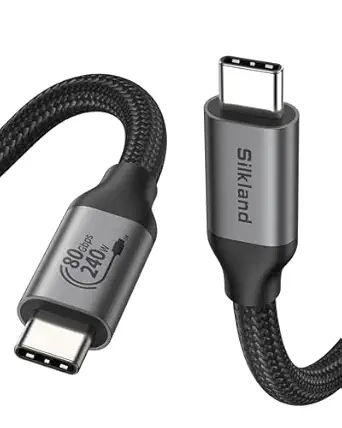
Silkland USB 4 Thunderbolt 5 Cable, 80Gbps Data Transfer, 120Gbps Bandwidth, 240W Charging, 4FT
I give the Silkland USB 4 Thunderbolt 5 Cable the performance role because its 80Gbps bidirectional data rate and 120Gbps bandwidth mode separate it from charging-focused cords. That headroom matters when moving large files, connecting fast SSDs, or driving demanding displays, while 240W charging lets one cable handle power too. The Anker Nano costs buyers less complexity and provides two extra feet of reach, but it cannot replace a display cable; Silkland can support resolutions up to 16K and refresh rates up to 4K at 540Hz when paired with compatible hardware. The catch is that the host, peripheral, and display must support the relevant standards, so older USB-C devices will not deliver the advertised speeds. Its four-foot length is also less forgiving around large desks, and the advanced construction may command a higher price than ordinary charging cords.
Pros:- Transfers compatible data at up to 80Gbps
- Supports up to 120Gbps bandwidth for demanding display workloads
- Combines advanced data and display support with 240W charging
- USB-IF certification and triple shielding support reliable high-bandwidth operation
Cons:- Maximum speed, resolution, and refresh rate depend on every connected device
- Four-foot length offers less routing freedom than the six-foot Anker cables
- Advanced specification may cost more than a charging-only cable
Best for: Creative professionals, workstation users, and external-SSD owners with Thunderbolt or current-generation USB4 hardware
Not ideal for: Phone-only buyers and users with older USB-C devices who would pay for bandwidth their hardware cannot use
- Connector type:USB-C to USB-C
- Maximum data transfer:80Gbps
- Maximum bandwidth:120Gbps
- Maximum charging power:240W
- Cable length:4 ft
- Standards compatibility:Thunderbolt 4/3, USB4, and USB 3.2
- Certification:USB-IF certified
- Construction:Braided nylon with aluminum shell
- Shielding:Triple shielding with EMI tinplate, 28 AWG OFC, and stainless connectors
Our verdict“This is my performance pick for buyers who can use its exceptional bandwidth and do not need more than four feet of cable.”
Anker USB C Fast Charging Flow Cord, 240W, 6FT
The Anker Flow Cord is my choice for bags and frequently rearranged charging setups because its soft silicone exterior stays flexible and resists tangles. It matches the Anker Nano’s 240W power ceiling and six-foot length, yet favors a smooth, pliable feel over a conventional braided surface. That makes it easier to coil around a compact charger or route across a nightstand. Its 25,000-bend rating is strong for ordinary use, though it falls slightly behind the Nano’s 30,000-plus rating and far behind the Anker Prime’s 300,000-plus cycles. Data capability is another limitation: the supplied information indicates only USB 2.0-class performance, with no display feature described. I rank it below the Nano because the softer finish is a specialized convenience rather than a broader capability advantage. It remains a smart alternative for buyers who dislike stiff, knot-prone braided cords.
Pros:- Soft silicone finish is flexible and comfortable to handle
- Tangle-resistant design suits bags and compact charger kits
- 240W output supports compatible high-power laptops and mobile devices
- Rated to withstand 25,000 bends
Cons:- USB 2.0-class data performance is slow beside the Silkland cable
- Bend rating trails both the Anker Nano and Anker Prime
- Only a black color option is identified in the supplied product data
Best for: Frequent travelers and bedside users who want a soft, easily coiled six-foot cable for phones, tablets, and laptops
Not ideal for: Workstation users who need fast storage transfers, monitor output, or the highest available bend rating
- Connector type:USB-C to USB-C
- Maximum charging power:240W
- Cable length:6 ft
- Exterior finish:Soft silicone
- Bend lifespan:25,000 bends
- Data class:USB 2.0
- Color:Black
- Compatible device types:USB-C phones, tablets, and laptops
Our verdict“I would choose the Flow Cord for easy packing and handling, provided high-speed data and extreme durability are not priorities.”
Anker Prime USB C to USB C Cable, 240W Fast Charging, 6 ft, Upcycled Braided Nylon
I reserve the durability title for the Anker Prime USB C to USB C Cable, whose 300,000-plus-bend rating is ten times the Anker Nano’s stated figure. Its upcycled braided nylon and operating range from -40°F to 176°F make it better suited to repair kits, field work, shared charging stations, and other harsh settings. Charging reaches the same 240W ceiling as the Nano and Flow Cord, so the higher durability does not require a power compromise. Capability is narrower elsewhere: USB 2.0 transfer speeds are poor for large files, and the cable cannot mirror a screen. Silkland’s Thunderbolt 5 model is a much better workstation link, though it offers less length and targets a different buyer. I place the Prime behind the Nano for general use because most people will not need this degree of reinforcement, but frequent cable breakers may find the longer service life worth the added cost.
Pros:- Rated for more than 300,000 bends
- 240W charging supports compatible high-power laptops
- Operates across a stated -40°F to 176°F temperature range
- Upcycled braided nylon combines reinforcement with recycled material use
Cons:- USB 2.0 data speed is unsuitable for large transfer workloads
- Does not support screen mirroring
- Heavy-duty construction may cost more than buyers with light usage need
Best for: Field technicians, frequent travelers, shared-device workplaces, and buyers who repeatedly wear out ordinary charging cables
Not ideal for: Display users and creators who need fast transfers to docks, cameras, or external SSDs
- Connector type:USB-C to USB-C
- Maximum charging power:240W
- Cable length:6 ft
- Exterior material:Upcycled braided nylon
- Bend durability:Over 300,000 bends
- Temperature resilience:-40°F to 176°F
- Data class:USB 2.0
- Video support:No screen mirroring
Our verdict“This is my pick for buyers who routinely damage cables and value service life far more than video or fast data.”
Belkin USB C to USB C Cable 2-Pack, 6.6ft, 240W
I rank the Belkin 240W two-pack as the strongest choice for households or workspaces that need two long-lasting charging cables. Its rated 100,000-plus bends and 20,000 plug-ins far exceed the stated durability figures for the Anker USB4 cable and UGREEN charging cable, while the 6.6-foot reach works well beside beds and desks. USB-IF certification adds confidence when charging demanding laptops at up to 240W. The compromise is performance beyond charging: its 480 Mbps data ceiling is tiny beside the Anker USB4 cable’s 40 Gbps, and it is not presented as a display cable. Compared with the single Apple woven cable, Belkin also supplies better coverage through two cables, though buyers focused on maximum data speed should move further down this ranking.
Pros:- Two 6.6-foot cables provide broad coverage around a home or office
- Supports charging at up to 240W for compatible hardware
- Rated to survive more than 100,000 bends and 20,000 plug-ins
- USB-IF certification supports dependable USB operation
Cons:- 480 Mbps transfer rate is far behind USB4 alternatives
- No display-output capability is specified
- Buying two cables may be unnecessary for a single-device setup
Best for: Multi-device households and shared offices that want two long, highly durable cables for phones, tablets, and high-powered laptops
Not ideal for: Video editors, dock users, and external-display setups that need multi-gigabit transfers or video output
- Pack Size:2 cables
- Length:6.6 feet
- Maximum Power:240W
- Data Transfer Speed:480 Mbps
- Materials:TPE and ABS
- Certification:USB-IF certified
- Rated Durability:100,000+ bends and 20,000+ plug-ins
- Compatibility:USB-C phones, tablets, and laptops
Our verdict“I recommend this Belkin pack when cable quantity, reach, and exceptional rated durability matter more than fast file transfers.”
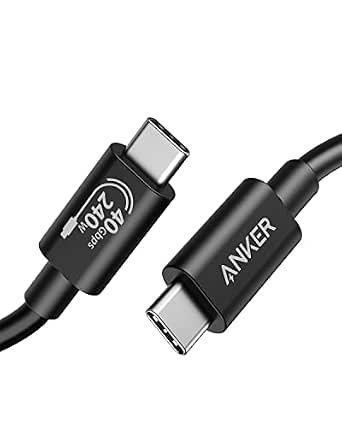
Anker USB-C Cable (3.3ft, 240W), USB4 Data Cable, 40Gbps, 8K HD Display, Thunderbolt 4/3 Compatible
The Anker USB4 cable earns its place as my workstation pick because it combines 240W charging, 40 Gbps transfers, and 8K display support in a compact cable. That combination suits a laptop connected to a nearby dock or monitor, where the Belkin and Apple cables’ USB 2-class speeds would create a severe data bottleneck. Anker also specifies Thunderbolt 4 and 3 compatibility, making its intended role clearer than that of a basic charging cord. It ranks below the UGREEN USB4 Gen4 model for raw performance because UGREEN offers twice the transfer rate and video support up to 16K. The 3.3-foot length is another dividing line: it keeps a desktop tidy but leaves little freedom when ports and peripherals sit far apart. Its 5,000-bend rating also trails the sturdier charging-focused options.
Pros:- Transfers data at up to 40 Gbps
- Supports display output at resolutions up to 8K
- Carries up to 240W for compatible laptops and devices
- Works with Thunderbolt 4 and Thunderbolt 3 equipment
Cons:- Three-foot reach is restrictive outside compact desk setups
- Performance is below the 80 Gbps UGREEN USB4 Gen4 cable
- Rated for only 5,000-plus bends, fewer than several charging-focused picks
Best for: Laptop users connecting a nearby Thunderbolt dock or 8K monitor while also charging through one cable
Not ideal for: Bedside users, conference-room installations, and distant peripherals that need more than 3.3 feet of reach
- Connector Type:USB-C to USB-C
- USB Standard:USB4
- Data Transfer Rate:40 Gbps
- Maximum Power:240W
- Maximum Voltage:48V
- Maximum Current:5A
- Length:3.3 feet
- Display Support:Up to 8K
- Compatibility:Thunderbolt 4/3, docks, hubs, MacBook, and iPhone 17
Our verdict“I recommend this Anker cable for compact 8K and Thunderbolt workstations that do not need the UGREEN Gen4 model’s higher ceiling.”
UGREEN 240W USB C to USB C Cable, Fast Charging for iPhone, Samsung, MacBook, iPad, Dell XPS, 6.6FT
I place the UGREEN 6.6-foot cable in the charging-first slot. Its PD 3.1 power delivery and E-marker safety chip make it well suited to moving between phones, tablets, handheld consoles, and laptops without giving up the 240W ceiling. The long nylon-braided cord also offers more placement freedom than either 3.3-foot USB4 model. Compared with the Belkin two-pack, UGREEN specifies a lower 10,000-bend durability figure and supplies only one cable, but it spells out smart power-management hardware and broad device support. The biggest reservation is its undefined data capability: no transfer speed or display support appears in the supplied details, so I would treat this as a dedicated charging cable. Buyers wanting one cord for a fast SSD, dock, or monitor should choose the Anker USB4 or UGREEN Gen4 cable instead.
Pros:- Supports up to 240W charging through PD 3.1
- E-marker chip and resistors manage power delivery
- 6.6-foot length reaches comfortably around furniture and desks
- Nylon braid is rated for more than 10,000 bends
Cons:- No data transfer speed is provided
- No display-output support is specified
- Single-cable package offers less coverage than the Belkin two-pack
Best for: Laptop, phone, and handheld-console owners who want a long braided cable primarily for high-power charging
Not ideal for: Creators and desk users seeking a documented data rate or support for an external display
- Connector Type:USB-C to USB-C
- Maximum Power:240W
- Charging Standard:PD 3.1
- Length:6.6 feet
- Outer Material:Nylon braided
- Safety Hardware:E-marker chip and resistors
- Rated Durability:10,000+ bends
- Compatibility:USB-C phones, tablets, laptops, Steam Deck, and Switch
Our verdict“I recommend this UGREEN model as a long, versatile charging cord, but not as an unverified replacement for a USB4 data cable.”
UGREEN 240W USB C to USB C Cable USB4 Gen4 80Gbps for Thunderbolt 4/3, 3.3FT
The UGREEN USB4 Gen4 cable leads this batch on capability, pairing 80 Gbps transfers, 240W charging, and video up to 16K. I rank it above the Anker USB4 cable for performance because it doubles Anker’s 40 Gbps rate and raises the stated display ceiling from 8K to 16K. Those gains matter most for cutting-edge docks, high-speed storage, and demanding display chains; they offer little benefit when a device tops out at a slower USB standard. Construction is equally purposeful, with braided nylon, aluminum housings, high-purity copper, and triple shielding. The drawbacks follow from that specialist role: its 3.3-foot reach limits placement, while the expected premium makes little sense for phone charging alone. Buyers who mainly need a long power cord will get more practical flexibility from the 6.6-foot UGREEN charging cable or Belkin two-pack.
Pros:- Class-leading transfer rate of up to 80 Gbps
- Supports video output at resolutions up to 16K
- Delivers as much as 240W at 48V and 5A
- Triple shielding and reinforced materials suit demanding connections
Cons:- 3.3-foot length restricts cable routing
- Advanced bandwidth may go unused with ordinary phones and chargers
- Likely costs more than charging-only cables
Best for: Power users building a short-range USB4 or Thunderbolt desk setup with fast storage, advanced displays, and laptop charging
Not ideal for: Phone-only buyers and room-scale setups that cannot benefit from 80 Gbps or work within a 3.3-foot span
- Connector Type:USB-C to USB-C
- USB Standard:USB4 Gen4
- Data Transfer Rate:80 Gbps
- Maximum Power:240W
- Electrical Rating:48V, 5A
- Length:3.3 feet
- Display Support:Up to 16K
- Materials:Nylon braid, aluminum housing, high-purity copper, triple shielding
- Compatibility:Thunderbolt 4/3, USB4, and USB 3.2/3.1/3.0
Our verdict“I recommend this UGREEN Gen4 cable when maximum USB-C performance matters enough to accept a short cable and premium positioning.”
Apple 240W USB-C to USB-C Woven Charge Cable (2 m)
The Apple 240W woven cable is my straightforward pick for Apple-centered charging setups. Its two-meter length and woven exterior suit a MacBook power adapter beside a desk or sofa, while the 240W rating leaves ample capacity for compatible Apple hardware. Compared with the similarly long UGREEN charging cable, Apple offers a familiar first-party match but provides less detail about safety electronics and durability testing. It also falls far behind both USB4 entries for connectivity: USB 2 data speeds are adequate for routine syncing, not large media transfers, fast external drives, or high-resolution monitor links. A power adapter is not included, which raises the total cost for buyers starting without a compatible charger. I would choose this for charging simplicity and brand alignment, while the Belkin two-pack delivers more cables and a quantified durability advantage.
Pros:- Supports charging at up to 240W
- Two-meter length offers useful reach beside furniture and desks
- Woven construction resists tangling and everyday abrasion
- First-party Apple design suits Apple-centered setups
Cons:- USB 2 data rate is unsuitable for demanding transfers
- Power adapter must be purchased separately
- No display-output capability is specified
Best for: Apple users who want a long first-party woven cable for charging compatible iPhones, iPads, and MacBooks
Not ideal for: Buyers needing an included power adapter, fast external-storage transfers, or a cable for high-resolution displays
- Brand:Apple
- Model:240W USB-C to USB-C Woven Charge Cable
- Connectors:USB-C to USB-C
- Length:2 meters
- Maximum Power:240W
- Data Standard:USB 2
- Construction:Woven
- Power Adapter:Sold separately
Our verdict“I recommend Apple’s woven cable for long-reach charging within an Apple setup, provided USB 2 data and the missing adapter are acceptable.”
Anker USB C to USB C Cable, 2-Pack 6 FT (1.8 m) Type C 100W Charger Cord
I rank this Anker pair as the best 100W two-pack because it covers everyday laptop, tablet, and phone charging without making buyers pay for display support they may never use. Each 6-foot nylon cable offers more placement freedom than the 3.3-foot Anker Prime Thunderbolt 4 Cable, while the second cord can remain in a travel bag or another room. The tradeoff is capability: it stops at 100W charging, versus 240W from the Anker Zolo, and it cannot carry video to a monitor. Its 5,000-bend rating also trails the Zolo’s 10,000-plus figure. I would choose this set for routine charging and basic data transfers, but buyers building a docked workstation should pay more for a full-featured USB4 or Thunderbolt cable.
Pros:- Two 6-foot cables provide good reach and an immediate spare
- 100W output covers many mainstream USB-C laptops and mobile devices
- Nylon exterior is rated for 5,000 bends
- Supports both charging and basic data transfer
Cons:- Cannot transmit video to USB-C displays
- 100W ceiling is lower than the 240W cables in this lineup
- 5,000-bend rating trails several heavier-duty alternatives
Best for: Households and office workers who want two long cables for charging phones, tablets, and laptops that draw no more than 100W
Not ideal for: Docked-laptop users who need monitor output, very fast file transfers, or charging above 100W
- Connector type:USB-C to USB-C
- Length:6 ft (1.8 m)
- Maximum power:100W
- Number of cables:2
- Outer material:Nylon
- Bend lifespan:5,000 bends
- Video output:Not supported
Our verdict“I recommend this two-pack for affordable, room-friendly charging, provided neither display output nor 240W power is needed.”
Anker Prime Thunderbolt 4 Cable, 3.3 ft USB C to USB C Cable, 240W Charging, 40Gbps Data Transfer, Supports 8K/4K Displays
The Anker Prime Thunderbolt 4 Cable earns my workstation pick by combining 240W charging, 40Gbps transfers, and high-resolution display support in one certified connection. Unlike the charging-focused Anker Zolo or LISEN cable, it can link a laptop to an 8K display or dual 4K setup while moving large files at up to 40Gbps. That makes it far more suitable for docks, fast external drives, and production desks. Its Thunderbolt 4 certification also gives buyers a clear performance standard rather than an unspecified data capability. The limitations are reach and cost: at 3.3 feet, it is half the length of many charging picks, and its advanced electronics may be wasted on a phone charger. I place it below newer 80Gbps cables for maximum bandwidth, but above ordinary USB-C cords for broad workstation use.
Pros:- Thunderbolt 4 certification establishes a clear performance baseline
- 40Gbps bandwidth suits fast external storage and docks
- Supports 8K and dual 4K display configurations
- 240W capacity accommodates high-powered compatible hardware
Cons:- 3.3-foot length restricts device placement
- Costs more than charging-only USB-C cables
- Full capabilities require suitably equipped Thunderbolt or USB4 devices
Best for: Creative professionals and desk-based laptop users connecting Thunderbolt docks, fast storage, and one 8K or two 4K displays
Not ideal for: Buyers who only charge phones or need a cable long enough to reach behind distant furniture
- Connector type:USB-C to USB-C
- Length:3.3 ft
- Maximum power:240W
- Data transfer rate:40Gbps
- Certification:Thunderbolt 4
- Maximum display support:8K
- Multiple-display support:Dual 4K
- Compatible interfaces:Thunderbolt 4 and USB4
Our verdict“I would buy this for a compact Thunderbolt workstation, not for basic charging where its bandwidth and display support add little value.”
LISEN USB C to USB C Cable, 240W Fast Charging, 6.6FT, 2-Pack, Braided
I give the LISEN 240W two-pack this role because it combines high charging capacity with two 6.6-foot cords, a stronger value proposition for multi-device homes than buying the single Anker Zolo. Its smart protocol matching is designed to negotiate suitable power with compatible equipment, while the braided military-grade nylon and oxygen-free copper focus on repeated charging duty. It also offers slightly more reach than the 6-foot Anker 100W pair and more than twice its power ceiling. Yet this is still a 480Mbps data cable, so 240W on the label should not be mistaken for Thunderbolt-class versatility. It lacks the 40Gbps speed and display credentials of the Anker Prime Thunderbolt 4 Cable, and maximum charging depends on a matching adapter and device. I favor it for power delivery across several locations, not demanding docks.
Pros:- Two 6.6-foot cables cover separate rooms or work areas
- 240W power rating supports demanding compatible devices
- Braided military-grade nylon is built for repeated handling
- Smart protocol matching supports compatible charging standards
Cons:- 480Mbps transfer speed is far below USB4 and Thunderbolt cables
- A compatible high-output charger and device are required to reach 240W
- USB-C connectors cannot plug directly into USB-A chargers
Best for: Multi-device households that need two long, braided charging cables for high-powered USB-C laptops, tablets, and phones
Not ideal for: Video editors and workstation users who need display output or faster-than-480Mbps transfers
- Connector type:USB-C to USB-C
- Length:6.6 ft
- Number of cables:2
- Maximum power:240W
- Data transfer rate:480Mbps
- Outer material:Military-grade braided nylon
- Conductor material:Oxygen-free copper
- Charging control:Smart protocol matching and real-time monitoring
Our verdict“I favor this pack for buyers prioritizing two long 240W charging cords over display support and high-speed data.”
Anker Zolo USB-C to USB-C Cable, 6ft, 240W Fast Charging, Braided, Slim Connector
The detail that separates the Anker Zolo from other 240W charging cords is its slim, low-profile connector. I would rank it ahead of the thicker, less case-focused LISEN pair for phones housed in protective cases, since a narrow plug is less likely to be blocked by the case opening. Its 6-foot reach works well beside a sofa or desk, while the braided jacket and rating of more than 10,000 bends make it a stronger durability proposition than Anker’s 5,000-bend 100W two-pack. Buyers give up quantity, however: the LISEN and 10-foot Anker packages each include two cables. The product data also provides no stated transfer speed or display support, so I would treat this as a 240W charging specialist, not a dock cable. Its best argument is physical fit and durability, rather than data performance or bundle value.
Pros:- Slim connector is designed to fit through restrictive case openings
- 240W rating provides ample headroom for compatible laptops and mobile devices
- Braided exterior withstands more than 10,000 bends
- 6-foot length balances reach with manageable cable bulk
Cons:- Only one cable is included, unlike the LISEN and 10-foot Anker packs
- No data transfer rate is stated
- Display support is not specified
Best for: Phone and tablet owners using thick protective cases who want a durable, long-reach charging cable with a narrow plug
Not ideal for: Buyers seeking a multi-cable bundle, verified high-speed data, or a cable for an external display
- Connector type:USB-C to USB-C
- Length:6 ft
- Maximum power:240W
- Outer material:Braided
- Connector design:Slim, low-profile
- Bend lifespan:More than 10,000 bends
- Number of cables:1
- Stated compatibility:iPhone 17 series and MacBook
Our verdict“I recommend the Zolo when connector clearance and charging durability matter more than bundle size or documented data performance.”
Anker USB C to USB C Cable (2 Pack, 10FT), 240W Fast Charging Cord for iPhone 17/16 Series, MacBook Pro 2020, iPad Air 4 and More
I chose this Anker 10-foot two-pack for situations where an outlet sits well beyond the desk, bed, or sofa. It adds 3.4 feet per cable over the LISEN 6.6-foot pair while retaining 240W charging, so high-powered compatible laptops do not need to remain beside the wall. The braided nylon exterior and 10,000-bend rating also suit cables that will be routed around furniture and handled frequently. Length creates its own compromise: ten feet is bulkier to pack and easier to snag than the 6-foot Anker Zolo, while its 480Mbps transfer rate is basic beside the 40Gbps Anker Prime Thunderbolt 4 Cable. It is also meant for USB-C equipment, with no direct USB-A connection. I rank it as a reach-first charging solution; buyers who need monitor output or rapid external-drive transfers should choose a certified USB4 or Thunderbolt model instead.
Pros:- Two 10-foot cables reach distant outlets with room to spare
- 240W rating supports high-powered compatible devices
- Braided nylon construction is rated for 10,000 bends
- Broad stated compatibility covers laptops, tablets, and phones
Cons:- Long cords are bulkier to store and more prone to snagging
- 480Mbps data rate is slow compared with USB4 and Thunderbolt options
- USB-C-only connectors require an adapter for USB-A power sources
Best for: Bedroom, living-room, and shared-office users who need two charging cables to span long distances from wall adapters
Not ideal for: Frequent travelers and dock users who would find 10-foot cords bulky or need high-speed data and video
- Connector type:USB-C to USB-C
- Length:10 ft
- Number of cables:2
- Maximum power:240W
- Maximum current:12A
- Maximum voltage:20V
- Data transfer rate:480Mbps
- Outer material:Braided nylon
- Bend lifespan:10,000 bends
Our verdict“I would choose this pair when outlet distance is the main problem and charging matters far more than fast data or display output.”
How We Picked
I ranked these cables by useful performance rather than the largest printed number. My comparison gave weight to charging capacity, stated data bandwidth, display support, length, connector design, pack size, and clarity about supported USB or Thunderbolt standards. I placed cables that handle charging, fast data, and video above single-purpose charging cords when their size remained practical. Published capabilities served as comparison points rather than substitutes for independent laboratory results.
I also judged how well each cable fits a recognizable buyer. Broad versatility shaped the top positions, while specialized cables earned roles tied to maximum bandwidth, long reach, straightforward charging, or multi-pack value. A 240W rating alone did not secure a high rank because several entries share that ceiling without offering comparable data performance. When two products had similar specifications, I favored clearer use-case value and fewer compromises.
Factors to Consider When Choosing Best USB-C Cables
USB-C describes the connector, not the cable’s full capabilities. I recommend matching power, data, video, and length to the devices the cable will actually connect. Paying for all four can make sense at a workstation, while a simpler cable is often the smarter choice beside a bed or in a travel bag. The factors below reveal where higher specifications create real benefits and where they merely add cost.
Match the Power Rating to the Charger and Device
I start with the highest-power device the cable needs to charge. A cable rated for 240W USB Power Delivery can serve current high-draw laptops and leave room for later upgrades, but it cannot make a phone or charger exceed its own limit. For phones, tablets, and many thin laptops, 60W or 100W may already cover normal use. Larger laptops paired with high-output adapters benefit more from a 240W cable, especially when charging during demanding workloads. I also look for clear power labeling because high-wattage USB-C charging relies on an electronically marked cable and compatible hardware. A replacement cable cannot correct a weak charger, damaged port, or device that negotiates a lower rate. My rule is to buy enough capacity for the most demanding device without treating 240W as proof of better data performance.
Separate Data Speed From Charging Speed
Many USB-C charging cables move data only at basic USB 2.0 rates, and their high wattage does not change that limitation. I separate power delivery from data bandwidth whenever the cable will connect storage, docks, cameras, or monitors. A 40Gbps USB4 or Thunderbolt 4 cable is a sensible match for fast external drives and established docking setups. An 80Gbps USB4 or Thunderbolt 5-class option makes more sense for newer workstations with ports and peripherals built for that bandwidth. Display claims also depend on the computer, dock, monitor, and supported display mode, so an 8K label is not a promise that every setup will produce 8K output. For a cable used only with a wall charger, paying extra for 40Gbps or 80Gbps data offers little practical return. I reserve high-bandwidth cables for connections where transfer time or display capability affects daily work.
Choose Length Around the Setup
I treat cable length as a functional choice rather than a convenience bonus. A 3.3-foot cable keeps a desk or travel kit tidy and commonly accompanies the strongest data specifications in this lineup. Six to 6.6 feet gives more freedom between a wall outlet and a sofa, nightstand, or standing desk without creating excessive slack. A 10-foot cable solves distant-outlet problems, but it takes more room to store and can feel cumbersome in a small bag. Longer high-bandwidth cables can also be harder and costlier to engineer, which helps explain why the fastest options here are comparatively short. I would choose separate cables for a workstation and bedside use instead of forcing one length into both jobs. That split usually produces better cable management and fewer accidental tugs on device ports.
Judge the Connector and Jacket, Not Just the Braid
Braided or woven jackets can resist surface wear, but braiding alone does not prove that a cable will tolerate repeated bending. I pay equal attention to strain relief, plug size, and flexibility, especially for cables that travel daily. A slim connector such as the one highlighted on the Anker Zolo can fit bulky phone cases more easily than a wide metal shell. Thicker 240W and high-data cables may feel stiffer, which is useful on a fixed desk but less pleasant when charging a handheld device. Soft silicone-style cords are easier to route, while textured woven jackets may resist tangles and abrasion more effectively. I also avoid sharply folding any cable near the plug because that point carries much of the mechanical stress. The best construction is the one that matches how and where the cable will bend.
Compare Multi-Packs With Specialized Single Cables
Multi-packs create real value when I need cables in several fixed locations, but only if every included cable matches those jobs. A pair of 60W charging cords can be more useful than one advanced USB4 cable for a phone, tablet, and compact laptop spread across a home. Buyers with two powerful laptops may get more from a 240W two-pack such as the Belkin, LISEN, or long Anker options. Specialized 40Gbps and 80Gbps cables cost more to justify when they spend most of their time attached to basic chargers. I compare the cost per useful connection, not merely the number of cables in the package. I would also keep one clearly marked high-data cable near a dock rather than trying to remember which identical-looking charging cord supports video. Paying more makes sense when the added bandwidth, certification, or connector design solves a repeated problem.
Frequently Asked Questions
Will a 240W USB-C Cable Charge My Phone Faster Than a 60W Cable?
No, not unless the 60W cable was already limiting a device that can accept more power. A phone negotiates its charging rate with the charger, so a 240W cable only supplies available headroom. Many phones draw far less than 60W, making both cables perform similarly with the same adapter. I would buy 240W for laptop compatibility or future flexibility, not as a guaranteed phone-speed upgrade. The charger’s supported protocol and the phone’s charging limit remain the controlling factors.
Can Every USB-C Cable Connect a Laptop to a Monitor?
No, because some USB-C cables are designed mainly for charging and basic data. A monitor connection requires a cable and computer port that support video output through DisplayPort Alt Mode, USB4, or Thunderbolt. The cable’s product information should state display support rather than relying only on a wattage rating. I would choose a 40Gbps USB4 or Thunderbolt cable for a dock or high-resolution monitor when the host hardware supports it. A cable cannot add video output to a USB-C port that lacks that capability.
Is an 80Gbps Cable Worth Buying Instead of a 40Gbps Cable?
An 80Gbps cable earns its price only when paired with ports and peripherals that can use the added bandwidth. Current Thunderbolt 4 docks, 40Gbps storage devices, and many laptops will not become faster merely because the cable supports 80Gbps. I see the Silkland and UGREEN 80Gbps models as specialized or forward-looking purchases. For established USB4 and Thunderbolt 4 setups, a 40Gbps cable offers the better balance of capability and hardware compatibility. Buyers planning a new high-bandwidth workstation have a stronger reason to choose 80Gbps now.
Should I Buy a 3.3-Foot, 6-Foot, or 10-Foot USB-C Cable?
I prefer 3.3 feet for docks, external drives, and tidy desks, where short runs reduce clutter. Six feet is the most flexible general-purpose length for charging from a nearby outlet while still using the device comfortably. Ten feet works well behind furniture or across a room, though it creates more slack and occupies more bag space. The fastest cables in this roundup cluster around shorter lengths, while long options prioritize charging reach. I would measure the actual route around furniture and add modest slack rather than choosing the longest cable automatically.
How Can I Verify That a Cable Supports Its Advertised Speed and Power?
I check for an exact wattage, data rate, USB or Thunderbolt generation, and display claim instead of accepting vague fast-charging language. Reputable listings should separate charging specifications from data specifications and identify whether the cable contains the required electronic marker for high power. USB-IF or Thunderbolt certification can add confidence when it is stated clearly and can be traced to the product. After purchase, a compatible laptop, dock, or power meter can confirm whether the connection reaches the expected mode, although results still depend on every device in the chain. I also label high-data cables because USB-C plugs reveal nothing about internal capability.
Conclusion
For most buyers, my best overall recommendation is the Anker 3.3ft 240W USB4 Cable because it covers fast charging, 40Gbps transfers, and display connections in one compact lead. The Anker 60W 2-Pack is my value pick for everyday phones, tablets, and lower-power laptops that do not need workstation bandwidth. Buyers who want a straightforward six-foot charging cable should start with the Anker Zolo, my beginner-friendly choice due to its high power rating and slim connector. For a more polished workstation cable, I would choose the Anker Prime Thunderbolt 4 as the premium option.
Specific setups call for different winners. The Silkland 80Gbps Thunderbolt 5 Cable is my choice for maximum advertised bandwidth, while the Anker 10FT 2-Pack fits rooms where outlet distance matters more than high-speed data. Buyers needing two long, high-power leads can compare the Belkin and LISEN 240W two-packs rather than paying for unused USB4 capability. Apple buyers who prioritize a matching woven design may prefer the Apple 2 m cable, but I would skip it when fast data or display support is the main goal.
Fall Picks
fall essentials
As an affiliate, we earn on qualifying purchases.