
Bridging ecosystems like HomeKit, Alexa, and Google helps you create a seamless smart home experience by enabling devices from different platforms to work together. You can use hubs or bridges to translate commands and connect incompatible devices, making control simpler through voice assistants and routines. This approach reduces app clutter and increases automation options. To learn how to effectively unify these ecosystems and enhance your smart home setup, explore the next steps carefully.
Key Takeaways
- Use compatible hubs or bridges to enable communication between HomeKit, Alexa, and Google ecosystem devices.
- Verify device compatibility across platforms before integration to ensure seamless multi-ecosystem operation.
- Leverage voice assistants to control cross-platform devices through routines and scenes.
- Create unified routines that combine devices from different ecosystems for simplified automation.
- Understanding communication protocols enhances troubleshooting and optimizes cross-ecosystem device integration.
In today’s smart home landscape, integrating devices across different ecosystems can feel like a formidable task. You want your smart devices to work seamlessly, but with platforms like HomeKit, Alexa, and Google Assistant, it’s easy to feel overwhelmed. The key to successful integration lies in understanding how voice commands and device compatibility work together to create a unified smart home experience. When you choose devices that support multiple ecosystems, you can control everything with simple voice commands, regardless of the platform you prefer.
Device compatibility is critical. Not all smart devices play nicely with every ecosystem, so it’s essential to verify that your devices support multiple platforms if you want flexibility. For example, some smart bulbs or thermostats are compatible with both Alexa and Google Assistant but may not work with Apple’s HomeKit. To bridge these gaps, you might need hubs or bridges that facilitate communication across ecosystems. These tools serve as translators, allowing devices from different platforms to work together smoothly. When you prioritize compatibility, you reduce the frustration of losing control over certain devices and ensure your entire smart home functions cohesively.
Device compatibility ensures seamless operation across ecosystems, reducing frustration and creating a cohesive smart home experience.
Voice commands are your best tool for managing a multi-ecosystem setup. The more compatible your devices are, the easier it is to control them using voice. You can ask Alexa to turn on the lights, tell Google to adjust the thermostat, or say “Hey Siri” to activate a scene in HomeKit—all from the same space. To maximize this convenience, you should set up routines and scenes that incorporate devices from different ecosystems. For example, you could create a “Good Night” scene that dims your lights via Alexa, locks your door through Google Assistant, and adjusts the temperature using HomeKit—all with a single voice command. This integration simplifies your daily routines, making your smart home feel more intuitive and responsive. Additionally, understanding home automation protocols helps you better grasp how devices communicate across different platforms, enhancing your setup’s reliability and flexibility.

Hubitat Elevation Home Automation Hub (Model C-8 Pro) Compatible with Alexa, Apple HomeKit, Google Home, Zigbee, Z-Wave, Matter, Bluetooth, Aqara
The Hubitat C-8 Pro is a powerful home automation hub designed to control various smart devices within your…
As an affiliate, we earn on qualifying purchases.
As an affiliate, we earn on qualifying purchases.
Frequently Asked Questions
Can I Control All Devices With a Single Voice Command?
Yes, you can control all devices with a single voice command if you set up a system with universal compatibility and smart home hubs. These hubs simplify voice command complexity by integrating multiple ecosystems like HomeKit, Alexa, and Google. By linking your devices through a compatible platform, your voice command can trigger multiple actions at once, making your smart home more seamless and efficient.
Are There Security Risks When Bridging Different Ecosystems?
Yes, bridging different ecosystems can introduce security risks due to interoperability challenges and ecosystem compatibility issues. When devices from various platforms communicate, vulnerabilities may arise if security protocols aren’t aligned properly. You should guarantee that all devices and bridges receive regular updates, use strong authentication, and follow best practices. This way, you minimize potential threats and keep your smart home ecosystem secure while enjoying seamless control.
How Does Data Privacy Differ Across These Platforms?
Imagine each platform as a guarded vault, with your data as precious contents. Privacy varies because each uses different locks—some rely on data encryption, others on user authentication. When bridging ecosystems, you need to trust these security measures. Alexa might store more voice data, while HomeKit emphasizes local control. Understanding how each handles encryption and authentication helps you protect your privacy across platforms.
What Are the Setup Costs for Bridging Ecosystems?
You’ll find that setup expenses for bridging ecosystems vary based on integration complexity, but generally, you might spend between $50 and $200. This covers purchasing compatible hubs or bridges, smart devices, and potential subscription fees for advanced features. Keep in mind, more complex integrations can increase setup expenses, requiring additional hardware or professional assistance, so plan accordingly to keep costs manageable while ensuring seamless connectivity across platforms.
Is There a Preferred Ecosystem for Smart Home Beginners?
A bird in the hand is worth two in the bush, so for beginners, starting with an ecosystem offering easy Ecosystem Compatibility is wise. Alexa tends to be the most user-friendly, with broad Cross Platform Integration and device support, making it ideal for newcomers. It’s easier to set up and expand, giving you confidence as you learn. Once comfortable, you can explore other ecosystems and expand your smart home seamlessly.

Linkind Matter Smart Light Bulb, BR30 Smart Bulbs, Recessed LED Color Changing Light Bulbs RGBTW, E26 Smart Flood Light Bulbs 650LM 60W Work with Alexa, Apple Home, Google Home, SmartThings, 4Pack
【Applications】 Fits 5" or 6" recessed cans. Make sure the bulb size matches the size of your recessed…
As an affiliate, we earn on qualifying purchases.
As an affiliate, we earn on qualifying purchases.
Conclusion
By bridging ecosystems like HomeKit, Alexa, and Google, you create a seamless smart home experience, turning chaos into harmony. Imagine your devices dancing in unison, each responding effortlessly to your command—it’s as if the digital symphony you’ve conducted finally plays in perfect harmony. Embrace these integrations, and you’ll discover that a connected home isn’t just a convenience; it’s a symphony of possibilities waiting to be accessed. Your smart home’s true potential lies in unity.

meross Smart Thermostat for Home, WiFi Thermostat Works with Matter, Alexa, Apple Home, Google Assistant, App & Voice Control, 7x24h Scheduling, Energy Saving, C-Wire Required
Before You Buy: Meross smart thermostat for home is suitable for 95% of HVAC systems, including heat pump,…
As an affiliate, we earn on qualifying purchases.
As an affiliate, we earn on qualifying purchases.
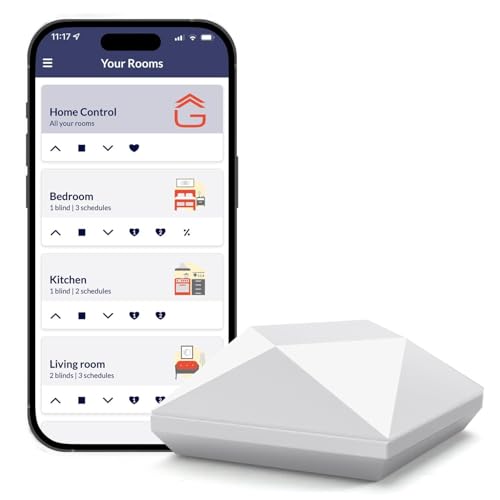
Go Smart Bridge Home Automation Hub for Motorized Blinds Compatible with Alexa, Google Home, IFTTT, Control4, Siri; Remote, App & Voice Control
REMOTE CONTROL – Control your motorized blinds, shades, and curtains in groups or individually from anywhere with your…
As an affiliate, we earn on qualifying purchases.
As an affiliate, we earn on qualifying purchases.