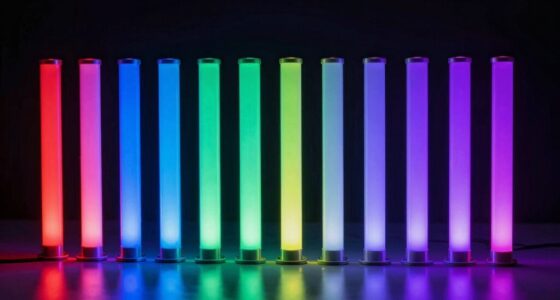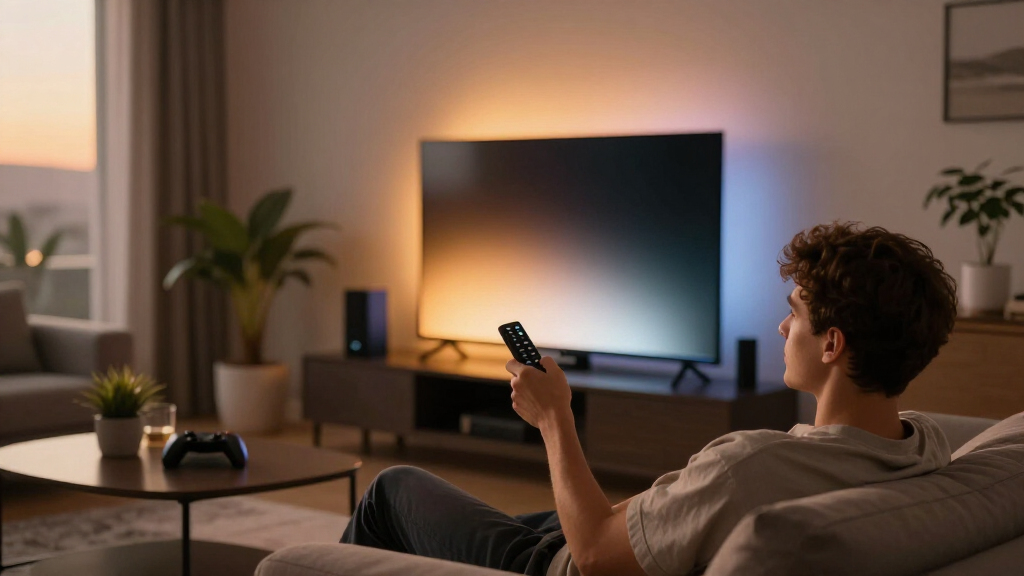

Finding the best RGBICWW light bars comes down to one core tradeoff: full color depth with warm and cool white channels versus ecosystem convenience. My top pick is the Govee Smart Light Bar RGBICWW (Black), which pairs multi-zone RGBIC color with dedicated tunable white LEDs, making it equally convincing for TV ambience and everyday room lighting. If your priority is smart-home future-proofing, the SwitchBot RGBICWW Light Bars with Matter integrate cleanly with Apple Home, Alexa, and Google without relying on a third-party cloud, while the ECWEYAG Smart RGBICWW bars undercut the big names on cost while keeping music sync and app control. Budget models often advertise “RGBIC” but drop the WW channel entirely — a common trap this comparison separates clearly. Keep reading for the full breakdown of all thirteen options.

Get the latest gadgets delivered free with Prime
- Fast, free delivery on millions of items
- Prime Video, Amazon Music and more included
- Member-only deals all year
Complete the kit



Key Takeaways
- The Govee RGBICWW black light bar earned the top spot because it is one of the few picks that genuinely delivers the warm-white and cool-white channels the RGBICWW label promises, rather than approximating white with mixed RGB diodes.
- Matter support is the clearest dividing line in this lineup: only the SwitchBot and Nurmina Nova Pro work natively across Apple Home, Alexa, and Google without a bridge, which matters for buyers building a long-term smart home.
- Three of the thirteen products carry the RGBIC branding but are RGBIC or RGBWIC only — if true white light quality matters for everyday use, the suffix is not negotiable.
- Govee dominates the category with six of thirteen entries, but they are not interchangeable: the wall-mounted Glide, the 15-inch TV backlight, and the Gaming Pro serve visibly different placements and screen sizes.
- Budget bars under the Govee and SwitchBot tier, like the ECWEYAG and the iron-base generic pair, consistently trade away app polish and effect variety rather than raw brightness, which is the right sacrifice for most casual buyers.




| RGBICWW light bar | Connectivity |
|---|---|
| WIXBOSHU Smart RGB LED Light B | — |
| RGB Light Bar Smart Music Sync | Bluetooth |
| Govee RGBIC Gaming Light Bars | Wi-Fi, Bluetooth |
| Govee Glide Wall Lights | Bluetooth, Wi-Fi |
| Nurmina Nova Light Bars Pro | Matter |
| ECWEYAG Smart RGBICWW LED Ligh | — |
| Philips Smart Lighting Gradien | Wi-Fi, Matter |
| Govee Smart Light Bar | — |
| Govee Smart RGBWIC Light Bars | — |
| Smart RGB-IC Gaming Light Bars | Bluetooth |
| Govee Smart Light Bar | Matter, Alexa, Google Home |
| Govee Gaming Light Bars Pro | Wi-Fi |
| SwitchBot RGBICWW Smart LED Li | Matter over Wi-Fi |
More Details on Our Top Picks
WIXBOSHU Smart RGB LED Light Bars with Music Sync and App Control
WIXBOSHU’s two-bar set delivers the core RGBICWW light bar experience — app control, music sync, and a huge effects library — without the premium pricing of name-brand rivals. With 213+ lighting effects and 16 million colors spread across two 17.3-inch bars, this option covers the basics more generously than the velted DX21005-1, which is limited to a handful of preset modes. The triple control approach (app, remote, physical control box) means you’re never locked out of adjustments if your phone dies, a convenience the app-only alternatives in this roundup can’t match. The tradeoff is the absence of smart home integration: no Alexa, no Google Assistant, no Matter — so buyers building a connected home ecosystem should step up to the Nurmina Nova Pro instead. The corded power requirement also limits placement flexibility compared to USB-powered desk options.
Pros:- 213+ lighting effects and 16 million colors give far more variety than similarly priced single-mode bars
- Three control methods (app, remote, control box) provide redundancy if one fails
- Two 17.3-inch bars and included stands create symmetric desk or TV setups out of the box
- Adjustable timers enable scheduled lighting without leaving the app running
Cons:- No smart home or voice assistant support, unlike Govee and Nurmina options
- Corded power restricts placement to areas near outlets
Best for: Budget-conscious buyers who want big effects libraries and physical controls without paying for smart home integration
Not ideal for: Smart home enthusiasts — there’s no voice assistant or ecosystem compatibility at all
- Brand:WIXBOSHU
- Model:SPL-FLL002
- Bar Length:17.3 inches
- Quantity:2 light bars
- Lighting Effects:213+
- Colors:Over 16 million
- Control Methods:App, remote control, control box
- Music Sync:Built-in microphone
- Warranty:2 years
Our verdict“A sensible budget choice for casual users who want variety and simple controls, not ecosystem integration.”
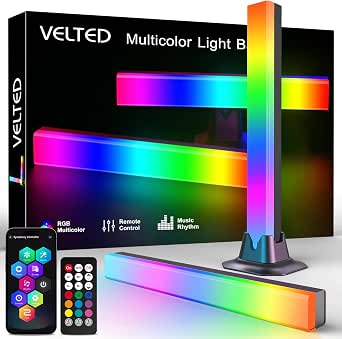
RGB Light Bar Smart Music Sync IC LED Light Bars with APP & Remote Control
The velted DX21005-1 earns its place through sheer convenience: USB power means it plugs straight into a PC, monitor, or console with no outlet hunting, no adapters, and no setup friction. Where the WIXBOSHU set demands wall power and the Govee Glide requires adhesive mounting, these compact bars sit on a removable base beside a monitor and work immediately. Seven music modes and eight dynamic color modes via IC control are modest compared to Govee’s 60+ scenes, but for close-range desk ambiance the difference is barely noticeable. Bluetooth-based app control through the Surplife app avoids occupying a Wi-Fi slot, though it also means no voice assistant support and no integration with the broader smart home. At 5 watts, expect accent lighting only.
Pros:- USB power draws directly from a PC, TV, or console with no outlet required
- Works out of the box with no account setup or Wi-Fi configuration
- Bluetooth app control doesn’t consume a Wi-Fi connection or require a hub
- Compact footprint with removable base fits crowded desks
Cons:- Only seven music modes and eight color modes, far fewer than Govee or WIXBOSHU alternatives
- 5-watt output limits these to close-range accent lighting
Best for: PC gamers and home office workers who want plug-and-play USB lighting beside a monitor
Not ideal for: Buyers seeking rich scene variety or whole-room lighting — the effects library and 5-watt output are limited
- Brand:velted
- Model:DX21005-1
- Power Source:USB (5V)
- Wattage:5 watts
- Control:Surplife app, remote control
- Connectivity:Bluetooth
- Music Modes:7 built-in modes
- Mounting:Tabletop with removable base
- Warranty:1 year
Our verdict“The easiest entry point for desk-side ambient lighting, as long as you don’t need deep customization or smart home features.”
Govee RGBIC Gaming Light Bars H6047 with Smart Controller, Wi-Fi Smart LED
For gamers who want lighting that reacts to what’s happening on screen, the Govee H6047 is the clear pick thanks to native Razer Chroma sync — something no other product in this lineup offers. RGBIC technology drives multi-zone color on each bar, and audio reactivity works from either speakers or headphones, which the WIXBOSHU’s basic microphone sync can’t replicate with the same precision. The bundled desktop dial controller is a genuinely useful differentiator: adjusting brightness or switching scenes mid-game without alt-tabbing. The main limitation is the absence of a camera, so true screen color picking is off the table — buyers chasing that feature should look at gradient TV bars instead. Software fragmentation is also real: full functionality requires juggling Govee Home, Govee Desktop, and Razer Synapse 3.
Pros:- Native Razer Chroma sync links lighting directly to game events
- RGBIC multi-zone technology displays multiple colors per bar simultaneously
- Desktop dial controller enables in-game adjustments without alt-tabbing
- AI Lighting Bot 2.0 generates custom effects from voice, text, or photos
Cons:- No camera means no true screen color picking
- Full functionality requires three separate apps (Govee Home, Govee Desktop, Razer Synapse 3)
Best for: PC gamers already in the Razer ecosystem who want reactive lighting without leaving their game
Not ideal for: Casual users who want simple app-and-go lighting — the multi-app setup is overkill for basic ambiance
- Model:H6047
- Connectivity:Wi-Fi, Bluetooth
- Technology:RGBIC
- Colors:16.8 million
- Scene Modes:60+
- Compatibility:Razer Synapse 3, Alexa, Google Assistant
- Controller:Smart desktop dial
- Camera:None (no screen color picking)
Our verdict“The best choice for Razer-equipped gamers who value in-game reactivity, provided they tolerate multi-app setup.”
Govee Glide Wall Lights, Smart RGBIC Gaming Light Bar (2-Panel Set)
Unlike every freestanding option here, the Govee Glide H610A is built to live on your wall, flanking a TV or monitor with two rigid panels that display up to 24 colors simultaneously. That wall-mounting focus changes what it’s for: compared to the desk-bound Govee H6047, the Glide creates room-scale ambiance rather than personal gaming lighting, and its SmartThings support broadens smart home reach beyond Alexa and Google. The 64+ scene modes and 11 music sync modes give it the deepest effects library among the bars in this batch. The rigidity is a double-edged sword — you get clean, stable lines instead of the flexibility some setups demand. Installation also demands patience: the adhesive needs roughly an hour to set, and all bars must be connected before power-up, so placement mistakes are annoying to fix.
Pros:- Displays up to 24 colors simultaneously per panel for vivid gradients
- Works with Alexa, Google Assistant, and SmartThings for broad smart home coverage
- 64+ scene modes and 11 music sync modes offer the deepest effects library here
- Straightforward adhesive and velcro mounting on smooth surfaces
Cons:- Rigid panels can’t be bent or shaped to fit curved or unusual spaces
- Adhesive requires about an hour to set, and all bars must connect before powering on
Best for: Home theater owners who want symmetric, wall-mounted accent lighting around a TV
Not ideal for: Renters or frequent rearrangers — adhesive mounting and rigid panels make repositioning difficult
- Model:H610A
- Panel Count:2 panels
- Segments Per Panel:3 light sections
- Segment Length:14.8 inches
- Connectivity:Bluetooth, Wi-Fi
- Compatibility:Alexa, Google Assistant, SmartThings
- Music Modes:11
- Scene Modes:64+
- Material:Rigid plastic
Our verdict“The go-to wall-mount option for TV surrounds, as long as you commit to a permanent placement.”
Nurmina Nova Light Bars Pro – Smart RGBWIC Gaming Lights with Matter, AI Effects & Music Sync
The Nurmina Nova Pro stands apart as the only product in this batch with native Matter support, which means it joins Apple Home, Alexa, and Google Home without extra hubs or manufacturer accounts — a genuine advantage for buyers frustrated by Govee’s app-dependent ecosystem. Its RGBWIC technology adds a white channel to the usual multi-color segmentation, giving cleaner ambient whites at 3000K than the RGB-only WIXBOSHU can produce. AI modes (Photo Gen, Voice Gen, Random Gen) build custom scenes quickly, and the built-in microphone with adjustable sensitivity offers tighter music sync than fixed-mode options like the velted bars. The honest limitation is brightness: at 800 lumens, these are ambiance lights, not task lights. The IP20 rating also rules out any outdoor or bathroom use, so treat it as a desk-and-living-room product.
Pros:- Matter support integrates with Alexa, Google Home, and Apple Home without extra hubs or accounts
- RGBWIC adds a dedicated white channel for cleaner 3000K ambient light
- AI lighting modes generate customized effects from photos, voice, or randomization
- Sleek 16-inch aluminum-and-polycarbonate build with a slim 3-inch base
Cons:- Only 800 lumens — suits accent lighting, not primary illumination
- IP20 rating means no moisture resistance for outdoor or bathroom use
Best for: Smart home owners, especially Apple Home users, who want hub-free multi-ecosystem control
Not ideal for: Anyone hoping to replace a lamp — 800 lumens is purely ambient-level output
- Brand:Nurmina
- Technology:RGBWIC
- Color Temperature:3000 Kelvin
- Brightness:800 lumens
- Wattage:15 watts
- Height:16 inches
- Connectivity:Matter
- Compatibility:Alexa, Google Assistant, Apple Home
- Control:App, remote, touch
Our verdict“The smartest pick for Matter-first households that prioritize cross-ecosystem control over raw brightness.”
ECWEYAG Smart RGBICWW LED Light Bars with Music Sync
For buyers who want the RGBICWW experience without a premium price, this ECWEYAG pair keeps the essentials intact: 16 million colors, three music sync modes, and dual-app control through Tuya or Smart Life. Compared with the Govee RGBICWW bar (B096WZXKZP), it gives up tunable white refinement and Govee’s deep scene library, but it counters with plug-and-play USB power and both Alexa and Google Assistant support at an entry-level cost. The 40 light sources per set are modest against the Govee RGBWIC bars (B0B14V95FJ), so gradients look good rather than spectacular. Placement flexibility is a genuine strength — upright, flat, or behind the TV — though the 5-watt draw caps brightness for larger living rooms. A 12-month warranty rounds out a sensible, low-commitment package.
Pros:- Plug-and-play USB power makes setup genuinely simple
- Dual app support (Tuya and Smart Life) plus Alexa and Google voice control
- Three placement orientations with included brackets and stickers
- Three music sync modes plus eight dynamic scenes offer solid variety for the price
Cons:- Low 5-watt output limits brightness and color richness compared to mains-powered rivals
- No water resistance and no Matter support, narrowing smart home integration options
Best for: First-time smart lighting buyers or students who want multi-color ambiance and music sync from a cheap, USB-powered setup
Not ideal for: Home theater enthusiasts with big TVs — the modest LED count and 5W output won’t fill a large living room with light
- Brand:ECWEYAG
- Colors:16 million
- Light Sources:40
- Music Sync Modes:3
- Dynamic Scenes:8
- Power Source:USB, 5V, 5W
- Control:Tuya app, Smart Life app, button box, Alexa, Google Assistant
- Warranty:12 months
Our verdict“This pick makes the most sense for casual users who want the RGBICWW feature set cheaply and don’t need showroom-grade saturation.”
Philips Smart Lighting Gradient Light Bars (Connected by WiZ)
The Philips WiZ gradient bars stand out for ecosystem breadth: native Matter support across Alexa, Google Home, and Apple Home, something the ECWEYAG pair and the iron-base gaming bars (B0H82QKH66) can’t match. iPhone owners finally get a gradient light bar that just works in Home. RGBIC simultaneous colors produce convincing gradient washes behind a monitor, and the matte finish looks tidy on a desk. Tradeoffs are real: unlike the Govee RGBWIC bars, there’s no true tunable white, TV screen matching requires separately sold hardware, and Hue loyalists are locked out entirely. At 8.4 watts and mains-powered, output beats USB rivals comfortably. The two-year warranty is the longest here, signaling confidence the budget brands don’t offer.
Pros:- Matter compatibility works natively with Alexa, Google Home, and Apple Home
- RGBIC gradient technology displays multiple simultaneous colors for rich ambient washes
- Two-year manufacturer warranty from an established brand
- Flexible horizontal, vertical, or wall-mount placement behind screens
Cons:- Not compatible with Philips Hue, which will frustrate existing Signify ecosystem owners
- True TV screen syncing requires additional hardware sold separately
- All-plastic construction feels less premium than the price suggests
Best for: Smart home households — especially Apple Home users — who want a mainstream brand with Matter support and multi-ecosystem voice control
Not ideal for: Philips Hue owners expecting ecosystem continuity, and anyone wanting true warm-to-cool white tones for everyday task lighting
- Brand:Philips (Signify)
- Model Number:612465
- Light Bars:2
- Wattage:8.4W, 120V corded electric
- Connectivity:Wi-Fi, Matter
- Compatible Assistants:Alexa, Google Home, Apple Home
- Dimensions (per bar):11.81 x 1.81 x 1.81 inches
- Warranty:2 years
Our verdict“This model is better suited to multi-ecosystem smart homes that prioritize Matter and Apple Home over raw customization depth.”
Govee Smart Light Bar, RGBICWW TV Lights for Living Room, Gaming, Black
This is the pick that best fulfills the roundup’s core promise: true RGBICWW, meaning vivid segmented RGBIC color plus tunable cool-to-warm white in one bar. The Philips WiZ bars skip the white axis entirely, and the ECWEYAG pair can’t match Govee’s 60+ scene modes, DIY options, and AI-generated effects. A built-in microphone handles music sync with no hub required, and Matter support covers Alexa and Google Home. The generous 106-inch cord gives real furniture-arranging freedom that USB-tethered options lack. The catch is scale: Govee recommends it for monitors under 45 inches, so living-room TV owners should step up to the 15-inch RGBWIC bars (B0B14V95FJ) instead. Depth of customization also lives almost entirely in the Govee Home app, which rewards tinkerers but may overwhelm set-and-forget users.
Pros:- Genuine RGBICWW output combines segmented RGB color with tunable cool-to-warm white
- 60+ scene modes plus DIY and AI-generated effects offer deep customization
- Matter support works with Alexa and Google Home without a hub
- 106-inch cord allows flexible placement far from outlets
Cons:- Officially recommended only for screens under 45 inches
- Full feature set depends heavily on the Govee Home app, which has a learning curve
Best for: Desk gamers and small-TV owners who want both saturated RGBIC effects and everyday-tunable white in a single hub-free bar
Not ideal for: Owners of 45-inch-plus TVs — Govee explicitly recommends the larger 15-inch bars for that job
- Technology:RGBICWW
- Recommended Screen Size:Under 45 inches
- Scene Modes:60+
- Cord Length:106 inches
- Smart Home Compatibility:Matter, Alexa, Google Home
- App:Govee Home App
- Placement:Lay flat, vertical, or wall-mount with included brackets
Our verdict“The strongest all-around RGBICWW choice for desktop and small-screen setups where color and quality white light both matter.”
Govee Smart RGBWIC Light Bars, 15-Inch WiFi TV Backlight for 45-70-Inch TVs
Where the Govee RGBICWW bar (B096WZXKZP) tops out around 45-inch monitors, this 15-inch pair is engineered for 45 to 70-inch TVs, with 27 extra LEDs per bar delivering visibly richer gradients and cleaner whites than standard RGB strips. Compared with the Philips WiZ bars, it offers broader hub-free compatibility — Matter, Alexa, Google Home, and SmartThings — plus AI effects through Govee’s AI Lighting Bot 2.0. UL Listed certification is a trust marker few budget rivals carry. The tradeoff list is short but pointed: there is no screen-matching sync, so the bars react to music and presets rather than on-screen content, and the corded 12-volt design demands outlet access behind the TV. At just 2 pounds, wall mounting behind a large panel stays simple.
Pros:- Sized and powered specifically for 45-70 inch televisions
- Upgraded RGBWIC color with 27 extra LEDs per bar for purer whites
- Works with Matter, Alexa, Google Home, and SmartThings without a hub
- UL Listed certification adds safety assurance for wall-mounted installations
Cons:- No on-screen color matching, so it can’t function as true TV bias lighting
- Corded electric power requires an accessible outlet near the television
Best for: Living room owners with 45-70 inch TVs who want bold, high-output ambient color rather than screen-matched lighting
Not ideal for: Buyers expecting bias-lighting that mirrors on-screen colors — this model has no color-matching function at all
- Light Source:LED (upgraded RGBWIC)
- Recommended TV Size:45-70 inches
- Bar Length:15 inches (14.94″)
- Power:12V corded electric, 10W
- Light Sources:30
- Compatibility:Matter, Alexa, Google Assistant, SmartThings
- Mounting:Wall mount, standing, or horizontal
- Certification:UL Listed
Our verdict“The clear choice for large-screen households that prioritize vivid, hub-free ambient color over screen-synced effects.”
Smart RGB-IC Gaming Light Bars with Iron Base (2-Pack)
These bars carve out a desk-first niche the bigger options ignore. The iron plate base gives upright stability that sticker-mounted rivals like the ECWEYAG pair can’t offer, and the compact footprint tucks behind a monitor without eating desk space. RGB-ICW technology covers both multi-color effects and adjustable white tones, edging out plain RGB-IC competitors on versatility, though output is modest next to the Govee RGBWIC bars. Bluetooth app control handles colors, brightness, and DIY modes, but there’s no Wi-Fi, no Matter, and no voice assistant support — a real limitation if your setup centers on Alexa or Google Home. USB power keeps energy use negligible and placement simple, provided a port is nearby. Music sync through the built-in microphone performs well for the size. A focused, no-frills gaming companion.
Pros:- Weighted iron base keeps bars upright without adhesive or brackets
- RGB-ICW output includes adjustable white tones, not just color effects
- Compact footprint suits crowded gaming desks and monitor setups
- USB power draws little energy and sets up in seconds
Cons:- Bluetooth-only connectivity excludes voice assistants and smart home platforms
- USB tether limits placement to within cable reach of a power source
- Full customization depends entirely on the smartphone app
Best for: PC gamers and home-office users with limited desk space who want stable, self-standing accent lighting
Not ideal for: Voice-assistant-dependent households — Bluetooth-only control means no Alexa, Google, or Matter integration
- Technology:RGB-ICW
- Quantity:2-pack
- Base:Iron plate
- Power:USB
- Connectivity:Bluetooth
- Music Sync:Built-in high-sensitivity microphone
Our verdict“A sensible, space-saving pick for desk gamers who value stability and simplicity over smart home integration.”
Govee Smart Light Bar, RGBICWW TV Lights for Living Room and Gaming, Silver
Where the Govee Gaming Light Bars Pro lean hard into screen-synced gaming spectacle, this single silver bar takes a more balanced approach, pairing vivid RGBIC color with tunable cool-to-warm white — the WW in RGBICWW that most gaming-focused picks treat as an afterthought. That makes it one of the few options in this roundup that works as everyday room lighting, not just effects lighting. Placement flexibility is a real strength: lay it flat under a TV stand, stand it upright, or wall-mount it behind a display with the included brackets. Matter support with no hub required means it slots cleanly into an Alexa or Google Home setup. The tradeoff is coverage — with a 45-inch monitor ceiling, owners of larger TVs will get better results from the Govee Smart RGBWIC Light Bars sized for 45–70-inch screens.
Pros:- True RGBICWW design combines color effects with genuinely usable tunable white light
- Matter, Alexa, and Google Home support with no hub required
- Three placement modes (flat, vertical, wall-mount) with brackets included
- Music sync via built-in microphone plus 60+ app scene modes and AI-generated effects
Cons:- Recommended only for displays under 45 inches, which rules out most living room TVs
- Full customization requires committing to the Govee Home App ecosystem
Best for: Living room and desk users who want one bar that handles both everyday warm-white lighting and colorful gaming effects without a hub
Not ideal for: Owners of TVs larger than 45 inches — the single-bar design won’t provide adequate coverage behind bigger screens
- Technology:RGBICWW
- Connectivity:Matter, Alexa, Google Home
- Music Sync:Yes (built-in microphone)
- Scene Modes:60+
- Recommended Monitor Size:Under 45 inches
- Cord Length:106 inches
- Hub Required:No
- Mounting:Flat, vertical, or wall-mount with included brackets
Our verdict“The right pick if you want a single, elegant bar that doubles as real room lighting rather than pure gaming decoration — as long as your screen is under 45 inches.”
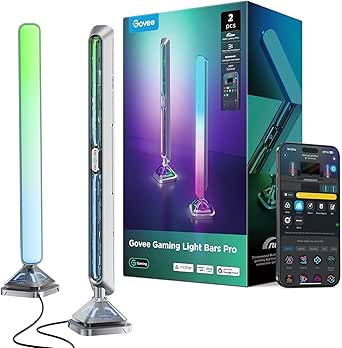
Govee Gaming Light Bars Pro – 16-Inch Smart RGBIC Wi-Fi LED Game Lights
This is the roundup’s most aggressive gaming play. The triple-sided illumination throws light forward, sideways, and backward, creating a wraparound effect that the flat panels of the Govee Glide Wall Lights can’t match from a desk. Pair that with real-time screen sync via Govee Desktop and Razer Chroma compatibility, and you get lighting that reacts to gameplay rather than just decorating around it. The weighted, metal-textured bases also feel more premium than the plastic stands on budget picks like the RGB Light Bar Smart Music Sync bars. The catch is a real one: screen color-matching only works through Govee Desktop, which is Windows-only, and the bars have no built-in color-matching of their own. Mac users and console-only gamers lose the headline feature entirely, leaving them with music sync and preset scenes — which cheaper bars already do.
Pros:- Triple-sided illumination delivers genuinely immersive 3D lighting from a desk setup
- Real-time screen sync plus Razer Chroma integration for coordinated gaming effects
- Matter, Alexa, and Google Home support with no hub needed
- AI Lighting Bot 2.0 generates custom effects from text, voice, or photos
Cons:- Screen color-matching depends entirely on Windows-only Govee Desktop software
- No onboard color-matching function if you don’t run the desktop app
Best for: Windows PC gamers who want true screen-synced, triple-sided lighting and already use Razer Chroma or a Govee ecosystem
Not ideal for: Mac and console-only gamers — the screen-sync feature requires Windows-only desktop software, gutting the main appeal
- Size:16 inches
- Colors:16M (RGBIC)
- Connectivity:Wi-Fi
- Smart Home Compatibility:Matter, Alexa, Google Home
- Screen Sync:Yes, via Govee Desktop (Windows only)
- Extras:Music sync, AI lighting, 60+ dynamic scenes, Razer Chroma
Our verdict“The strongest choice for Windows PC gamers chasing true screen-reactive lighting — but skip it if you’re not running Govee Desktop on a PC.”
SwitchBot RGBICWW Smart LED Light Bars with Matter
Most bars in this roundup pay lip service to smart home compatibility, but the SwitchBot W1070 is the only one here with explicit Apple Home support through Matter, plus SmartThings — a combination iPhone households won’t find on the Govee Smart Light Bar, which lists only Alexa and Google Home. Its 2200–6500K adjustable white range is also wider than typical RGB-only picks, covering candlelight-warm to daylight-cool alongside 16 million colors and six RGBIC zones per bar. The magnetic or adhesive mounting gives placement flexibility, though magnets only help on metal surfaces. At 800 lumens per pair, output is modest — fine for accent lighting, but the Govee Gaming Light Bars Pro will feel more dramatic in a gaming cave. If you’ve already built a SwitchBot or Apple-centric home, though, this is the path of least resistance.
Pros:- Native Matter support spanning Apple Home, Alexa, Google Home, and SmartThings
- Full RGBICWW design with a wide 2200–6500K adjustable white range
- Flexible magnetic, adhesive, or tabletop mounting options
- Music-reactive effects with app, voice, and wired control plus scheduling
Cons:- Magnetic mounting only works on compatible metal surfaces
- Indoor-only design with modest 800-lumen total output
Best for: Apple Home, SmartThings, or existing SwitchBot users who want RGBICWW bars that integrate natively into their setup
Not ideal for: Gamers wanting maximum brightness and dramatic effects — 800 lumens per pair is accent-level output, not room-filling
- Lighting Zones:6 RGBIC zones per bar
- Colors:16 million
- White Color Temperature:2200–6500K
- Brightness:Up to 800 lm per pair
- Connectivity:Matter over Wi-Fi
- Voice Assistants:Apple Home, Alexa, Google Home, SmartThings
- Mounting:Magnetic, adhesive, tabletop
Our verdict“The clear pick for Apple Home and SmartThings households who want color-plus-white bars that just work in their ecosystem, without Govee’s app dependence.”

How We Picked
I evaluated each light bar against four buyer-facing criteria. First, color architecture: true RGBICWW bars have independently controllable zones plus dedicated warm and cool white diodes, and I flagged any product that blurs that distinction. Second, control ecosystem — Wi-Fi app reliability, voice assistant compatibility, music sync responsiveness, and whether Matter support is native or absent. Third, placement flexibility: desk bars, TV backlights, and wall panels solve different problems, and mounting hardware, bar length, and power supply design all affect where a product realistically belongs.
Fourth, value durability: build quality, cable management, and how much a manufacturer’s software updates actually matter to the long-term experience. Ranking follows use case rather than raw feature count — a simpler bar that nails the fundamentals for a living room outranks a feature-stuffed bar with a clunky app. Where two products tie on hardware, ecosystem reliability and setup friction broke the tie.
Factors to Consider When Choosing Best RGBICWW Light Bars
Before choosing between these thirteen bars, it helps to understand what actually separates a satisfying purchase from a disappointing one. RGBICWW is a specific technical promise, and the differences between products in this roundup stem mostly from how honestly each one fulfills it.Verify the WW Channels Are Real
The single most common mistake in this category is buying a bar labeled RGBIC and expecting quality white light. True RGBICWW bars include dedicated warm-white and cool-white diodes, which produce clean, non-tinted illumination for reading, working, or relaxing. When a bar generates white by mixing red, green, and blue, the result looks slightly blue or purple at the edges and renders skin tones poorly on camera. Buyers who plan to use their bars as everyday room lighting — not just gaming accents — should treat the WW suffix as non-negotiable. Check the product specifications for CCT range (ideally 2200K–6500K) rather than trusting the marketing color. In this lineup, the Govee RGBICWW models and SwitchBot bars pass this test cleanly, while several generic options quietly do not.
Match the Bar to the Placement, Not the Feature List
A 15-inch backlight designed for a 45–70-inch TV is the wrong tool for a desk, and a desktop gaming pair will look lost behind a large living room television. Placement determines bar length, mounting style, and brightness requirements more than any other factor. Wall-mounted panels like the Govee Glide avoid desk clutter entirely but commit you to adhesive or screw installation. Desk bars with weighted bases offer flexibility but consume surface area. TV backlight-style bars need sufficient throw to cover the wall behind the screen without hotspots. Buyers should measure their space and decide on placement before comparing apps or effects — the best feature set in the wrong form factor is still a bad purchase.
Ecosystem Choice Outlasts Hardware
Light bars typically outlive the phones and hubs they pair with, so the control ecosystem matters more than it first appears. Matter support is the safest long-term bet because it works natively with Apple Home, Alexa, and Google Home without depending on one manufacturer’s cloud servers. Wi-Fi bars tied to a proprietary app, like most Govee and WiZ products, generally offer richer effects and better music sync but leave you dependent on that company keeping its software alive. Bluetooth-only budget bars are the least future-proof, though they are the simplest to set up. Buyers heavily invested in one voice assistant should verify compatibility before buying, since not every RGBICWW bar supports all three platforms.
Music Sync Quality Varies Widely
Nearly every bar in this category advertises music sync, but the implementation differs enough to change the experience. Microphone-based sync reacts to ambient sound, which works for parties but picks up voices and background noise. App-based or device-audio sync reads the actual audio signal, producing tighter, more accurate timing. Bars that only offer a basic beat-flash pattern feel gimmicky after a week; models with multiple rhythm modes and sensitivity tuning stay engaging. Buyers who want TV or gaming ambience should prioritize bars with low-latency sync, since a visible lag between screen and light breaks the immersion entirely. This is a spec worth reading fine print on, because marketing copy rarely distinguishes between the two approaches.
Brightness and Room Size Have to Match
A bar that dazzles on a dark bedroom desk can disappear behind a 65-inch TV in a well-lit living room. Lumen output should scale with room size and ambient light, and buyers comparing products need to look past LED count, which tells you little about actual brightness. Warm white performance matters here too: many bars quote maximum brightness for saturated RGB colors only, with white modes running noticeably dimmer. Consider whether the bars are the main light source or an accent layer — accent bars can be modest, but primary lighting demands real output and good color rendering. Buyers frequently overbuy brightness for small spaces, ending up with bars they run at 30% and never see full effect.
When Paying More Actually Pays Off
The premium tier in this category is not about more colors — every bar here can already do millions. What extra money buys is build quality, app polish, and ecosystem integration: aluminum housings instead of plastic, cleaner cable routing, faster app response, and Matter or AI-driven effect generation. Premium bars like the Nurmina Nova Pro also tend to receive longer software support, which extends usable lifespan. That said, casual buyers who want colorful desk accents get nearly the same visual result from a budget option. The mistake to avoid is paying premium prices for mid-tier products — a Wi-Fi bar with a mediocre app costs almost as much as a Matter-native one but ages far worse. Spend up for ecosystem and build, not for effect-count bragging rights.
Frequently Asked Questions
Is RGBICWW actually different from RGBIC, or is it just marketing?
The difference is real and visible. RGBIC bars have addressable color zones for multi-color effects, but they produce white by blending red, green, and blue diodes, which leaves a faint tint and poor color accuracy. RGBICWW bars add dedicated warm-white and cool-white LEDs, delivering clean white light across a proper color temperature range for everyday use. If you only want gaming effects in the dark, standard RGBIC is fine and often cheaper. But if the bars will double as reading or ambient room lighting, the WW channels are what make them usable without a separate lamp. In this roundup, that distinction separated the genuine picks from the ones borrowing the label loosely.
Do I need a hub or bridge to use these light bars?
It depends entirely on the connectivity standard. Wi-Fi bars from Govee, Philips WiZ, and SwitchBot connect directly to your router with no hub, which covers most buyers’ needs. Matter-enabled bars like the SwitchBot and Nurmina models do require a Matter controller — an Apple HomePod, Google Nest Hub, or Alexa-enabled device — but most smart homes already have one. Bluetooth-only budget bars need no network at all but lose remote control and voice commands. Buyers should avoid assuming a Wi-Fi bar works without internet during setup, since most demand a 2.4GHz network and an account. If your router only broadcasts 5GHz, check for band-steering support before buying.
Which of these bars work best behind a TV versus on a desk?
The two placements demand different hardware. For desk setups, shorter bar pairs with weighted bases — the Govee Gaming Light Bars Pro or the H6047 — sit beside a monitor and throw color onto the wall behind it. For living room televisions, the Govee 15-inch WiFi TV backlight is sized specifically for 45–70-inch screens and projects wide, even coverage, while the Philips WiZ gradient bars are tuned for TV and music sync across a larger wall. Wall-mounted panels like the Glide sidestep the desk-versus-TV question entirely by living on the wall itself. The mistake to avoid is buying desk-height bars for a big TV and expecting them to fill the wall — brightness and throw distance simply are not there.
Are the generic RGBIC light bars worth the savings?
For casual, occasional use, often yes — and in this comparison the ECWEYAG bars proved a legitimate value pick with working music sync and acceptable app control. The honest tradeoff is software, not hardware: generic bars typically ship with slower, less polished apps, fewer effect presets, weaker update support, and sometimes spotty voice-assistant integration. Buyers who enjoy tinkering tolerate this easily; buyers who want everything to work flawlessly on day one and stay that way for years will be happier with Govee, SwitchBot, or Philips. Also watch the spec sheet, because several generic options in this roundup are RGBIC-only despite marketing that implies white channels. The savings are real, but so is the compromise.
Can these light bars sync with music and TV content in real time?
Music sync is near-universal here, but the quality varies by method. Bars with built-in microphones sync to any ambient sound, including your voice and street noise, which is convenient but imprecise. App-based sync that reads audio from your phone or PC is tighter and more responsive. For TV content, the strongest options are the Philips WiZ gradient bars and Govee’s Wi-Fi TV models, which can follow on-screen action with minimal lag through their apps. Expect some latency on any camera- or microphone-based system — a fraction of a second is normal and barely noticeable for ambience, but obvious lag ruins the effect. Buyers prioritizing sync should favor bars with wired or app-level audio input over pure microphone listening.
Conclusion
For most buyers, the Govee Smart Light Bar RGBICWW in black is the best overall pick — it delivers true white channels, reliable Wi-Fi control, and flexible placement for both living rooms and gaming setups. Value seekers should look at the ECWEYAG RGBICWW bars, which capture most of the experience at a lower cost if you can accept a plainer app. At the premium end, the Nurmina Nova Light Bars Pro justify their price with Matter support, AI-generated effects, and stronger build quality for buyers building a serious smart home. Beginners get the smoothest entry with the Govee H6047 gaming bars, which are simple to set up and hard to misuse.
Specific needs break the tie from there: SwitchBot’s Matter-native bars are the right call for Apple Home households, the Govee 15-inch TV backlight handles large-screen ambience, the Glide wall panels suit buyers who want light without desk clutter, and the Philips WiZ gradient bars excel at TV and music sync. Whatever you choose, confirm the WW channels are genuine and match the form factor to your space — those two decisions matter more than any feature count on the box.