
AR smart glasses range from wearable screens for movies and gaming to AI glasses built for translation and prompts. For an all-around screen-focused pick, I’d start with the XREAL One Pro for its built-in X1 chip, 120Hz refresh rate, and spatial display features; the VITURE Pro 2 stands out for its high refresh rate and adjustable myopia correction, while the AiLens targets teleprompter and translation use. The main tradeoffs are display size and clarity versus comfort, device compatibility, and whether you need a screen or hands-free smart features. No single pair fits every use, and advertised virtual screen sizes do not tell the whole story about fit or viewing comfort. Read on for the full comparison and guidance on which design suits your routine.

Get the latest gadgets delivered free with Prime
- Fast, free delivery on millions of items
- Prime Video, Amazon Music and more included
- Member-only deals all year
Complete the kit



Key Takeaways
- XREAL One Pro pairs a built-in X1 chip with 120Hz refresh, making it a stronger fit for buyers who want spatial features without relying entirely on an external accessory.
- Rokid Max2 with Station2 bundles glasses with a spatial computer, so it suits buyers who want a more self-contained setup; the glasses-only Max2 is a simpler option for people who already have compatible devices.
- VITURE Pro 2 stands apart for its 0 to -5.00D myopia adjustment, which can reduce the need for prescription lens inserts for some wearers.
- Several models advertise very large virtual displays, but screen size claims alone do not establish comfort, image sharpness, or how well the glasses fit a particular face.
- AiLens and INMO GO3 focus on practical smart-glasses tasks such as translation and teleprompting, unlike display-first options such as RayNeo Air 3s Pro and AOC Air Mega.
| Rokid Max2 Black AR Glasses |  | Best for Built-In Myopia Adjustment | Display: Micro-OLED | Virtual screen: Up to 215 inches at 6 m | Field of view: 50° | VIEW LATEST PRICE | See Our Full Breakdown |
| RayNeo Air 3s Pro AR/XR Glasses |  | Best for Brightness and Viewing Flexibility | Display: Micro-OLED | Virtual screen: 201 inches at 6 m | Refresh rate: 120Hz | VIEW LATEST PRICE | See Our Full Breakdown |
| Rokid Max2 AR Glasses with Station2 Spatial Computer |  | Best for Multi-Screen Spatial Work | Glasses display: Micro-OLED, 1920 × 1200 | Refresh rate: 120Hz | Maximum brightness: 600 nits | VIEW LATEST PRICE | See Our Full Breakdown |
| AiLens AR Smart Glasses with Teleprompter and Translation |  | Best Lightweight Prompting Glasses | Display: Binocular waveguide LED | Display size: 60 inches | Maximum brightness: 1,200 nits | VIEW LATEST PRICE | See Our Full Breakdown |
| INMO GO3 AI Translation Smart Glasses with Camera and Teleprompter |  | Best for Translation and Capture | Display: Invisible teleprompter display | Camera: 8MP HD | Translation: Real-time two-way translation in 98 languages | VIEW LATEST PRICE | See Our Full Breakdown |
| XREAL a01+ AR Glasses with 147-Inch Virtual Display |  | Best for Lightweight Everyday Viewing | Virtual display size: 147 inches | Display: Dual Micro-OLED panels | Resolution: 1920 × 1080 per eye | VIEW LATEST PRICE | See Our Full Breakdown |
| XREAL 1S AR Glasses with 500-Inch Virtual Screen and X1 Chip |  | Best for Spatial Viewing | Virtual screen size: Up to 500 inches | Processor: X1 chip | Resolution: 1920 × 1200 | VIEW LATEST PRICE | See Our Full Breakdown |
| Bapick AI Smart Glasses with 8MP Camera |  | Best for Hands-Free Capture and Translation | Camera: 8 MP | Photo resolution: 32 MP | Video: 1080p at 30 fps with stabilization | VIEW LATEST PRICE | See Our Full Breakdown |
| VITURE Pro 2 XR Glasses with 0 to -5.00D Myopia Adjustment, 120Hz |  | Best for Buyers with Nearsightedness | Virtual display size: 146 inches | Resolution: 1080p | Display panels: Sony Micro-OLED | VIEW LATEST PRICE | See Our Full Breakdown |
| XREAL One Pro AR Glasses with X1 Chip, 171-Inch Virtual Display and 120Hz Refresh Rate | 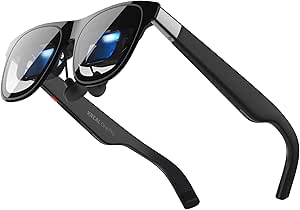 | Best Premium Display Experience | Display: 0.55-inch Micro-OLED | Virtual display size: Up to 171 inches | Refresh rate: 120Hz | VIEW LATEST PRICE | See Our Full Breakdown |
| RayNeo GT Max AR/XR Glasses with 59° FOV, Native 3DoF, and Bang & Olufsen Audio |  | Best for Spatial Viewing | Field of view: 59° | Virtual display size: 227, 267, or up to 307 inches | Spatial tracking: Native 3DoF | VIEW LATEST PRICE | See Our Full Breakdown |
| AOC Air Mega AR/XR Glasses, 201-Inch Micro-OLED Wearable Display |  | Best for Straightforward USB-C Viewing | Display type: Micro-OLED | Resolution: 1920 × 1080 | Display size: 201 inches | VIEW LATEST PRICE | See Our Full Breakdown |
| RayNeo Air 4 Pro Batman Limited Edition AR/XR Glasses |  | Best for 3D-Enhanced Entertainment | Display resolution: 345 × 201 (as listed) | Refresh rate: 120Hz | Screen size: 201 inches | VIEW LATEST PRICE | See Our Full Breakdown |
| THINKAR AiRA XR AR Glasses, 160-Inch Virtual Display, 120Hz |  | Best for Adjustable Myopia Correction | Virtual display size: 160 inches | Field of view: 45° | Resolution: 1920 × 1080 per eye | VIEW LATEST PRICE | See Our Full Breakdown |
| RayNeo Air 3s AR/XR Glasses with 201-Inch 120Hz FHD HueView Display |  | Best for Viewing Comfort Features | Display: OLED | Display size: 201 inches | Resolution: 1920 × 1080 | VIEW LATEST PRICE | See Our Full Breakdown |
| AR smart glasse | Refresh rate | Weight | Audio |
|---|---|---|---|
| Rokid Max2 Black AR Glasses | 120Hz | 75 g | — |
| RayNeo Air 3s Pro AR/XR Glasse | 120Hz | 76 g | Built-in speakers, spatial audio, and microphone |
| Rokid Max2 AR Glasses with Sta | 120Hz | — | — |
| AiLens AR Smart Glasses with T | — | 37 g | — |
| INMO GO3 AI Translation Smart | — | 58 g | — |
| XREAL a01+ AR Glasses with 147 | — | 62 g | Built-in directional speakers |
| XREAL 1S AR Glasses with 500-I | 120Hz in 3DoF mode; 90Hz global refresh | — | Bose-tuned open-ear audio |
| Bapick AI Smart Glasses with 8 | — | — | — |
| VITURE Pro 2 XR Glasses with 0 | 120Hz | 63 g | — |
| XREAL One Pro AR Glasses with | 120Hz | — | Bose-tuned built-in audio |
| RayNeo GT Max AR/XR Glasses wi | Up to 120Hz | — | Quad-speaker system co-tuned by Bang & Olufsen |
| AOC Air Mega AR/XR Glasses | 120Hz | 63 g | Built-in speakers |
| RayNeo Air 4 Pro Batman Limite | 120Hz | 2.72 ounces | Quad-speaker system co-tuned by Bang & Olufsen |
| THINKAR AiRA XR AR Glasses | 120Hz | 63 g | — |
| RayNeo Air 3s AR/XR Glasses wi | 120Hz | — | Built-in speakers with dual opposing acoustic chamber design |
More Details on Our Top Picks
Rokid Max2 Black AR Glasses
The Rokid Max2 is a strong fit for viewers who want a large, high-refresh-rate virtual screen without adding a separate prescription insert for supported nearsightedness. Its built-in dial adjusts myopia up to 600 degrees, a practical distinction from the RayNeo Air 3s Pro, which calls for prescription lenses made through an optician. The 50° field of view and 120Hz Micro-OLED image support immersive video and gaming, while included nose-pad options help with fit. At 75 g, it stays in the same lightweight class as RayNeo’s model. The tradeoffs are a less-bright 600-nit specification than the Air 3s Pro’s 1,200 nits, and no support for astigmatism or presbyopia. It also depends on a compatible USB-C source rather than running independently.
Pros:- Built-in adjustment for myopia up to 600 degrees
- 120Hz Micro-OLED display with a 50° field of view
- Lightweight 75 g design with interchangeable nose pads
- Connects directly to compatible USB-C devices without an internal battery
Cons:- 600-nit brightness is below the RayNeo Air 3s Pro’s listed 1,200 nits
- Built-in vision adjustment does not support astigmatism or presbyopia
- Requires a compatible connected device for power and content
Best for: USB-C phone, tablet, or laptop owners with myopia of up to 600 degrees who want a personal big-screen display without separate prescription lenses.
Not ideal for: People with astigmatism or presbyopia, users whose myopia exceeds the built-in adjustment range, and buyers seeking a self-contained glasses experience.
- Display:Micro-OLED
- Virtual screen:Up to 215 inches at 6 m
- Field of view:50°
- Refresh rate:120Hz
- Brightness:600 nits
- Weight:75 g
- Myopia adjustment:Up to 600 degrees
- Power and connection:USB-C; powered by a compatible connected device
Our verdict“Choose the Rokid Max2 if built-in myopia adjustment and a lightweight, wired virtual screen matter more to you than higher brightness or standalone operation.”
RayNeo Air 3s Pro AR/XR Glasses
The RayNeo Air 3s Pro earns its place for buyers who prioritize a bright virtual display and several ways to tune the viewing experience. Its listed 1,200-nit to-eye brightness is double the Rokid Max2’s 600-nit figure, which gives this model the stronger brightness specification in this group. The 120Hz Micro-OLED display, six viewing modes, and 20 brightness settings let users adjust the presentation to different content and preferences; TÜV SÜD low-blue-light and flicker-free certifications add useful context for extended viewing. Built-in speakers and spatial audio also mean fewer accessories are needed for personal entertainment. Compared with the Rokid Max2, it gives up built-in myopia adjustment: nearsighted or astigmatic users need prescription lenses arranged through an optician. It is also a connected display, not a water-resistant standalone device.
Pros:- Listed 1,200-nit to-eye brightness and 120Hz refresh rate
- Six viewing modes and 20 brightness levels offer display flexibility
- Built-in speakers and spatial audio reduce reliance on extra audio gear
- Compatible with iOS, Android, Windows, PCs, and consoles
Cons:- Prescription lenses require a local optician for nearsighted or astigmatic users
- Not water resistant
- Needs a connected compatible device for content
Best for: Movie and gaming viewers who want a bright 120Hz wearable screen, multiple viewing modes, and built-in audio for use with a phone, computer, or console.
Not ideal for: Buyers who need built-in myopia adjustment, water resistance, or an untethered glasses system; prescription users should account for the separate optician step.
- Display:Micro-OLED
- Virtual screen:201 inches at 6 m
- Refresh rate:120Hz
- To-eye brightness:1,200 nits
- Contrast ratio:200,000:1
- Color gamut:98% DCI-P3
- Weight:76 g
- Viewing controls:Six viewing modes; 20 brightness levels
- Audio:Built-in speakers, spatial audio, and microphone
Our verdict“Pick the RayNeo Air 3s Pro if a brighter display and adjustable viewing modes outweigh the convenience of the Rokid Max2’s built-in myopia correction.”
Rokid Max2 AR Glasses with Station2 Spatial Computer
This bundle is the most computer-like option here: the Rokid Max2 and Station2 pair the glasses with a dedicated spatial computer for three-screen viewing and 3DoF support in select modes. That makes it a better match for multitasking than the standalone-display approach of the RayNeo Air 3s Pro, which emphasizes brightness and viewing modes rather than a bundled spatial computer. The glasses retain a 1920 × 1200 Micro-OLED display at 120Hz, and the Station2 adds 8GB RAM, 128GB storage, Wi-Fi 6, and Bluetooth 5.2. Its 5,000mAh battery is listed for 3.5 hours, though, so long sessions may need a recharge. Android three-screen use also requires DLNA, and the glasses’ myopia adjustment does not correct astigmatism.
Pros:- Station2 enables three-screen multitasking and select 3DoF modes
- 1920 × 1200 Micro-OLED display with a 120Hz refresh rate
- Station2 includes 8GB RAM, 128GB storage, and Wi-Fi 6
- Glasses include myopia adjustment up to 600 degrees
Cons:- Station2 runtime is listed as only 3.5 hours
- Three-screen display on Android requires DLNA
- Myopia adjustment does not support astigmatism
Best for: Mobile professionals and multitaskers who want a bundled spatial computer, several virtual screens, and select 3DoF viewing modes rather than relying only on a phone or laptop.
Not ideal for: People seeking long untethered sessions, astigmatism correction, or a simple glasses-only purchase; Android users should check whether DLNA fits their setup.
- Glasses display:Micro-OLED, 1920 × 1200
- Refresh rate:120Hz
- Maximum brightness:600 nits
- Glasses weight:75 g
- Spatial computer:Station2; 0.31 kg
- Station2 memory and storage:8GB RAM; 128GB storage
- Station2 battery and runtime:5,000mAh; listed runtime of 3.5 hours
- Connectivity:Wi-Fi 6, Bluetooth 5.2, and dual USB-C
- Spatial features:Three-screen display; 3DoF in select modes
Our verdict“Choose the Max2 with Station2 if spatial multitasking is the priority and you can accept a short listed runtime and a more involved setup than the RayNeo Air 3s Pro.”
AiLens AR Smart Glasses with Teleprompter and Translation
The AiLens AR Smart Glasses take a different route from display-first models such as the Rokid Max2: their waveguide screen is a compact information layer for translation, prompts, notifications, and navigation, rather than a large private cinema screen. At 37 g, they are the lightest listed option in this batch, making the design more suited to hands-free communication and speaking tasks than extended video viewing. The built-in teleprompter is the clearest reason to choose them, while support for more than 40 translation languages broadens their usefulness for conversations. The listed battery life reaches eight hours, but this is not a water-resistant pair, and GPS geotagging is absent. Buyers should also distinguish its 60-inch screen specification from the much larger virtual displays offered by the Rokid and RayNeo glasses.
Pros:- 37 g frame is lighter than the display-first glasses in this batch
- Built-in teleprompter supports speaking and presentation tasks
- Translation supports more than 40 languages
- Advertised battery life is up to eight hours
Cons:- 60-inch display is far smaller than the virtual screens listed for Rokid and RayNeo models
- Not water resistant
- No GPS geotagging functionality
Best for: Presenters, language learners, and frequent travelers who want lightweight prompts, translation, and everyday notifications rather than a cinema-scale virtual display.
Not ideal for: Buyers focused on immersive movies or gaming, users needing water resistance or GPS geotagging, and anyone who wants the larger display experience of the Rokid Max2.
- Display:Binocular waveguide LED
- Display size:60 inches
- Maximum brightness:1,200 nits
- Weight:37 g
- Battery life:Up to 8 hours
- Battery capacity:175mAh
- Translation:More than 40 languages
- Operating system:THINKAR OS
- Compatibility:iOS and Android
Our verdict“Choose AiLens if low-weight prompting and translation matter more than the large virtual screen and high-refresh-rate video offered by the Rokid Max2.”
INMO GO3 AI Translation Smart Glasses with Camera and Teleprompter
The INMO GO3 is the feature-led choice for buyers who want translation paired with a camera, captions, and meeting assistance in one frame. Its two-way translation covers 98 languages, more than the AiLens model’s listed support for over 40, while the 8MP camera and AI meeting notes add functions that the AiLens description does not list. Two removable batteries are a practical distinction: swapping one can extend use without waiting for an in-frame battery to recharge, though the product’s overall listed use is still up to eight hours. This is not the pick for a cinema-like display; its strengths center on communication and capture, not large Micro-OLED virtual screens such as the Rokid Max2’s. It also lacks water resistance and GPS geotagging, so buyers should not treat its navigation features as proof of location logging.
Pros:- Real-time two-way translation supports 98 languages
- 8MP camera, live captions, teleprompter, and AI meeting notes add communication tools
- Two removable batteries allow quick swaps
- Advertised use reaches up to eight hours
Cons:- No water resistance
- GPS geotagging is not supported
- Communication-focused features do not replace a large virtual display like the Rokid Max2’s
Best for: International travelers and meeting-heavy professionals who want broad two-way translation, live captions, an 8MP camera, and removable batteries in one pair of smart glasses.
Not ideal for: Movie and gaming viewers seeking a large virtual display, buyers who need water resistance or GPS geotagging, and people looking for an uncomplicated display-only headset.
- Display:Invisible teleprompter display
- Camera:8MP HD
- Translation:Real-time two-way translation in 98 languages
- Weight:58 g
- Battery life:Up to 8 hours
- Battery capacity:660mAh
- Batteries:Two removable batteries
- Operating system:RTOS
- Storage and RAM:256GB storage; 64GB installed RAM
Our verdict“Pick the INMO GO3 over AiLens if broader translation, a camera, and meeting notes matter more than minimum weight or a simple prompting setup.”
XREAL a01+ AR Glasses with 147-Inch Virtual Display
The a01+ is a straightforward pick for buyers who want a large private screen without a heavier setup: its 62 g frame connects over USB-C DisplayPort and projects a 147-inch Full HD display. The dual Micro-OLED panels and HDR10 support make it better suited to films, handheld gaming, and laptop viewing than the camera-and-assistant-focused Bapick glasses, which do not offer a comparable virtual-screen experience. Stabilized screen tracking helps keep viewing comfortable, while adjustable nose pads and optional prescription inserts add fit flexibility. Its main compromise is that it lacks the XREAL 1S’s native 3DoF spatial modes and 120Hz option. Some devices also need an adapter, and buyers who need prescription lenses must purchase inserts separately.
Pros:- 62 g design with multiple nose-pad sizes
- Dual 1920 × 1080 Micro-OLED panels with HDR10
- Stabilized screen tracking for personal viewing
- Built-in directional speakers
Cons:- Some source devices need a separately obtained adapter
- Prescription inserts and lenses are sold separately
- Not water resistant
Best for: People who want lightweight, cable-connected glasses for watching films or using a handheld console, phone, or computer with compatible USB-C video output.
Not ideal for: Buyers seeking spatial screen placement, a high-refresh gaming mode, water resistance, or a ready-made prescription solution.
- Virtual display size:147 inches
- Display:Dual Micro-OLED panels
- Resolution:1920 × 1080 per eye
- Maximum brightness:Up to 1600 nits
- Weight:62 g
- Connectivity:USB-C DisplayPort
- Audio:Built-in directional speakers
- Water resistance:Not water resistant
Our verdict“Choose the a01+ for a light, personal big-screen display, but pick the XREAL 1S if native spatial modes and higher refresh matter more.”
XREAL 1S AR Glasses with 500-Inch Virtual Screen and X1 Chip
The XREAL 1S stands apart from simple screen-mirroring glasses with native 3DoF viewing, screen-follow and anchored modes, and an X1 chip that supports REAL 3D conversion for compatible content. Its 120Hz refresh rate in 3DoF mode also gives motion-heavy games a smoother presentation than the a01+, which is positioned around a lighter, simpler virtual display. The 1920 × 1200 resolution and Bose-tuned open-ear audio make it a versatile choice across compatible phones, consoles, and computers. The tradeoff is device dependence: the source needs USB-C DisplayPort, and the advertised 6DoF anchoring requires the separate XREAL Eye. Buyers who only want a private movie screen may find its spatial features less useful than the more basic a01+ experience.
Pros:- Native 3DoF modes include follow and anchored viewing
- 120Hz refresh rate in 3DoF mode
- 1920 × 1200 resolution and 52-degree field of view
- Bose-tuned open-ear audio
Cons:- Requires a USB-C DisplayPort-enabled source device
- 6DoF spatial anchoring requires the separately mentioned XREAL Eye
Best for: USB-C DisplayPort device owners who want to reposition a virtual screen for gaming, media, or multitasking and value a high-refresh spatial mode.
Not ideal for: People whose devices lack USB-C DisplayPort video output, or viewers who want a simple display and do not need spatial modes or the separate accessory for 6DoF.
- Virtual screen size:Up to 500 inches
- Processor:X1 chip
- Resolution:1920 × 1200
- Spatial viewing:Native 3DoF; 0DoF follow and 3DoF anchor modes
- Refresh rate:120Hz in 3DoF mode; 90Hz global refresh
- Field of view:52 degrees
- Connectivity:USB-C DisplayPort
- Audio:Bose-tuned open-ear audio
Our verdict“Pick the XREAL 1S for spatial screen control and fast motion, while the a01+ is the simpler choice for basic personal viewing.”
Bapick AI Smart Glasses with 8MP Camera
Unlike the XREAL models in this roundup, Bapick is not built around a large virtual display; its appeal is wearable capture and voice features. The 8MP camera captures 32MP photos and stabilized 1080p video, while Bluetooth 5.3, open-ear audio, and noise-canceling microphones support calls without fully blocking surrounding sound. Two lens types—polarized and blue-light-filtering—make it more adaptable between outdoor use and screen time than display-first glasses such as the XREAL a01+. Its voice assistant offers translation support across 139 languages, though the product data does not establish how translation performs in different settings. Continuous video capture is limited to 80 minutes, and there is no GPS, so it is less suited to long recording sessions or location-aware use.
Pros:- 8MP camera supports 32MP photos and stabilized 1080p video
- Open-ear audio and noise-canceling microphones support calls
- Includes polarized and blue-light-filtering lens types
- Voice assistant includes translation support for 139 languages
Cons:- Continuous capture is limited to 80 minutes
- No GPS functionality
- Does not provide the large virtual display offered by XREAL glasses
Best for: Phone users who want hands-free photos, short video clips, open-ear calls, and voice-activated translation in a glasses format.
Not ideal for: Buyers seeking a wearable cinema or gaming screen, built-in GPS, or extended continuous video recording.
- Camera:8 MP
- Photo resolution:32 MP
- Video:1080p at 30 fps with stabilization
- Bluetooth:5.3
- Battery capacity:300 mAh
- Music playback:Up to 10 hours
- Continuous capture:80 minutes
- Storage:32 GB
- AI translation:Supports 139 languages
Our verdict“Choose Bapick for camera, calling, and translation features; choose the XREAL a01+ instead if your priority is a private virtual screen.”
VITURE Pro 2 XR Glasses with 0 to -5.00D Myopia Adjustment, 120Hz
The Pro 2’s strongest differentiator is practical for nearsighted buyers: independent focus dials for each eye adjust from 0 to -5.00D, potentially reducing the need to wear glasses beneath the headset. That sets it apart from the XREAL a01+, which offers optional prescription inserts rather than built-in diopter adjustment. VITURE pairs the focus controls with a 120Hz 1080p Sony Micro-OLED display, a 146-inch virtual screen, and seven nose-pad sizes, giving buyers several ways to tailor viewing and fit. The 63 g frame is close in weight to the a01+, but this is still a cable-connected display, not a standalone computer. It also depends on USB-C video output, and some devices need separately sold accessories; the listed iPhone 16e and iPhone 17 Air are incompatible.
Pros:- Independent myopia adjustment from 0 to -5.00D per eye
- 120Hz 1080p Sony Micro-OLED display
- Seven nose-pad sizes support fit adjustment
- Lightweight 63 g frame
Cons:- Some devices require separately sold compatible accessories
- iPhone 16e and iPhone 17 Air are listed as incompatible
- Requires a compatible USB-C video-output source
Best for: Nearsighted viewers who want a USB-C-connected virtual display and need separate focus adjustment for each eye.
Not ideal for: People without compatible USB-C video output, owners of the listed incompatible iPhone models, or buyers who want spatial tracking features specified as standard.
- Virtual display size:146 inches
- Resolution:1080p
- Display panels:Sony Micro-OLED
- Refresh rate:120Hz
- Peak brightness:Up to 1600 nits
- Field of view:50 degrees
- Myopia adjustment:0 to -5.00D, independently adjustable per eye
- Weight:63 g
- Connectivity:USB-C video output
Our verdict“Choose the VITURE Pro 2 if built-in nearsightedness adjustment is your priority; the XREAL a01+ is a close alternative for buyers who do not need diopter controls.”
XREAL One Pro AR Glasses with X1 Chip, 171-Inch Virtual Display and 120Hz Refresh Rate
The One Pro is the display-focused premium pick in this group, combining a 57-degree field of view with a 171-inch virtual screen and 120Hz Micro-OLED presentation. Its X1 chip provides native 3DoF tracking and a stated 3ms motion-to-photon latency, giving screen positioning a more spatial feel than the simpler a01+. Bose-tuned audio and adjustable lens dimming add useful control for private viewing. Compared with the XREAL 1S, the One Pro lists a wider field of view and lower stated latency, while the 1S specifies a higher peak brightness and more explicit viewing modes. One Pro’s brightness is listed at up to 700 nits, and full 6DoF spatial anchoring requires the optional XREAL Eye. HDMI sources may also need an additional Beam or adapter.
Pros:- 57-degree field of view with a virtual screen up to 171 inches
- 120Hz Micro-OLED display
- Native 3DoF tracking with stated 3ms motion-to-photon latency
- Bose-tuned audio and adjustable lens dimming
Cons:- 6DoF spatial anchoring requires the optional XREAL Eye
- Some HDMI devices need an additional Beam or adapter
- Listed brightness is up to 700 nits, below the 1600-nit figures given for the a01+ and VITURE Pro 2
Best for: USB-C video-output device owners who prioritize a wide viewing area, native 3DoF tracking, and a high-refresh private display.
Not ideal for: Buyers who need 6DoF anchoring without extra hardware, rely on HDMI sources without adapters, or prioritize the highest listed brightness.
- Display:0.55-inch Micro-OLED
- Virtual display size:Up to 171 inches
- Refresh rate:120Hz
- Field of view:57 degrees
- Tracking:Native 3DoF; optional 6DoF with XREAL Eye
- Motion-to-photon latency:3 ms
- Brightness:Up to 700 nits
- Connectivity:USB-C video-output devices
- Audio:Bose-tuned built-in audio
Our verdict“Choose the One Pro for its wider field of view and native 3DoF display, but favor the XREAL 1S if its specified brightness and spatial modes better fit your priorities.”
RayNeo GT Max AR/XR Glasses with 59° FOV, Native 3DoF, and Bang & Olufsen Audio
The RayNeo GT Max is the strongest fit here for buyers who want a virtual screen that feels anchored in space rather than fixed to their gaze. Its native 3DoF tracking works without an external computing box, while the 59° field of view is broader than the 45° view listed for THINKAR AiRA. That combination suits movie watching and supported games where a larger, steadier image matters. The 120Hz refresh rate and Bang & Olufsen-tuned spatial audio add to its entertainment focus, and 3D playback plus 2D-to-3D conversion offer more viewing modes than the simpler AOC Air Mega. The tradeoff is a more demanding fit: only three IPD size bands are specified, and some devices need an adapter. I would also check device compatibility before buying.
Pros:- Native 3DoF tracking works without an external computing box
- 59° field of view and virtual display options up to 307 inches
- Bang & Olufsen-tuned quad-speaker audio with reduced sound leakage
- Supports 3D playback and 2D-to-3D conversion
Cons:- Some connected devices may require an adapter
- Only three IPD size options are listed
Best for: Movie and gaming viewers who want native spatial tracking, a wide field of view, and compatibility across phones, computers, and consoles.
Not ideal for: Buyers who need a precisely adjustable fit between the listed IPD bands or want a guaranteed direct connection to every device without adapters.
- Field of view:59°
- Virtual display size:227, 267, or up to 307 inches
- Spatial tracking:Native 3DoF
- Refresh rate:Up to 120Hz
- Perceived brightness:Up to 1200 nits
- Color gamut:145% sRGB, 98% DCI-P3
- Audio:Quad-speaker system co-tuned by Bang & Olufsen
- IPD sizes:S under 64mm; M 64–67mm; L over 67mm
Our verdict“Choose the GT Max if spatial tracking and a wider virtual view matter more than simple, adapter-free setup.”
AOC Air Mega AR/XR Glasses, 201-Inch Micro-OLED Wearable Display
The AOC Air Mega keeps its pitch simple: a portable 1080p Micro-OLED screen, built-in speakers, and a direct USB-C connection for compatible devices. At 63 g, it is a lightweight choice for watching video or gaming without carrying a separate display. Its listed 120Hz refresh rate matches the RayNeo Air 3s, but the AOC description is less focused on viewing-comfort features or special image processing. That makes it a more straightforward display pick, not the most feature-rich option in this group. The key limitation is compatibility: the USB-C port must support DisplayPort Alt Mode, so a USB-C connector alone is not enough. Unlike the RayNeo GT Max, it does not list native 3DoF tracking or a wider field of view. I would choose it for uncomplicated personal viewing, not spatial AR use.
Pros:- 1920 × 1080 Micro-OLED display for movies and games
- Listed 120Hz refresh rate
- Lightweight 63 g design with built-in speakers
- Adjustable nose pads and a carry case are included
Cons:- Requires USB-C DisplayPort Alt Mode, which not every USB-C device supports
- No water-resistance rating is listed
Best for: People who want a lightweight personal screen for movies or games from a DisplayPort Alt Mode phone, tablet, or computer.
Not ideal for: Buyers whose USB-C device lacks DisplayPort video output, or who want native spatial tracking and advanced AR viewing features.
- Display type:Micro-OLED
- Resolution:1920 × 1080
- Display size:201 inches
- Refresh rate:120Hz
- Maximum brightness:900 nits
- Connectivity:USB-C with DisplayPort Alt Mode
- Weight:63 g
- Audio:Built-in speakers
Our verdict“Pick the AOC Air Mega for a light, direct-connected viewing screen if your device supports DisplayPort over USB-C.”
RayNeo Air 4 Pro Batman Limited Edition AR/XR Glasses
The RayNeo Air 4 Pro Batman Edition is aimed at viewers who want conventional video to feel more immersive, with AI 2D-to-3D conversion and HDR10 support at the center of its appeal. Its stated brightness reaches 1200 nits, and the quad-speaker system co-tuned by Bang & Olufsen gives it a stronger audio proposition than the AOC Air Mega’s built-in speakers, though the AOC is more clearly specified as a 1920 × 1080 Micro-OLED display. Here, the supplied display resolution is listed as 345 × 201, so I would verify that figure with the seller or manufacturer before treating it as comparable to other Full HD glasses. A USB-C connection keeps setup familiar, but it also limits use with devices that lack compatible video output. This edition makes most sense for buyers drawn to its conversion features and themed design, not spec-first shoppers.
Pros:- HDR10 display with listed brightness up to 1200 nits
- AI processing converts 2D content into 3D
- Quad-speaker audio co-tuned by Bang & Olufsen
- Connects to compatible computers, consoles, and smartphones through USB-C
Cons:- Listed display resolution of 345 × 201 is unclear and warrants verification
- Requires a compatible USB Type-C video connection
Best for: Entertainment viewers interested in HDR10, AI-assisted 2D-to-3D conversion, and Bang & Olufsen-tuned audio from compatible USB-C devices.
Not ideal for: Resolution-focused buyers who want clearly stated Full HD specifications or people whose phone, computer, or console cannot output video over USB-C.
- Display resolution:345 × 201 (as listed)
- Refresh rate:120Hz
- Screen size:201 inches
- Display features:HDR10; AI-enhanced brightness and 2D-to-3D conversion
- Brightness:Up to 1200 nits
- Audio:Quad-speaker system co-tuned by Bang & Olufsen
- Connectivity:USB Type-C
- Weight:2.72 ounces
Our verdict“Choose this Batman edition for its HDR and 2D-to-3D features only after confirming the listed display resolution meets your needs.”
THINKAR AiRA XR AR Glasses, 160-Inch Virtual Display, 120Hz
The THINKAR AiRA XR has a practical advantage for nearsighted viewers: its built-in adjustment covers approximately 0 to –6.00D, which may reduce the need for separate prescription inserts within that range. It also provides a 1920 × 1080 image per eye, 120Hz refresh rate, and a 45° field of view. Compared with the RayNeo GT Max, its view is narrower and the product data does not list native 3DoF tracking; its appeal is instead a light 63 g frame with visual adjustment built in. Compatibility is broad across listed phones, handhelds, and computers, but the USB-C port must support DisplayPort output. HDMI devices need an adapter or hub, and the listing excludes some iPhone models. I would favor it over the AOC Air Mega when myopia adjustment matters, but not when spatial tracking or the widest view is the priority.
Pros:- Myopia adjustment typically covers 0 to –6.00D
- 1920 × 1080 resolution per eye with a 120Hz refresh rate
- Lightweight 63 g design with built-in stereo speakers
- Compatible with a range of DisplayPort-enabled phones, handhelds, and computers
Cons:- USB-C connection requires DisplayPort output support
- HDMI devices need an adapter or hub
- Compatibility excludes iPhone Air and iPhone 16e
Best for: Nearsighted phone, handheld-console, or computer users who want built-in adjustment up to approximately –6.00D in a lightweight display.
Not ideal for: Buyers who need a wider field of view, native 3DoF tracking, HDMI connection without an adapter, or compatibility with the excluded iPhone models.
- Virtual display size:160 inches
- Field of view:45°
- Resolution:1920 × 1080 per eye
- Refresh rate:120Hz
- Display type:Micro-OLED
- Maximum brightness:5000 nits
- Weight:63 g
- Myopia adjustment:Typically 0 to –6.00D
Our verdict“Choose the AiRA XR if built-in myopia adjustment is more useful to you than the RayNeo GT Max’s wider view and native tracking.”
RayNeo Air 3s AR/XR Glasses with 201-Inch 120Hz FHD HueView Display
The RayNeo Air 3s is the comfort-minded entertainment pick in this group. Its 1080p OLED display and 120Hz refresh rate suit video and gaming, while OptiCare dimming and low-blue-light and flicker-free certifications speak to viewers who plan to use a wearable screen regularly. That emphasis separates it from the AOC Air Mega, which also lists a 120Hz display but does not specify the same viewing-comfort features. The Air 3s is less compelling than the RayNeo GT Max for spatial AR: no field of view or native 3DoF tracking is listed, and its maximum brightness is 650 nits rather than the GT Max’s stated 1200 nits. RayNeo also recommends a 10-minute break after every 30 minutes of use, so this is not a promise of uninterrupted viewing. It is best for shorter sessions with familiar devices.
Pros:- 1920 × 1080 OLED display with a 120Hz refresh rate
- OptiCare dimming plus low-blue-light and flicker-free certifications
- Built-in speakers use a dual opposing acoustic chamber design
- Listed compatibility includes iPhone, Android, Mac, Nintendo Switch, and PS5
Cons:- Manufacturer recommends a 10-minute break after every 30 minutes of use
- Not water resistant
- Maximum brightness is listed as 650 nits, below the RayNeo GT Max’s stated 1200 nits
Best for: People who watch movies or play games in shorter sessions and value OLED, high refresh rate, and listed eye-comfort features.
Not ideal for: Buyers who need native spatial tracking, higher listed brightness, water resistance, or a device designed for extended continuous viewing.
- Display:OLED
- Display size:201 inches
- Resolution:1920 × 1080
- Refresh rate:120Hz
- Maximum brightness:650 nits
- Audio:Built-in speakers with dual opposing acoustic chamber design
- Connectivity compatibility:iPhone, Android, Mac, Nintendo Switch, PS5
- Warranty:1 year
Our verdict“Pick the Air 3s for comfort-focused movie and gaming sessions, but choose the GT Max if spatial tracking or higher listed brightness matters more.”

How We Picked
I compared these 15 options by how well their stated features serve distinct AR-glasses jobs: viewing a personal screen, using spatial display features, or getting hands-free assistance such as translation and teleprompting. For display-focused models, I weighed resolution and refresh claims alongside field of view, brightness, adjustment options, and the need for a separate phone, computer, or accessory. For AI-focused models, I looked at whether the listed functions match a clear everyday use rather than treating a camera or assistant label as a benefit on its own.
The order favors versatility and practical differentiation, not the largest advertised virtual-screen figure. Models with spatial processing or useful display adjustments rank ahead when they offer a clearer reason to choose them, while specialized and limited-edition designs sit lower because they serve narrower needs. Product details supplied for this roundup do not establish every factor that affects ownership, including fit, app support, battery arrangements, or regional feature availability, so I call out those points as buyer checks rather than assuming parity.
Factors to Consider When Choosing AR Smart Glasses
Before choosing AR smart glasses, decide what job they need to do. A wearable display, a spatial-computing setup, and AI glasses for prompts or translation can look similar in a product listing but solve different problems. These checks help separate useful features from specifications that may not match your routine.
Choose the job before comparing screen sizes
Start by deciding whether you want a private screen for video and games, a spatial display for working across virtual windows, or hands-free tools such as translation and teleprompting. These are different use cases, even when each listing calls the device AR or XR glasses. A large virtual-screen number describes a presentation claim, not how useful the glasses will be for your apps or work. If you mainly want a wearable monitor, prioritize display clarity, refresh rate, and compatible connections. If you need translation or camera functions, check the supported languages, app requirements, and how controls work. Buying for the wrong job is a more common mistake than choosing a slightly smaller screen.
Check compatibility across your actual devices
Compatibility can determine whether glasses work smoothly or become an extra accessory project. Check the exact phone, tablet, computer, or console you plan to connect, rather than assuming that a matching connector guarantees every feature. Some models may need a separate computing accessory for spatial functions, while a simpler display mode may work through a direct connection. Confirm whether your device supports the required video output and whether the glasses’ controls or companion software run on your operating system. Also look for limitations around protected streaming apps, audio routing, and multi-screen use if those matter to you. A short compatibility check can prevent a costly mismatch.
Treat field of view and virtual-screen size as different measures
Virtual screen size and field of view answer different questions: the first describes how large a screen may appear at a distance, while the second concerns how much of your view the image occupies. A bigger screen claim does not guarantee a wider, clearer, or more immersive image. Field of view, optical alignment, and how securely the glasses sit all affect how much content you can comfortably see. If you plan to read text or use virtual windows, prioritize legibility and stable positioning over a headline screen measurement. Product listings may not provide enough information to compare optical quality directly, so seek return terms and fit guidance before committing. This is especially helpful if you wear glasses or have trouble keeping displays centered.
Plan around fit, vision correction, and long sessions
Comfort is personal, and even a capable display can become distracting if the frame presses on your nose or temples. Check weight, nose-pad options, temple shape, and whether the product supports prescription lenses or vision adjustment. VITURE Pro 2’s listed diopter adjustment is unusual in this group, but it does not replace checking whether its correction range suits your prescription. Think about session length, too: a pair that works for a short commute may feel different during several hours of desk use. If possible, buy from a seller with a workable return policy and review any sizing or lens guidance first. Do not assume that one-size frame descriptions mean one fit works for everyone.
Separate built-in processing from accessory-dependent features
A spatial display may rely on processing inside the glasses, a connected phone or computer, or a separate accessory. That affects portability, setup time, and what you need to carry. A bundled spatial computer can make a kit feel more complete, but it adds another device to charge, store, and learn. Glasses with a built-in chip may reduce reliance on a host for some functions, though you should still check which features work independently and which need a connection. Before buying, map the full setup: glasses, cable, host device, battery, and any controller or computing unit. A lower-complexity kit can be a better everyday choice than a more feature-rich setup you rarely want to assemble.
Check privacy and support for camera or AI features
Camera and AI functions raise practical questions beyond image quality or convenience. Check how recording is indicated, where captured media is stored, what data an assistant or translation service sends online, and whether core functions work without an account. Translation performance can vary by language, network access, and speaking conditions, so do not treat a feature label as a guarantee of accuracy. For teleprompter use, confirm how text is loaded and controlled before relying on the glasses for a presentation. Also check software support and warranty coverage, since connected features may depend on ongoing app updates. These questions matter most for AI-oriented models such as AiLens, INMO GO3, and Bapick.
Frequently Asked Questions
Can I use AR smart glasses without a phone or computer?
Some functions may run on the glasses or a bundled computing accessory, while many wearable-display models need a connected device to provide video. Do not assume that a built-in chip means the glasses operate independently for every task. Check which features work standalone, which require a phone or computer, and whether a model needs a separate spatial computer. If you want to watch media while traveling, verify the complete setup and power needs before buying. A simpler connection-based pair may be more convenient if your phone is already part of your routine.
Will AR glasses replace my prescription glasses?
Some models offer diopter adjustment or prescription-lens support, but that does not mean every wearer can use them without additional lenses. A listed correction range applies only within its stated limits, and astigmatism or other vision needs may call for a custom solution. Check the manufacturer’s prescription guidance and whether inserts are sold or supported in your region. Fit also matters: lenses need to align with your eyes for a clear image. If you depend on prescription eyewear throughout the day, confirm the optical setup before choosing a model.
Are AR smart glasses suitable for a full workday?
They can work for focused tasks such as viewing a private screen or following a teleprompter, but a long-session setup depends on comfort, text clarity, and software compatibility. Virtual-display glasses may not replace a physical monitor for every workflow, especially if you need precise color work or frequent collaboration. Check whether your work apps run on the connected device and whether multiple windows behave as you expect. Frame fit and visual adjustment become more noticeable over extended sessions. If possible, try the glasses for a shorter period first or choose a seller with clear return terms.
Should I choose a model with a larger virtual screen or a wider field of view?
Neither specification is a complete measure of image quality or comfort. A large virtual-screen claim may suit movie viewing, while field of view can matter more for how much of the displayed image occupies your view. For reading and productivity, sharp text, stable alignment, and comfortable fit may matter more than either headline number. Compare the specifications only when they are described in compatible terms, and look for independent detail on optics where available. If the listing emphasizes screen size but says little about fit or clarity, treat that as an incomplete comparison.
What should I check before relying on translation or camera features?
Check which languages and translation modes are supported, whether an internet connection is required, and how the glasses handle noisy environments. For camera use, look for a clear recording indicator and understand where images or video are stored. AI functions may depend on companion apps, user accounts, or cloud services, so read the privacy terms before using them around other people. Test the control method and workflow before relying on the glasses for a meeting or presentation. If those tasks are central to your purchase, favor a model with clearly documented support over one that only lists broad AI capabilities.
Conclusion
For a screen-first buyer who wants spatial features and a strong refresh specification, my best overall pick is the XREAL One Pro. The best value-style choice depends on the devices you already own: choose the Rokid Max2 on its own for a straightforward connected display, or the Station2 bundle if you want its spatial computer in the kit. For a premium, feature-led setup, compare the One Pro with Rokid Max2 plus Station2 and decide whether built-in processing or a bundled accessory better suits your routine. The best choice for beginners is the simplest display-focused model that works with a device you already use, rather than a spatial setup with extra parts. For specific needs, look to VITURE Pro 2 for its listed vision adjustment, AiLens or INMO GO3 for translation and teleprompting, and RayNeo Air 3s Pro or AOC Air Mega for display-led viewing. Match the glasses to your main task, then verify compatibility, fit, and required accessories before deciding.
Fall Picks

DJI Osmo Action 4 Essential Combo Waterproof 4K Action Camera
As an affiliate, we earn on qualifying purchases.