I rank the Raspberry Pi 5 8GB as the best single-board computer overall because it balances speed, software support, accessory choice, and long-term usefulness better than the rest of this lineup. The NVIDIA Jetson Orin Nano Super Developer Kit is the clear premium pick for edge AI and robotics, while the Radxa Rock 2A makes sense for buyers who want a lower-cost board for media, lightweight servers, or embedded projects. The main tradeoffs are raw performance versus community support, AI capability versus price, and familiar Raspberry Pi simplicity versus more specialized hardware. Some boards give you more power on paper, but they may demand more setup work or have fewer beginner-friendly resources. Continue reading for the full breakdown of which board fits which buyer.
Key Takeaways
- The Raspberry Pi 5 8GB earns the top spot because it has the best mix of performance, ecosystem depth, and project flexibility.
- The NVIDIA Jetson Orin Nano Super Developer Kit is the most capable board here for AI workloads, but it is overkill for basic learning, retro gaming, or simple home server jobs.
- The LattePanda 3 Delta stands apart because its x86 Intel platform runs more desktop-style software than Arm boards, though that benefit comes with a higher price.
- The Raspberry Pi 3 Model B+ remains useful for simple projects and learning, but it feels limited next to the Raspberry Pi 5 for multitasking and modern workloads.
- The Radxa Rock 2A and Orange Pi 4 Pro offer appealing specs for the money, but buyers should weigh software support and documentation before choosing them over Raspberry Pi.



More Details on Our Top Picks
Raspberry Pi 5 8GB Single-Board Computer
Raspberry Pi 5 8GB earns my Best Overall spot because it offers the broadest mix of performance, community support, and project flexibility. Compared with the Raspberry Pi 3 Model B+, its 8GB LPDDR4X RAM and 2.4GHz quad-core processor make it far better suited to multitasking, light desktop use, 4K display projects, and camera-based builds. It is also much more approachable than the NVIDIA Jetson Orin Nano Super Developer Kit if the buyer does not need dedicated AI acceleration. The tradeoff is that it still arrives as a board-first purchase: storage is limited, cooling is not built in, and many setups need a case, power supply, and microSD or storage add-ons. I would rank it highest for buyers who want one SBC that can cover the most ground.
Pros:- 8GB LPDDR4X RAM gives it much more room for multitasking than older Raspberry Pi boards
- 2.4GHz quad-core ARM processor suits general computing, media, and maker projects
- Supports 4K displays through HDMI for signage, dashboards, and media builds
- Strong Raspberry Pi OS and accessory ecosystem lowers project friction
Cons:- Limited onboard storage means most buyers need separate boot media or expansion
- No built-in cooling system, so sustained workloads may need a fan or heatsink
- Requires extra components before it feels like a complete computer
Best for: Makers, students, and home lab users who want a flexible SBC for coding, media, automation, camera projects, and light desktop workloads
Not ideal for: Buyers who want a complete out-of-the-box mini PC, since storage, cooling, case, and power accessories may need to be added
- RAM:8GB LPDDR4X
- Processor:2.4GHz quad-core ARM
- Operating System:Raspberry Pi OS
- Connectivity:802.11ac Wi-Fi, Bluetooth, HDMI
- USB Ports:4
- Display Support:4K displays via HDMI
- Compatible Devices:Raspberry Pi Camera Module V2, 4K HDMI displays
- Storage Capacity Listed:8GB
Bottom line: This is the SBC I would choose first for the widest range of serious hobby, education, and home lab projects.
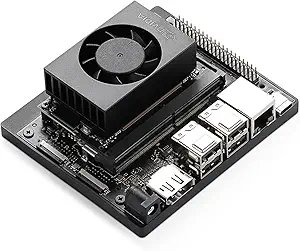
NVIDIA Jetson Orin Nano Super Developer Kit
NVIDIA Jetson Orin Nano Super Developer Kit is the clear specialist in this lineup. Its 67 TOPS of AI performance, Ampere GPU, and 8GB module put it in a different category from the Raspberry Pi 5 8GB or Radxa Rock 2A when the work involves vision models, robotics perception, or small local AI applications. The Raspberry Pi 5 is the better general-purpose board for most hobbyists, but this model makes far more sense when the project depends on NVIDIA’s AI software stack, including Isaac, DeepStream, and Riva. The downsides are cost and skill level: at $249, it is not a casual starter board, and buyers who only need media playback, GPIO learning, or basic Linux projects will pay for power they may not use.
Pros:- 67 TOPS of AI performance supports demanding edge inference workloads
- Ampere GPU and 6-core ARM CPU are built for AI and robotics development
- 8GB RAM gives more headroom for models than entry-level SBCs
- NVIDIA software ecosystem supports vision, robotics, and speech pipelines
Cons:- Costs more than mainstream boards like the Raspberry Pi 5 8GB
- Advanced AI tooling can be difficult for first-time SBC buyers
- Less appealing for simple GPIO, media, or education projects
Best for: AI developers, robotics builders, and edge-computing teams running local vision, speech, or model inference workloads
Not ideal for: Beginners building basic Linux, classroom, or media projects, because the price and software stack are more advanced than needed
- AI Performance:67 TOPS
- RAM:8GB
- GPU:NVIDIA Ampere
- CPU:6-core ARM
- Camera Connectors:2 MIPI CSI with 4-lane support
- Software Stack:Isaac, DeepStream, Riva
- Price:$249
- Form Factor:Compact developer kit with carrier board
Bottom line: Pick this when AI acceleration is the reason for buying an SBC, not just a nice extra.
LattePanda 3 Delta x86 Single Board Computer with Intel N5105, 8GB RAM, 64GB eMMC for IoT and Robotics
LattePanda 3 Delta is my pick for buyers who want an SBC that behaves more like a small PC than a maker board. Unlike the Raspberry Pi 5 8GB and Radxa Rock 2A, it runs Windows 10/11 and Linux natively on an Intel N5105 processor, which matters when a project needs x86 software, Windows tools, or fewer ARM compatibility questions. It also goes beyond the Raspberry Pi 3 Model B+ with dual M.2 expansion, Wi-Fi 6, 2.5GbE, and an Arduino Leonardo-compatible coprocessor for hardware control. The catch is complexity and price. Beginners may find the feature set heavier than needed, and the 64GB eMMC can feel tight once Windows, development tools, and project files pile up.
Pros:- Runs full Windows 10/11 and Linux natively on x86 hardware
- Intel N5105 processor suits mini PC, IoT, and robotics workloads
- Built-in Arduino Leonardo-compatible coprocessor simplifies hardware control
- Dual M.2 slots, Wi-Fi 6, and 2.5GbE give it strong expansion and networking
Cons:- Higher price than standard SBCs like Raspberry Pi 5 8GB
- Advanced feature set can slow down beginners
- 64GB eMMC may require M.2 expansion for larger Windows or development projects
Best for: Developers and robotics builders who need native Windows or x86 Linux support alongside GPIO-style hardware control
Not ideal for: First-time hobbyists on a tight budget, since the setup, expansion options, and price are more demanding than Raspberry Pi alternatives
- RAM:8GB DDR4
- Storage:64GB eMMC
- Processor:Intel N5105 quad-core up to 2.9GHz
- Connectivity:Wi-Fi 6, 2.5GbE Ethernet
- Expansion:Dual M.2, M Key NVMe and B Key SATA/5G
- Operating Systems:Windows 10/11, Linux
- USB Ports:5
- Display Support:Triple display: dual 4K HDMI/Type-C plus 1080p eDP
- Arduino Coprocessor:ATmega32U4, Leonardo compatible
Bottom line: This is the strongest choice when software compatibility matters as much as board-level tinkering.
Radxa Rock 2A Single Board Computer (RK3528A Quad-Core CPU, 4K HDMI)
Radxa Rock 2A stands out as the practical value pick for buyers who care more about wired networking and embedded use than the Raspberry Pi ecosystem. Its RK3528A quad-core CPU, 4GB LPDDR4 RAM, Gigabit Ethernet with PoE support, and 4K HDMI output make it a better fit than the Raspberry Pi 3 Model B+ for always-on dashboards, small servers, media displays, and installation-friendly DIY projects. Compared with the Raspberry Pi 5 8GB, it gives up memory headroom and the larger community, but it counters with PoE flexibility and a compact 3.5-inch square board. The main limitation is software breadth: Debian support is useful, yet buyers wanting Windows, Raspberry Pi OS polish, or wide tutorial coverage may prefer another board.
Pros:- Gigabit Ethernet with PoE support can reduce cable clutter in fixed installations
- 4GB LPDDR4 RAM is stronger than the Raspberry Pi 3 Model B+ for lightweight multitasking
- 4K HDMI output works well for dashboards and media displays
- RP5-compatible FPC connector helps with ecosystem expansion
Cons:- Debian-focused software path is narrower than Raspberry Pi options
- Not smart home compatible based on the listed product data
- Less memory and community depth than Raspberry Pi 5 8GB
Best for: DIY builders setting up wired dashboards, media endpoints, compact servers, or embedded projects where PoE can simplify installation
Not ideal for: Buyers who want the broadest OS choice, Windows support, or the largest tutorial and accessory ecosystem
- RAM:4GB LPDDR4
- CPU:RK3528A quad-core ARM Cortex A5
- Processor Speed:2GHz
- Connectivity:Gigabit Ethernet with PoE, HDMI 4K, USB ports
- Operating System:Debian
- Dimensions:3.5 x 3.5 x 0.5 inches
- Display Output:4K HDMI
- Smart Home Compatibility:Not compatible
Bottom line: Choose this for compact wired projects where PoE and 4K output matter more than the broadest software ecosystem.
Raspberry Pi 3 Model B+ Board with 1GB RAM
Raspberry Pi 3 Model B+ is the budget-friendly starter board I would keep in the list for learning, simple automation, and lightweight maker projects. Its 1.4GHz quad-core processor, dual-band Wi-Fi, Bluetooth 4.2/BLE, Ethernet, and four USB ports still cover the basics better than many bare-minimum boards. Compared with the Raspberry Pi 5 8GB, though, it is clearly the slower, tighter option; 1GB of RAM limits browser use, heavier Linux desktops, and multi-service home lab setups. It also lacks the AI focus of the NVIDIA Jetson Orin Nano Super Developer Kit and the x86 software flexibility of the LattePanda 3 Delta. This pick makes sense when low cost and learning resources beat raw speed, but I would skip it for ambitious current-generation builds.
Pros:- Affordable entry into the Raspberry Pi ecosystem
- Dual-band Wi-Fi and Ethernet give flexible network options
- Four USB ports make peripherals easy to add
- Broad OS and project support helps new learners get started
Cons:- Only 1GB RAM limits modern multitasking and heavier applications
- Much less performance headroom than Raspberry Pi 5 8GB
- Return policy may include restocking fees after purchase
Best for: Students, classroom buyers, and hobbyists building low-cost GPIO, coding, retro, or simple network projects
Not ideal for: Users planning heavier desktop workloads, AI projects, or multi-service home servers, because 1GB RAM becomes a hard ceiling
- RAM:1GB LPDDR3
- Processor Speed:1.4GHz
- CPU Model:Broadcom Cortex-based quad-core
- Wi-Fi:802.11ac dual-band, 2.4GHz and 5GHz
- Bluetooth:Bluetooth 4.2/BLE
- Ethernet:Included
- USB Ports:4
- Smart Home Compatibility:Not smart home compatible
Bottom line: This is the right pick for low-cost learning projects, not for buyers chasing modern SBC performance.
Orange Pi 4 Pro 6GB Single Board Computer with AI NPU, Wi-Fi 6 & Bluetooth 5.4
I rank the Orange Pi 4 Pro 6GB as the best midrange AI pick because it sits between mainstream hobby boards and heavier AI kits. Compared with the Raspberry Pi 5 8GB, it brings a dedicated 3 TOPS AI NPU, which makes more sense for vision, recognition, and robotics projects that need local inference. Compared with the NVIDIA Jetson Orin Nano Super Developer Kit, though, it is less of a full AI workstation and more of a compact developer board with useful acceleration. The tradeoff is software polish: Raspberry Pi buyers get a broader community and easier guides, while this board asks for more comfort with images, drivers, and open-source setup. Its Wi-Fi 6 and Bluetooth 5.4 help modern connected builds, but portable projects may need careful power planning.
Pros:- Dedicated 3 TOPS AI NPU for local inference workloads
- Faster octa-core CPU than basic learning boards like the Raspberry Pi 3 Model B+
- Wi-Fi 6 and Bluetooth 5.4 suit modern wireless projects
- Supports Android, Debian, Ubuntu, and OpenHarmony for flexible development
Cons:- Software setup and driver work can be harder than on Raspberry Pi boards
- Not as powerful for serious AI workloads as the NVIDIA Jetson Orin Nano Super Developer Kit
- Higher cost than basic SBCs used for simple media, GPIO, or learning projects
Best for: Developers building compact robotics, edge AI, or connected vision projects who want onboard acceleration without stepping up to a Jetson-class kit
Not ideal for: First-time SBC buyers who mainly want tutorials, plug-and-play accessories, and the broadest community support
- CPU:8-core processor with 2x Cortex-A76 and 6x Cortex-A55 cores
- Clock Speed:Up to 2.0GHz
- RAM:6GB LPDDR5
- AI Accelerator:3 TOPS NPU with INT8, FP16, and BF16 support
- Wireless:Wi-Fi 6 and Bluetooth 5.4
- OS Support:Android, Debian, Ubuntu, and OpenHarmony
- Project Fit:Robotics, industrial control, AI vision, and connected edge projects
- Form Factor:Single-board computer
Bottom line: The Orange Pi 4 Pro 6GB is the pick I would choose for AI-curious builders who want more acceleration than a Raspberry Pi without paying for a Jetson-class setup.
How We Picked
I ranked these boards by how well they serve real buyer needs, not by spec sheets alone. The main factors were usable performance, software support, accessory availability, setup difficulty, connectivity, storage options, and price. A board moved higher when its strengths applied to more projects without forcing buyers into unusual workarounds. A board moved lower when it offered strong hardware but weaker documentation, a narrower audience, or less predictable long-term support.
The order also reflects how buyers usually choose among the best single-board computers: some need a dependable all-rounder, some need AI acceleration, some want x86 compatibility, and some just want a cheap board for experiments. I gave the Raspberry Pi 5 8GB the overall win because it is the easiest recommendation across the most use cases. The Jetson Orin Nano ranks as the premium specialist, while the Radxa Rock 2A earns attention for value. Older or more niche boards still have a place, but only when their limits match the buyer’s project.
Factors to Consider When Choosing Best Single-board Computers
Choosing a single-board computer is less about buying the fastest tiny computer and more about matching the board to the work you expect it to do. I would start with the software stack, then work backward through performance, ports, storage, power needs, and community support.
Match Performance To The Actual Project
A faster board is not always the smarter buy. For basic GPIO projects, simple dashboards, DNS filtering, or classroom lessons, the Raspberry Pi 3 Model B+ can still be enough. For multitasking, desktop use, containers, and heavier maker projects, the Raspberry Pi 5 8GB gives more headroom without becoming overly specialized. AI vision, robotics inference, and neural network work push buyers toward the Jetson Orin Nano, where the GPU matters more than general CPU speed. The common mistake is paying for compute that sits idle while ignoring memory, storage, or software support.
Software Support Can Matter More Than Specs
Specs are only useful if the board runs the software you need with minimal friction. Raspberry Pi boards have the advantage here because tutorials, OS images, hats, cases, and troubleshooting guides are easy to find. Boards like the Radxa Rock 2A and Orange Pi 4 Pro may offer attractive hardware for the price, but buyers should expect more time spent checking image support, driver maturity, and update cadence. The LattePanda 3 Delta solves a different problem by using x86 hardware, which helps when a project depends on desktop Linux or Windows-compatible software. If downtime is costly, the board with the larger ecosystem may beat the board with the flashier processor.
Check Ports, Storage, And Expansion Before Buying
Single-board computers often fail a project through small mismatches: not enough USB bandwidth, awkward display support, weak storage options, or missing wireless features. A board with fast storage support can feel much quicker than one that relies only on a slow microSD card. If the project needs cameras, sensors, motor control, or hats, the Raspberry Pi ecosystem gives buyers the widest accessory path. If the project needs 4K video output, industrial I/O, or AI cameras, the Jetson, Orange Pi, or Radxa options may fit better. I would check the full connection plan before buying the board, case, power supply, and add-ons.
Think About Power, Cooling, And Enclosures
Performance claims often assume the board has enough power and cooling. The Raspberry Pi 5 and Jetson Orin Nano can both benefit from active cooling under heavier workloads, while smaller or older boards may be easier to run quietly. A board used in a robot, kiosk, media player, or closet server also needs a stable power supply and a case that does not trap heat. Cheap kits sometimes bundle weak adapters, which can cause throttling or random crashes that look like software bugs. For always-on projects, I would favor stable thermals and reliable power over chasing a slightly faster benchmark.
Know When Paying More Makes Sense
Spending more is worthwhile when the board changes what the project can actually do. The Jetson Orin Nano earns its premium price only if AI acceleration, robotics, or camera inference sits at the center of the build. The LattePanda 3 Delta makes sense when x86 compatibility saves time or supports software that Arm boards cannot run cleanly. For general maker work, the Raspberry Pi 5 8GB usually lands in the sweet spot because it feels modern without pushing buyers into a specialist platform. If the project is simple, a lower-cost board like the Radxa Rock 2A can leave more budget for sensors, storage, and a better power supply.
Frequently Asked Questions
Which Single-Board Computer Is Best For Most People?
For most buyers, I would choose the Raspberry Pi 5 8GB. It has enough power for desktop experiments, home servers, coding projects, media tasks, and maker builds, while still benefiting from the strongest accessory and tutorial ecosystem in this group. Compared with the Raspberry Pi 3 Model B+, it has far more room for modern workloads. Compared with the Jetson Orin Nano, it is easier to recommend for general use because buyers are not paying mainly for AI hardware. It is the safest all-round pick when the project list is broad or still changing.
Should I Buy A Raspberry Pi Or A Non-Raspberry Pi Board?
Choose a Raspberry Pi if you value setup help, project guides, cases, hats, and long-term community support. Choose a non-Raspberry Pi board when a specific feature matters more, such as the Jetson Orin Nano for AI, the LattePanda 3 Delta for x86 software, or the Orange Pi 4 Pro for a feature-rich Arm board. The tradeoff is that alternative boards can require more patience with OS images, drivers, and documentation. That extra work may be fine for experienced makers but frustrating for beginners. For a first board, I would usually keep the path simple and start with Raspberry Pi.
Is The NVIDIA Jetson Orin Nano Worth It For A Beginner?
The NVIDIA Jetson Orin Nano Super Developer Kit is worth it for a beginner only if the goal is clearly AI, computer vision, or robotics. It is far more specialized than the Raspberry Pi 5, and its value comes from GPU-accelerated workloads rather than everyday maker tasks. For learning Linux, GPIO, Python, or basic electronics, it costs more than needed. For a buyer building camera inference, object detection, or autonomous machine projects, it makes far more sense. I would treat it as a premium development platform, not a casual starter board.
Is The Raspberry Pi 3 Model B+ Still Worth Buying In 2026?
The Raspberry Pi 3 Model B+ can still be worth buying for lightweight projects, classroom use, simple automation, and low-cost tinkering. Its biggest weakness is that it feels constrained next to the Raspberry Pi 5 8GB, especially for desktop use, containers, browsers, or heavier services. It remains appealing when price, availability, or existing accessories matter more than speed. I would skip it for new projects that may grow over time. It is best viewed as a simple learning board, not the strongest long-term platform.
What Specs Should Matter Most When Comparing Single-Board Computers?
I would look at software support, memory, storage speed, connectivity, power needs, and accessory fit before chasing CPU numbers. More RAM helps with browsers, containers, databases, and multitasking, which is why the Raspberry Pi 5 8GB is easier to recommend than lower-memory boards for general use. Storage support can also change the feel of a system, especially when moving from microSD-only setups to faster options. Wireless features, display output, and camera support matter only if the project needs them. The best board is the one whose limitations do not block the build.
Conclusion
If I were choosing one board for the widest range of projects, I would buy the Raspberry Pi 5 8GB; it is the best overall because it blends speed, support, and flexibility. For best value, the Radxa Rock 2A is the pick when low cost matters and the buyer can accept a smaller support ecosystem. For best premium, the NVIDIA Jetson Orin Nano Super Developer Kit is the right call for AI, robotics, and vision-heavy builds. For beginners, the Raspberry Pi 3 Model B+ works for simple learning, though the Raspberry Pi 5 is the better long-term choice. For x86 software needs, I would choose the LattePanda 3 Delta, while the Orange Pi 4 Pro fits buyers who want strong Arm-board features and are comfortable doing more setup work.