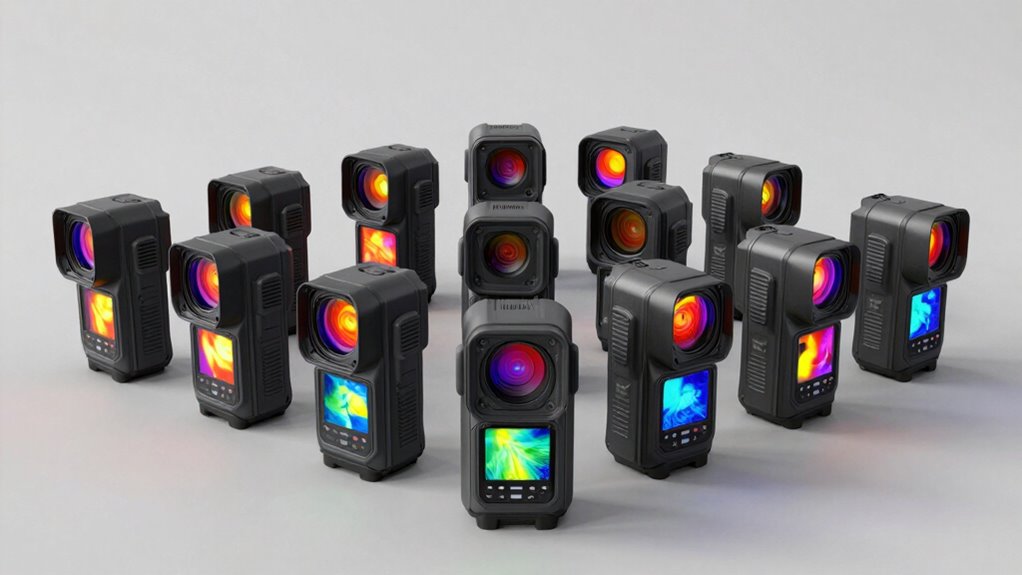

For a versatile handheld FLIR thermal imaging camera, I’d start with the FLIR E6 Pro, whose inspection-focused design and cloud workflow suit regular building and maintenance work. The C8 is a compact alternative with higher stated resolution, while the TG268 pairs thermal viewing with a bullseye laser for targeted checks. The main tradeoffs are image detail and standalone capability versus a smaller phone-connected format, along with the workflow and compatibility limits of each device. A higher-resolution camera can reveal finer temperature patterns, but it cannot replace proper inspection technique or surface emissivity settings. Read on for how these ten FLIR options differ and which buyer each one fits.

Get the latest gadgets delivered free with Prime
- Fast, free delivery on millions of items
- Prime Video, Amazon Music and more included
- Member-only deals all year
Complete the kit



Key Takeaways
The E6 Pro is the strongest all-around handheld choice in this lineup for buyers who want a dedicated inspection camera with Wi-Fi and Ignite Cloud.
The C8 stands out among compact cameras with its stated 320 × 240 resolution, but buyers should weigh its pocketable form against a larger dedicated unit’s handling.
The TG268 and TG165-X favor targeted spot checks with a bullseye laser, making them more task-focused than the C-series imaging cameras.
Phone-connected models trade independence for portability: Edge Pro and One-series cameras depend on a compatible phone, while handheld models operate as standalone tools.
The E5 Pro and C5 offer simpler steps into dedicated FLIR imaging, while One Pro distinguishes itself from the standard One through its more advanced imaging feature set.
| FLIR E6 Pro Thermal Imaging Camera with Wi-Fi and Ignite Cloud |  | Best for Broad Temperature Coverage | Thermal resolution: 240 × 180 pixels | Temperature range: -20°C to 550°C (-4°F to 1022°F) | Image enhancement: MSX | VIEW ON AMAZON | See Our Full Breakdown |
| FLIR C3-X Compact Thermal Imaging Camera |  | Best for Compact Everyday Inspections | Thermal resolution: 128 × 96 pixels | Temperature range: -20°C to 300°C (-4°F to 572°F) | Focus: Fixed focus | VIEW ON AMAZON | See Our Full Breakdown |
| FLIR TG268 Thermal Imaging Camera, 320 × 240, with Bullseye Laser |  | Best for Rugged Point-and-Measure Work | Thermal image resolution: 320 × 240 with Vivid IR upscaling from 160 × 120 | Visual camera resolution: 640 × 480 | Image enhancement: MSX | VIEW ON AMAZON | See Our Full Breakdown |
| FLIR Edge Pro Wireless Thermal Imaging Camera for iOS and Android |  | Best for Hard-to-Reach Viewing | Compatibility: iOS and Android devices | Connection: Bluetooth; Wi-Fi for cloud uploads | Image resolution: 480 × 360 with VividIR upscaling from 160 × 120 | VIEW ON AMAZON | See Our Full Breakdown |
| FLIR C8 Compact Thermal Imaging Camera with 320 × 240 Resolution and Ignite Cloud |  | Best for Higher Native Image Detail | Thermal resolution: 320 × 240 pixels (76,800 pixels) | Horizontal field of view: 35° | Image enhancement: MSX | VIEW ON AMAZON | See Our Full Breakdown |
| FLIR TG165-X Thermal Imaging Camera with Bullseye Laser |  | Best for Targeted Spot Checks | Model: TG165-X | Infrared resolution: 4,800 pixels | Temperature range: -25°C to 300°C (-13°F to 572°F) | VIEW ON AMAZON | See Our Full Breakdown |
| FLIR One Pro Thermal Imaging Camera for iPhone 15 and Newer (USB-C) |  | Best Phone-Based Detail | Compatibility: iPhone 15 and newer with USB-C | Native infrared resolution: 160×120 | Super resolution: 480×360 | VIEW ON AMAZON | See Our Full Breakdown |
| FLIR One Thermal Imaging Camera for iPhone 15 and Newer | 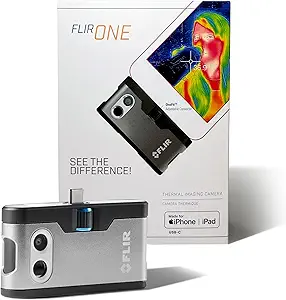 | Best Entry-Level Phone Attachment | Compatibility: iPhone 15 and newer with USB-C | Native infrared resolution: 80×60 | Super resolution: 240×180 | VIEW ON AMAZON | See Our Full Breakdown |
| FLIR E5 Pro Thermal Imaging Camera with Wi-Fi and Ignite Cloud |  | Best for Connected Job Documentation | Thermal resolution: 160×120 (19,200 pixels) | Temperature range: -20°C to 400°C (-4°F to 752°F) | Connectivity: Wi-Fi | VIEW ON AMAZON | See Our Full Breakdown |
| FLIR C5 Compact Thermal Imaging Camera |  | Best Compact Standalone Camera | Temperature range: -20°C to 400°C (-4°F to 752°F) | Thermal resolution: 160×120 (19,200 pixels) | Visual still resolution: 5 MP | VIEW ON AMAZON | See Our Full Breakdown |
| thermal imaging camera flir | Thermal resolution | Temperature range | Image enhancement | Connectivity |
|---|---|---|---|---|
| FLIR E6 Pro Thermal Imaging Ca | 240 × 180 pixels | -20°C to 550°C (-4°F to 1022°F) | MSX | Wi-Fi |
| FLIR C3-X Compact Thermal Imag | 128 × 96 pixels | -20°C to 300°C (-4°F to 572°F) | — | Wi-Fi |
| FLIR TG268 Thermal Imaging Cam | — | — | MSX | — |
| FLIR Edge Pro Wireless Thermal | — | — | FLIR MSX thermal and visual image merging | — |
| FLIR C8 Compact Thermal Imagin | 320 × 240 pixels (76,800 pixels) | — | MSX | FLIR Ignite cloud |
| FLIR TG165-X Thermal Imaging C | — | -25°C to 300°C (-13°F to 572°F) | MSX | — |
| FLIR One Pro Thermal Imaging C | — | — | — | — |
| FLIR One Thermal Imaging Camer | — | — | — | — |
| FLIR E5 Pro Thermal Imaging Ca | 160×120 (19,200 pixels) | -20°C to 400°C (-4°F to 752°F) | — | Wi-Fi |
| FLIR C5 Compact Thermal Imagin | 160×120 (19,200 pixels) | -20°C to 400°C (-4°F to 752°F) | — | Wi-Fi |
More Details on Our Top Picks
FLIR E6 Pro Thermal Imaging Camera with Wi-Fi and Ignite Cloud
The FLIR E6 Pro is the strongest fit here when inspections may involve both cold surfaces and very hot equipment. Its -20°C to 550°C range reaches far beyond the FLIR C3-X’s 300°C ceiling, while 240 × 180 thermal resolution gives it more native image detail than that compact model. MSX adds visual edges to thermal images, helping connect a temperature pattern to the physical feature being inspected. Wi-Fi and FLIR Ignite also make it easier to store and share findings. The tradeoff is that this isn’t the lineup’s sharpest listed image option: the FLIR C8 offers 320 × 240 resolution. Video is limited to 480p, and export restrictions may affect some users. I’d choose the E6 Pro for varied temperature work where its range matters more than higher resolution.
Pros:- Measures from -20°C to 550°C, covering a broad range of inspection conditions
- 240 × 180 thermal resolution provides more native detail than the FLIR C3-X
- MSX adds visual details that help identify the source of thermal patterns
- Wi-Fi, Ignite cloud support, and ten-year detector coverage
Cons:- 480p video capture is limited for recording fine visual detail
- Export and end-use restrictions apply to certain destinations and users
Best for: Building inspectors and maintenance technicians who need one handheld camera for a wide range of surface temperatures and cloud-based image sharing
Not ideal for: Buyers whose main priority is higher thermal resolution or detailed video; the FLIR C8 lists 320 × 240 resolution, while the E6 Pro video is 480p
- Thermal resolution:240 × 180 pixels
- Temperature range:-20°C to 550°C (-4°F to 1022°F)
- Image enhancement:MSX
- Connectivity:Wi-Fi
- Cloud service:FLIR Ignite
- Video capture:480p
- Media format:JPEG with radiometric data
- Warranty:2 years parts and labor; 10 years on detector
Our verdict“Choose the E6 Pro if you need a handheld FLIR camera with broad temperature coverage and cloud sharing more than the higher resolution listed for the C8.”
FLIR C3-X Compact Thermal Imaging Camera
The FLIR C3-X suits quick building checks where portability and straightforward image sharing matter more than fine thermal detail. At 6.72 ounces, it is easy to carry between rooms, and its fixed-focus design avoids adjustments during routine scans. MSX overlays visible edges on thermal images, while Wi-Fi and Ignite support uploading and sharing inspection files. Those conveniences come with a clear image-detail compromise: its 128 × 96 sensor has far fewer native pixels than the FLIR E6 Pro’s 240 × 180 or the FLIR C8’s 320 × 240. Its 300°C upper limit also trails the E6 Pro. I’d pick the C3-X for basic, portable checks; technicians diagnosing small components or needing a wider temperature range should step up to a higher-resolution model.
Pros:- Lightweight 6.72-ounce design is easy to carry through routine inspections
- MSX, visual, infrared, and picture-in-picture modes support different viewing needs
- Wi-Fi and FLIR Ignite support uploading and sharing images
- Measures temperatures up to 300°C
Cons:- 128 × 96 thermal resolution provides less native detail than the E6 Pro and C8
- Fixed focus offers less flexibility for varied inspection distances
Best for: Home inspectors and facility staff who want a lightweight camera for routine surface checks and cloud-based reporting
Not ideal for: Technicians who need to inspect small hot components or distinguish fine thermal details; its 128 × 96 resolution and 300°C ceiling are limiting
- Thermal resolution:128 × 96 pixels
- Temperature range:-20°C to 300°C (-4°F to 572°F)
- Focus:Fixed focus
- Shooting modes:Infrared, Visual, MSX, Picture-in-Picture
- Connectivity:Wi-Fi
- File formats:JPEG, PNG
- Weight:6.72 ounces
- Warranty:2 years parts and labor; 10 years on detector
Our verdict“Choose the C3-X for lightweight routine inspections and easy image sharing, but move to the E6 Pro or C8 if image detail is a priority.”
FLIR TG268 Thermal Imaging Camera, 320 × 240, with Bullseye Laser
The FLIR TG268 is geared toward hands-on maintenance work where locating a measurement target and tolerating a rougher setting matter. Its Bullseye laser indicates the measurement area, while an IP54 enclosure and drop-tested build suit work around dust, dirt, and oil. Vivid IR presents 160 × 120 thermal imagery at 320 × 240, and MSX adds visual context; that displayed resolution should not be confused with a native 320 × 240 thermal sensor. The FLIR C8, by comparison, captures 320 × 240 thermal images, making it the clearer choice for buyers focused on native image resolution. The TG268’s appeal is its pointing aid and tougher enclosure. It makes most sense for field technicians who value those practical features over native pixel count.
Pros:- Bullseye laser helps indicate the measurement area
- IP54 enclosure provides protection from dirt, dust, and oil
- Drop-tested design suits demanding work environments
- MSX combines visual details with thermal imagery
Cons:- 320 × 240 thermal image is upscaled from a native 160 × 120 image
- The listed image resolution may overstate the sensor’s native thermal detail
Best for: Maintenance technicians who take targeted readings in workshops or service areas where dust, oil, and accidental drops are concerns
Not ideal for: Buyers who need native 320 × 240 thermal capture; the C8 lists that resolution, while the TG268 upscales from 160 × 120
- Thermal image resolution:320 × 240 with Vivid IR upscaling from 160 × 120
- Visual camera resolution:640 × 480
- Image enhancement:MSX
- Laser pointer:Bullseye; indicates measurement area
- Ingress protection:IP54
- Durability:Drop-tested
- Warranty:2 years parts and labor; 10 years on detector
Our verdict“Choose the TG268 for targeted measurements in rough work settings, and choose the C8 if native 320 × 240 thermal resolution matters more.”
FLIR Edge Pro Wireless Thermal Imaging Camera for iOS and Android
The FLIR Edge Pro changes how you position a thermal camera: it connects to a compatible iOS or Android device over Bluetooth, making it easier to view tight spaces or look around corners. That flexibility is its main advantage over handheld options such as the FLIR E6 Pro, which has a stated native 240 × 180 thermal resolution and a broad -20°C to 550°C temperature range. The Edge Pro instead presents 480 × 360 imagery through VividIR upscaling from 160 × 120, with MSX blending in visual detail. Wi-Fi supports Ignite uploads. Its stated ±3°C or ±5% accuracy applies only within specified unit and scene temperature conditions, so buyers should check those limits against their work. I’d choose it when camera placement is the problem, not when handheld operation or broad temperature coverage is the priority.
Pros:- Wireless positioning can help view tight spaces and around corners
- Compatible with iOS and Android devices
- VividIR upscaling and MSX add detail to thermal imagery
- Wi-Fi and Ignite support image uploads and sharing
Cons:- 480 × 360 imagery is upscaled from 160 × 120 thermal imagery
- Specified temperature accuracy applies only under stated unit and scene conditions
Best for: Inspectors who need to view behind equipment, inside tight gaps, or around corners using a compatible iOS or Android device
Not ideal for: Buyers who want a standalone handheld camera or who need a broad stated temperature range; the E6 Pro specifies -20°C to 550°C
- Compatibility:iOS and Android devices
- Connection:Bluetooth; Wi-Fi for cloud uploads
- Image resolution:480 × 360 with VividIR upscaling from 160 × 120
- Image enhancement:FLIR MSX thermal and visual image merging
- Temperature accuracy:±3°C or ±5%
- Accuracy conditions:Unit temperature 15°C–35°C; scene temperature 5°C–120°C
- Cloud service:FLIR Ignite
Our verdict“Choose the Edge Pro when wireless placement helps you reach difficult viewing angles and your phone is a suitable display.”
FLIR C8 Compact Thermal Imaging Camera with 320 × 240 Resolution and Ignite Cloud
The FLIR C8 stands out in this group for its stated 320 × 240 thermal resolution, giving buyers more native image detail than the C3-X and E6 Pro. That can help when comparing heat patterns across a surface or documenting faults for someone who was not present. Its 35° horizontal field of view frames the inspection area, while MSX adds visible features that help connect temperature patterns to physical objects. Ignite cloud support covers uploading, reporting, and sharing. Compared with the TG268, the C8’s listed resolution is native rather than an upscale from 160 × 120; the TG268 counters with a Bullseye laser and an IP54, drop-tested design. The C8’s supplied details do not state a temperature range, so I’d check that against the intended job before choosing it over the E6 Pro.
Pros:- 320 × 240 thermal resolution is higher than the E6 Pro and C3-X specifications
- 35° horizontal field of view frames inspection areas
- MSX adds visual details to help interpret thermal patterns
- Ignite cloud supports image upload, reporting, and sharing
Cons:- The supplied specifications do not state a temperature measurement range
- The supplied specifications do not describe ruggedization or a laser pointer like the TG268
Best for: Inspectors who prioritize higher native thermal image detail and need to share findings through FLIR Ignite
Not ideal for: Buyers who need a clearly stated operating temperature range or a ruggedized enclosure; those details are not provided here, while the E6 Pro lists its range and the TG268 lists IP54 protection
- Thermal resolution:320 × 240 pixels (76,800 pixels)
- Horizontal field of view:35°
- Image enhancement:MSX
- Connectivity:FLIR Ignite cloud
- Camera warranty:2 years parts and labor
- Detector warranty:10 years
Our verdict“Choose the C8 for higher listed native thermal resolution and cloud reporting, after confirming its temperature range fits your work.”
FLIR TG165-X Thermal Imaging Camera with Bullseye Laser
The TG165-X suits buyers who want a handheld FLIR camera for quick temperature checks without connecting a phone. Its Bullseye laser marks the measurement area, while MSX adds visible scene detail to help locate the reading. Compared with the FLIR E5 Pro, it has a much lower stated maximum temperature and no listed Wi-Fi or cloud workflow, so it is better for straightforward inspections than documenting a stream of jobs. Its IP54 enclosure and drop-tested build support work in less delicate settings, and the detector warranty lasts ten years. The supplied data does not specify display resolution or battery life, which makes it harder to judge how it will fare during long inspection sessions.
Pros:- Bullseye laser indicates the measurement area
- MSX adds visual detail to thermal images
- Drop-tested body with IP54 protection
- Ten-year detector coverage
Cons:- Temperature range tops out at 300°C, below the E5 Pro and C5’s 400°C maximum
- No display resolution or battery-life details are provided
Best for: Technicians who need a standalone FLIR camera for quick, localized checks on building systems or equipment.
Not ideal for: Inspectors who need cloud-based reporting, a documented high-resolution display, or measurements above 300°C.
- Model:TG165-X
- Infrared resolution:4,800 pixels
- Temperature range:-25°C to 300°C (-13°F to 572°F)
- Image enhancement:MSX
- Measurement aid:Bullseye laser indicates measurement area
- Protection:Drop-tested; IP54 enclosure
- Warranty:2 years parts and labor; 10 years on detector
Our verdict“Choose the TG165-X for rugged, targeted spot checks; pick the E5 Pro if you need a higher temperature ceiling and Wi-Fi image sharing.”
FLIR One Pro Thermal Imaging Camera for iPhone 15 and Newer (USB-C)
For iPhone 15 and newer owners, the One Pro offers a portable route into thermal inspections, with 160×120 native resolution and Vivid IR upscaling to 480×360. The added pixels are processed detail, not a native sensor upgrade, but the higher-resolution sensor gives it an advantage over the FLIR One, whose native resolution is 80×60. Both models use MSX and provide guided inspection steps for common home issues, so the Pro is the stronger choice when distinguishing small temperature patterns matters. Its compact 1.29-ounce body and 1.5-meter drop rating suit mobile work. The tradeoff is platform dependence: it requires a compatible USB-C iPhone, and its stated accuracy applies only within specified unit and scene temperatures.
Pros:- 160×120 native infrared resolution, higher than the FLIR One’s 80×60
- Vivid IR upscales images to 480×360
- MSX and guided app workflows support locating and documenting common issues
- Compact 1.29-ounce design rated for 1.5-meter drops
Cons:- Requires an iPhone 15 or newer with USB-C
- 480×360 output is upscaled from the native sensor resolution
- Specified accuracy is limited to stated unit and scene temperature conditions
Best for: Home inspectors and service technicians with an iPhone 15 or newer who want a pocketable camera with more native thermal detail.
Not ideal for: Android users, owners of older or non-USB-C iPhones, and buyers who need a standalone handheld camera.
- Compatibility:iPhone 15 and newer with USB-C
- Native infrared resolution:160×120
- Super resolution:480×360
- Temperature accuracy:±3°C or ±5%
- Accuracy conditions:Unit: 15°C–35°C; scene: 5°C–120°C
- Dimensions:2.6 × 1.3 × 0.6 inches
- Weight:1.29 ounces
Our verdict“Pick the One Pro if you have a compatible iPhone and want more native thermal detail than the FLIR One provides in a phone-attached format.”
FLIR One Thermal Imaging Camera for iPhone 15 and Newer
The FLIR One makes sense for iPhone owners who want guided thermal checks in a small attachment, especially for common tasks such as spotting air leaks or moisture. It combines MSX visual detail with Vivid IR upscaling from an 80×60 native sensor to 240×180. That lower native resolution is the key distinction from the FLIR One Pro, which starts at 160×120 and can better resolve finer patterns. Both share iPhone 15-and-newer USB-C compatibility, inspection guides, and a stated 1.5-meter drop rating. This model is the simpler pick when portability and guided workflows matter more than thermal detail. Its phone dependence and low native resolution make it a poor fit for buyers who need a dedicated camera or frequent close analysis.
Pros:- MSX combines thermal imagery with visible scene details
- Vivid IR upscales images to 240×180
- In-app guides cover common issues such as air leaks and moisture
- Rated for drops from 1.5 meters
Cons:- 80×60 native resolution provides less thermal detail than the One Pro
- Requires an iPhone 15 or newer with USB-C
- Temperature accuracy is specified only under stated operating and scene conditions
Best for: iPhone 15 or newer owners who want a compact FLIR attachment for guided home checks and basic inspections.
Not ideal for: Inspectors who need finer thermal detail, use Android or older iPhones, or prefer a standalone camera.
- Compatibility:iPhone 15 and newer with USB-C
- Native infrared resolution:80×60
- Super resolution:240×180
- Temperature accuracy:±3°C or ±5%
- Accuracy conditions:Unit: 15°C–35°C; scene: 5°C–120°C
- Image features:FLIR MSX; Vivid IR
- App features:Guided inspections for issues such as air leaks and moisture
Our verdict“Choose the FLIR One for guided, basic checks on a compatible iPhone, and move up to the One Pro if finer native detail matters.”
FLIR E5 Pro Thermal Imaging Camera with Wi-Fi and Ignite Cloud
The E5 Pro is the most work-focused option here for buyers who need to capture thermal images and move them into a reporting workflow. Its 160×120 sensor, MSX image detail, Wi-Fi, and Ignite Cloud support storing, editing, and sharing files from the handheld camera. Compared with the phone-dependent FLIR One Pro, the E5 Pro is a dedicated device and reaches a higher stated maximum temperature of 400°C; compared with the FLIR C5, it shares that temperature range and cloud route but has no listed visual still or video resolution. The 9 Hz-or-less frame rate and 160×120 resolution limit fast-moving or fine-detail work. It fits repeatable troubleshooting better than applications needing high-speed imaging.
Pros:- 160×120 thermal resolution with MSX visual detail
- Measures from -20°C to 400°C
- Wi-Fi and Ignite Cloud support image storage, editing, and sharing
- Ten-year detector coverage
Cons:- Frame rate is 9 Hz or less
- 160×120 resolution may not capture fine thermal patterns
- No visual still or video resolution is listed, unlike the C5
Best for: Building and maintenance technicians who want a dedicated FLIR camera with Wi-Fi image sharing and a broad measurement range.
Not ideal for: Buyers who need high thermal resolution, fast frame capture, or a specified visual camera resolution.
- Thermal resolution:160×120 (19,200 pixels)
- Temperature range:-20°C to 400°C (-4°F to 752°F)
- Connectivity:Wi-Fi
- Image technology:MSX
- Cloud service:FLIR Ignite
- Frame rate:9 Hz or less
- Weight:1.27 pounds
- Warranty:2 years parts and labor; 10 years on detector
Our verdict“Choose the E5 Pro for a dedicated camera and cloud-based job documentation; consider the C5 if a specified visual camera and video resolution matter.”
FLIR C5 Compact Thermal Imaging Camera
The C5 brings a dedicated screen and camera into a compact handheld format, making it a practical middle ground between the standalone E5 Pro and the phone-attached FLIR One Pro. Its 3.5-inch screen means inspections do not depend on a compatible iPhone, while Wi-Fi and FLIR Ignite provide a route to share images and reports. The 160×120 thermal sensor and MSX help connect heat patterns to visible scene details; the listed 5 MP stills and 1080p video add documentation options that are not specified for the E5 Pro. The main compromise is fixed focus, which limits flexibility with changing distances. Its thermal resolution also matches the E5 Pro rather than the higher-resolution models elsewhere in the roundup.
Pros:- Standalone 3.5-inch screen avoids reliance on a compatible phone
- MSX combines thermal and visible details
- Wi-Fi and Ignite support image sharing and reporting
- 5 MP stills and 1080p video add documentation options
Cons:- Fixed focus limits use across different inspection distances
- 160×120 thermal resolution is modest compared with higher-resolution FLIR models
- Minimum focus distance is 0.3 m
Best for: Inspectors who want a compact, standalone FLIR camera with an onboard screen, cloud sharing, and visual documentation.
Not ideal for: Buyers who need adjustable focus or more thermal detail than a 160×120 sensor provides.
- Temperature range:-20°C to 400°C (-4°F to 752°F)
- Thermal resolution:160×120 (19,200 pixels)
- Visual still resolution:5 MP
- Video resolution:1080p
- Connectivity:Wi-Fi
- Screen:3.5 inches
- Focus:Fixed focus; minimum distance 0.3 m (11.8 in)
- Image formats:JPEG, MP4
Our verdict“Pick the C5 for a compact standalone workflow with visual and video documentation; choose the One Pro if you prefer a lighter phone attachment and accept its compatibility limits.”

How We Picked
I ranked these cameras by how well their stated design and features fit common inspection needs: image resolution, standalone usability, portability, targeting aids, connectivity, and likely workflow. I gave more weight to a balanced handheld inspection tool for the overall position, since it can serve more tasks without tying operation to a phone. Compact cameras and phone-connected models rank higher for buyers who prioritize size or mobile use, while the TG models suit targeted checks where laser guidance is useful. I also considered whether a model’s format and feature mix make its limits clear to a buyer.
These products serve different jobs, so the ordering reflects breadth of use rather than a claim that one device is best for every inspection. Resolution alone does not establish accuracy or guarantee that a small temperature difference will be meaningful; setup, distance, surface emissivity, and conditions matter. The E6 Pro leads for its dedicated-camera workflow, the C8 is the compact resolution pick, and the Edge Pro and One models are placed according to their phone-based convenience and dependency. The entry-level and task-specific options rank below them for buyers whose needs are narrower or who want fewer inspection features.
| thermal imaging camera flir | Temperature range | Image enhancement | Connectivity |
|---|---|---|---|
| FLIR E6 Pro Thermal Imaging Ca | -20°C to 550°C (-4°F to 1022°F) | MSX | Wi-Fi |
| FLIR C3-X Compact Thermal Imag | -20°C to 300°C (-4°F to 572°F) | — | Wi-Fi |
| FLIR TG268 Thermal Imaging Cam | — | MSX | — |
| FLIR Edge Pro Wireless Thermal | — | FLIR MSX thermal and visual image merging | — |
| FLIR C8 Compact Thermal Imagin | — | MSX | FLIR Ignite cloud |
| FLIR TG165-X Thermal Imaging C | -25°C to 300°C (-13°F to 572°F) | MSX | — |
| FLIR One Pro Thermal Imaging C | — | — | — |
| FLIR One Thermal Imaging Camer | — | — | — |
| FLIR E5 Pro Thermal Imaging Ca | -20°C to 400°C (-4°F to 752°F) | — | Wi-Fi |
| FLIR C5 Compact Thermal Imagin | -20°C to 400°C (-4°F to 752°F) | — | Wi-Fi |
Factors to Consider When Choosing Thermal Imaging Camera Flir
Before choosing a FLIR camera, I’d match its format and measurement workflow to the way you plan to inspect. These broader checks can prevent buying for a headline specification that does not solve your actual task.
Choose resolution for the distance and detail you need
Resolution matters most when you need to distinguish small areas or inspect a target from farther away. A low-resolution image may be enough to locate a broad hot or cold region, but it can blur small components together. Think about the smallest feature you need to see and how close you can safely get. Also check the camera’s field of view and focus behavior, since more pixels alone do not determine how much of the scene fits in the frame. Avoid treating a temperature reading on a single pixel as a definitive diagnosis. For recurring building surveys, consistent positioning and repeatable capture can matter more than a small resolution step.
Decide whether a standalone camera or phone accessory fits
A handheld unit is easier to use as a dedicated inspection tool because it does not rely on your phone’s connector, battery, or operating system. A phone accessory can be easier to carry and may fit occasional checks, but it adds compatibility and app dependencies. Confirm your exact phone model, port, and operating system support before buying a phone-connected camera. Consider whether a protective case interferes with the connection or camera placement. In shared workplaces, standalone devices may be simpler to pass between users. For personal, intermittent use, the smaller accessory format may be the more practical choice.
Match laser guidance to the kind of inspection
A laser pointer can help indicate the area being targeted, especially during quick checks on equipment or building surfaces. It does not make the thermal measurement more accurate by itself, and the laser mark may not correspond exactly to the camera’s full thermal measurement area. Broad scene scanning often benefits more from image clarity and a useful field of view than from a targeting aid. For small components, plan the camera distance and target size rather than relying on the laser alone. Buyers inspecting energized or moving equipment should also consider safe access and working distance. Pick a laser-equipped model when aiming is a regular part of your workflow.
Check data handling before relying on cloud features
Wi-Fi and cloud services can make it easier to organize and share inspection images, particularly across repeated jobs. They also introduce account, connectivity, and data-handling questions that a camera used offline does not raise. Find out whether your workplace permits images to be uploaded to an external service and whether records need to remain available without an internet connection. Establish a naming and file storage routine before collecting many images, or comparisons can become difficult later. If reports need to be delivered to clients, confirm the export formats and workflow your team uses. Connectivity is useful when it shortens reporting work, but it should fit existing procedures.
Treat thermal images as evidence, not a diagnosis
Thermal cameras show surface temperature patterns, which can point to an area worth investigating but rarely explain the cause on their own. Reflective surfaces, emissivity differences, airflow, recent sunlight, and insulation can all affect what the image suggests. Learn the camera’s emissivity and reflected temperature settings and use them consistently when comparing readings. A visible-light reference can help identify the surface or component associated with a thermal pattern. For consequential electrical, mechanical, or building decisions, pair the image with appropriate tests and professional judgment. Paying for greater resolution will not correct a poor measurement setup.
Frequently Asked Questions
Should I choose the E6 Pro or the C8 for building inspections?
I’d choose the E6 Pro if you want a dedicated handheld camera and expect to manage inspections through its Wi-Fi and Ignite Cloud workflow. The C8 makes more sense if compact size is a priority and its stated 320 × 240 resolution suits the detail you need. Consider how often you will carry the camera, whether cloud handling fits your work, and how much time you spend framing images. Neither resolution nor cloud access alone determines inspection quality. Match the camera to the way you capture and document a typical job.
Are FLIR One and Edge Pro cameras a good choice if I already own a compatible phone?
They can suit buyers who value a small kit and are comfortable using a phone as the camera’s screen and operating platform. Before choosing, confirm support for your exact phone and its current connector, since a compatible device today may not match a later upgrade. A phone accessory also means your inspection workflow depends on phone battery life, app support, and the physical connection. A standalone handheld is generally a better fit if you need to share the tool among workers or operate it independently. Think about the whole work session, not just the convenience of carrying less.
Does a bullseye laser make the TG268 a better choice than the E5 Pro?
The laser helps with aiming during targeted spot checks, which gives the TG268 a different role from the E5 Pro’s dedicated inspection-camera format. It does not automatically make the TG268 a better general imager or guarantee a more precise temperature result. If you routinely need to point out a small inspection area, the laser can make the task easier to repeat. For broader thermal surveys, consider the imaging workflow, resolution, and image handling that matter across the whole inspection. Choose based on the task you repeat most often.
Is the C5 a better everyday camera than the C3-X?
That depends on which model’s capabilities and workflow fit your inspections; both are compact FLIR cameras intended for buyers who want a small dedicated unit. Compare their stated imaging specifications, connectivity, and controls against the detail and documentation your work requires. A compact size is useful when the camera travels frequently, but it does not remove the need to frame and interpret images carefully. If you regularly inspect small targets, prioritize the image detail and working distance that support those targets. For occasional broad checks, a simpler compact camera may be sufficient.
When is it worth choosing the E6 Pro over the E5 Pro?
The E6 Pro is the more fitting choice when its additional inspection capabilities and workflow features address a recurring need, rather than simply because it sits higher in a lineup. Compare the image detail and connectivity features you will actually use with the types of jobs you perform. If your work mostly involves broad anomaly checks and straightforward documentation, the E5 Pro may cover the task with less complexity. If you need finer image information or make repeated reports, the E6 Pro’s feature set may be more useful. Confirm the specific differences in the current model documentation before deciding.
Conclusion
For the best overall dedicated inspection tool, I’d pick the FLIR E6 Pro. Buyers seeking the best compact resolution option should compare the C8, while the E5 Pro and C5 are sensible value-oriented dedicated choices for less demanding workflows. For a beginner who wants a standalone camera, I’d start by comparing the C3-X and C5 based on the required image detail and documentation needs. The best for targeted spot checks is the TG268, with the TG165-X serving buyers whose requirements are more focused. Choose Edge Pro or One Pro when phone-based portability is the priority, and the standard One when a simpler phone-connected option fits; check device compatibility first.