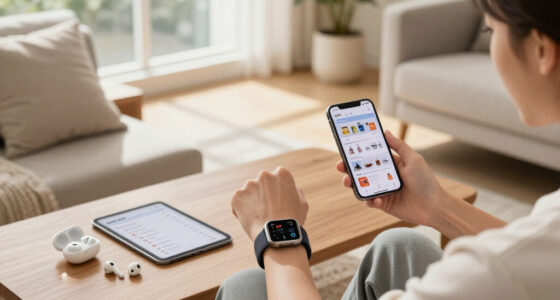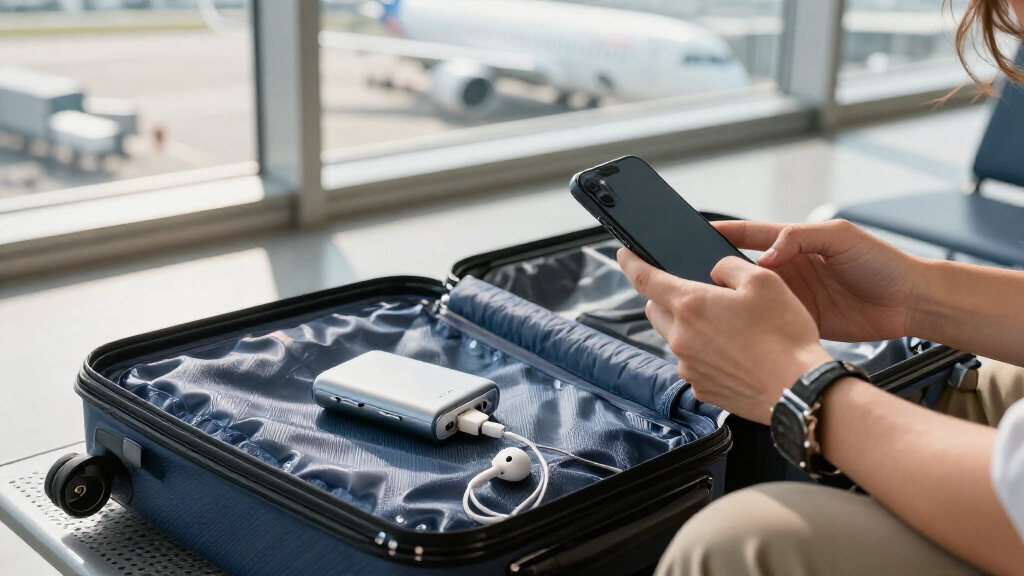
This checklist is for travelers who want to keep their devices charged, stay connected, and make long trips more comfortable. It covers a mix of charging gear, headphones, a luggage tracker, and a portable hotspot, with advice to help you decide which items suit your travel routine. Start with your essentials: the best kit depends on the devices you carry and the connections you need.

Get the latest gadgets delivered free with Prime
- Fast, free delivery on millions of items
- Prime Video, Amazon Music and more included
- Member-only deals all year
The sections are organized by travel need, from charging and power to comfort, tracking, and connectivity. Each one explains why the slot matters, what to check before buying, and where the named pick may fit. The GaN USB-C charger section offers general buying advice because no specific product was supplied. Check compatibility first, especially for charging standards, device ports, and mobile networks.
Use this as a planning tool rather than a fixed packing list. Compare each item with your existing gear, confirm its requirements against your devices and destination, and prioritize the gaps that would affect your trip most. Pack for your actual itinerary: a short city break and a long, multi-stop journey can call for different gear.
Universal travel adapter
A travel adapter helps connect compatible plugs to outlets at your destination, so it can be a useful part of a charging kit. The pick here is the Anker Nano 100W Universal Travel Charger with Smart Display. Before choosing it, check the plug types used where you are going and confirm that the adapter supports those outlet formats. Plug compatibility comes first; an adapter does not automatically make every device suitable for every power system.
A common mistake is treating an adapter as a voltage converter or assuming that every port can deliver the power a device needs. Check the charger’s specifications alongside the input requirements of your phone, tablet, or laptop, and consider how many devices you expect to charge at once. The product name indicates a 100W rating and a smart display, but verify port details and how power is allocated across ports before relying on it for multiple devices. Review the full output specifications for your own setup.
Think about fit in your bag and access at the outlet, too: bulky plugs or crowded sockets can make a compact charging setup awkward. Confirm that the adapter’s included plug configuration suits your route, including any connecting destinations. Match it to every stop, not just the first one.
What to look for:
- Plug formats for every destination
- Device input voltage compatibility
- Port types and total output
- Power sharing across connected devices
- Size and access at crowded outlets
Anker Nano 100W Universal Travel Charger with Smart Display

This compact travel charger has built-in US, UK, and EU plugs and supports Type A, C, and G outlets across a 100–275V input range. It charges up to four devices through three USB-C ports and one USB-A port, with up to 100W from USB-C1 or USB-C2 when used individually.
Pros:
- Charges up to four devices at once.
- USB-C1 or USB-C2 can deliver up to 100W individually for laptop charging.
- Built-in US, UK, and EU plugs support Type A, C, and G outlets.
- LCD shows voltage zone, power output, and temperature.
Cons:
- Does not support Type I outlets, including those used in Australia and New Zealand.
- It is not a battery and requires an outlet.
Best for: Travelers seeking a universal charger with a display
Not ideal for: People who need verified port details before choosing
Bottom line: Confirm outlet, device, and port compatibility before packing this charger.
GaN USB-C charger
A GaN USB-C charger can serve as a compact charging option for travelers carrying USB-C devices. No specific product is named for this slot, so choose one by comparing its specifications with the devices you plan to bring. Start with your device requirements: check the charging standard, input range, and power level each device supports.
One common buying mistake is choosing by a headline wattage alone. A charger’s total output may be shared when several devices are connected, and individual ports can have different limits. Check the detailed output table and consider whether you will charge a laptop and phone together, or mostly smaller devices. Also confirm that the charger has the right number and type of ports for your cables. Read the per-port ratings rather than assuming every connection delivers the same power.
For travel, account for plug compatibility and how the charger will fit into your existing adapter setup. Some chargers are designed for a particular plug shape; others may need a separate travel adapter. Avoid assuming that USB-C alone guarantees compatibility, since supported charging protocols and cable capabilities matter. Check charger, cable, and device as a set. If you have several USB-C devices, make a quick list of their needs before choosing a charger, then compare it against the manufacturer specifications.
What to look for:
- USB-C power output per port
- Total output when ports are used together
- Supported charging protocols
- Port count for your device list
- Plug format and adapter compatibility
Portable power bank
A portable power bank can keep compatible devices powered when an outlet is not convenient. The listed pick is the Anker 25,000mAh Power Bank with 165W Output and Built-In Retractable C. Its name highlights capacity, output, and a built-in retractable C connection; check the complete specifications to confirm how those features work with your devices. Verify device compatibility before treating it as a one-cable solution.
A common mistake is assuming the stated capacity translates directly into a particular number of full charges. Actual results depend on the devices and charging conditions, so use the manufacturer’s guidance for expectations. Check whether the power bank can deliver the output your laptop or other demanding device requires, and how that output changes when multiple devices are connected. Look at simultaneous output details if you plan to charge more than one item at once.
Consider whether the built-in retractable cable reaches comfortably and whether its connector matches the devices you bring. Also check what additional ports are available, what cable is needed for recharging the bank, and any travel rules that apply to carrying power banks on your route. The product name alone does not confirm those details. Check current airline guidance and pack the bank where required. If the capacity or integrated cable does not suit your kit, compare alternatives against your actual charging needs.
What to look for:
- Capacity and manufacturer charge guidance
- Output for each port and combined use
- Retractable cable connector compatibility
- Additional ports and recharge method
- Applicable airline carry-on requirements
Anker 25,000mAh Power Bank with 165W Output and Built-In Retractable Cables

This 25,000mAh rechargeable power bank delivers up to 165W total output and can charge up to four devices at once through its USB-C and USB-A ports. It includes two built-in USB-C cables, including a retractable cable, and meets the 100Wh airline carry-on limit.
Pros:
- High 25,000mAh capacity for extended trips and backup power
- Can charge up to four devices simultaneously
- Two integrated USB-C cables reduce the need to carry separate cables
- Carry-on friendly under the stated 100Wh airline restriction
Cons:
- Charging adapter is not included
- The 100W-per-port output applies to USB-C ports
Best for: Travelers who want a high-capacity bank with a built-in cable
Not ideal for: People whose devices or cables do not match its connections
Bottom line: Confirm output, cable fit, and airline requirements before traveling.
Noise-canceling headphones
Noise-canceling headphones can make travel listening more comfortable, especially when you want to reduce surrounding sound. The pick is Bose QuietComfort Wireless Noise Cancelling Headphones, Petal Pink. Before buying, check how they fit your head and ears, whether their controls feel straightforward, and whether the features match how you listen on the move. Comfort is personal, so try the fit if you can.
A common mistake is focusing only on noise cancellation and overlooking everyday usability. Review the manufacturer’s details for wireless connectivity, controls, charging, and any wired listening option you may want. Check that the headphones pair with your devices and that the included or supported cables suit your setup. If you wear glasses or plan to use them for long stretches, consider how the headband and earcups feel over time. Fit affects long-session comfort, and product names do not establish how they will feel for you.
Think through the situations where you will use them: a flight, a train, or listening while moving through a terminal may call for different control and storage preferences. Confirm what accessories are included and whether the headphones can be stored conveniently in your carry-on. Petal Pink identifies the listed color, so make sure that finish is the one you want. Check the details that affect your routine before making this a regular travel companion.
What to look for:
- Fit and comfort for extended wear
- Compatibility with your playback devices
- Controls and connection details
- Charging and any wired option
- Storage and included accessories
Bose QuietComfort Wireless Noise Cancelling Headphones, Petal Pink
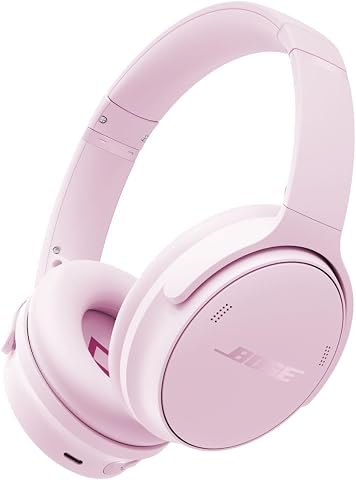
These over-ear Bluetooth headphones combine active noise cancellation with Quiet and Aware listening modes, adjustable EQ, and high-fidelity audio. They offer up to 24 hours of battery life, USB-C charging, multipoint Bluetooth connectivity, and an included cable for wired listening.
Pros:
- Active noise cancellation with Quiet and Aware modes
- Adjustable EQ for bass, mid-range, and treble
- Up to 24 hours of battery life with USB-C quick charging
- Multipoint Bluetooth and included wired listening option
Cons:
- Wired listening requires the included audio cable
- USB-C cable is 12 inches long
Best for: Travelers who want wireless noise-canceling headphones
Not ideal for: Anyone who has not checked fit or device compatibility
Bottom line: Confirm comfort, connections, and charging details for your listening setup.
Bluetooth luggage tracker
A luggage tracker can help you keep tabs on a bag through a compatible device ecosystem. This pick is Apple AirTag (2nd Generation), 4-Pack. Before purchasing, confirm that your phone and account can use the required Apple features and that you understand how the tracker is set up and located. Check ecosystem compatibility before choosing a tracker for your luggage.
A common mistake is assuming a tracker works independently of a phone, app, or nearby devices. Review Apple’s current setup instructions and location features, and check what notifications and sharing options are available for your use. Consider how you will attach each tracker securely; the product name does not indicate an included luggage attachment. Plan for secure placement, and check whether you need to obtain accessories separately.
The four-pack may suit travelers who want to track several items, but consider how many bags or belongings you actually need to monitor. Check the manufacturer’s details on battery type, replacement, and care, and understand any limitations of using a tracker during travel. Make sure each item is easy to identify in the app if you use several trackers. Set it up before departure and test the basic steps at home so you know how to locate your belongings when needed.
What to look for:
- Compatibility with your phone and account
- Setup and location feature requirements
- Secure attachment options for luggage
- Battery type and replacement guidance
- Number of items you need to track
Apple AirTag (2nd Generation), 4-Pack

AirTag helps you locate personal items through the Find My app, with Precision Finding directions on compatible iPhone and Apple Watch models. It features an upgraded speaker, Ultra Wideband and Bluetooth chips, secure location sharing, and a replaceable battery that lasts more than a year under typical use.
Pros:
- Find My tracking with Precision Finding on compatible devices
- Speaker is 50% louder than the previous generation
- Replaceable battery lasts more than a year under typical use
- Supports temporary location sharing with trusted contacts and participating airlines
Cons:
- Some features require specific Apple devices, operating systems, or regions
- Battery life varies with usage and environmental conditions
Best for: Apple users who want to track several belongings
Not ideal for: Travelers without a compatible Apple setup
Bottom line: Confirm compatibility and plan how to attach each tracker securely.
Portable Wi-Fi hotspot
A portable Wi-Fi hotspot can provide a way to connect compatible devices while traveling, depending on its network support and service requirements. The listed option is the GlocalMe Numen Air 5G Mobile Hotspot. Before buying, check whether its supported cellular bands and network services align with the destinations on your itinerary. Destination coverage is essential; the product name alone does not establish availability in a particular country.
A common mistake is assuming that 5G support guarantees service everywhere or that a hotspot includes connectivity without a separate plan. Review current manufacturer information for supported networks, activation requirements, data options, and any restrictions. Confirm whether the hotspot can connect your devices over Wi-Fi and how many you expect to use at once. Check service terms and coverage for each destination, including stopovers.
Consider the practical fit for your trip: how often you need internet, whether your phone can already serve as a hotspot, and whether carrying another device makes sense. Check the unit’s charging method, battery details, and any setup steps before departure. If you rely on navigation, work access, or messaging, plan a backup connection in case coverage or service is unavailable. Test setup before traveling and verify that your devices connect as expected.
What to look for:
- Supported bands and destination coverage
- Service, activation, and data requirements
- Number of devices supported at once
- Charging method and battery details
- Setup steps and backup connection options
GlocalMe Numen Air 5G Mobile Hotspot
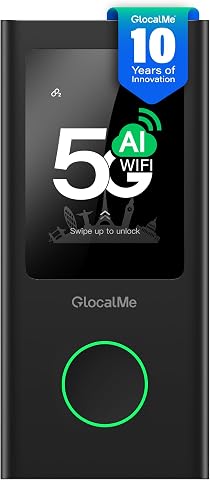
Portable 5G and 4G Wi-Fi hotspot with CloudSIM connectivity and support for data plans in more than 200 countries. It has a 2.4-inch touchscreen, supports up to 16 connected devices, and can also function as a power bank.
Pros:
- Supports 5G and 4G connectivity across a wide range of countries and operator networks.
- CloudSIM enables connectivity without requiring a physical SIM card.
- Connects up to 16 devices and includes a touchscreen for managing settings and usage.
- Can function as a power bank.
Cons:
- Upstream data transfer is limited to 50 Mbps.
- Data service requires selecting and purchasing a data package.
Best for: Travelers who need a separate mobile hotspot
Not ideal for: People whose destinations lack compatible service
Bottom line: Verify network support, service terms, and destination coverage before relying on it.
For a budget-first buying order, begin with the gaps that most affect your trip: confirm charging compatibility, then prioritize a suitable charger or power bank if you often run short of outlets. Add headphones, tracking, or a hotspot according to your comfort and connectivity needs. Buy for the problems you actually have, and check each item against gear you already own to avoid duplicating capabilities.
A well-chosen travel kit can stay simple: compatible charging, enough backup power for your routine, and only the extras that make your journey easier. Review destination requirements and device details before checkout, then test setup at home. A little preparation goes a long way toward packing confidently for your next trip.