When choosing between pen displays and tablets, you’ll find each has hidden trade-offs. Pen displays offer a natural, direct drawing experience with better precision, but they tend to be bulkier and less portable. Tablets are portable and affordable but rely on external screens, which might disconnect your workflow. Costs, durability, ergonomics, and technical constraints all impact your choices. If you want to uncover the full picture, keep exploring what’s behind these differences.
Key Takeaways
- Pen displays offer direct screen interaction for a more natural drawing experience, unlike tablets that require looking at a separate monitor.
- Portability favors tablets, which are lightweight and compact, whereas pen displays are bulkier and less suitable for travel.
- Cost considerations include initial affordability versus long-term durability, with higher-quality pen displays often lasting longer.
- Technical limitations such as compatibility issues and driver problems can impact workflow, especially with tablets reliant on external hardware.
- Ergonomic setup and environmental factors significantly influence comfort, with proper posture and lighting reducing fatigue during extended use.

XPPen Artist 13.3 Pro 13.3" Drawing Tablet with Screen, 16K, Full-Laminated
- Connection Requirement: Connects to computer or laptop
- Tilt Functionality: Supports up to 60 degrees tilt
- High Color Gamut: 123% sRGB for vibrant colors
As an affiliate, we earn on qualifying purchases.
As an affiliate, we earn on qualifying purchases.
What Are Pen Displays and Tablets, and How Do They Differ?
Pen Displays vs Tablets: The Trade‑Off Nobody Mentions
What Are Pen Displays and Tablets, and How Do They Differ?
Pen displays and tablets are both popular tools for digital artists and designers, but they serve different purposes and offer distinct experiences. Pen displays feature a screen that shows your work directly, allowing you to draw with digital ink in real-time. They often provide high stylus sensitivity, making it feel more natural and responsive, closely mimicking traditional drawing tools. Tablets, on the other hand, are typically secondary devices that connect to a computer, relying on your monitor to display your work. While they may lack the immersive screen of a pen display, they still offer excellent stylus sensitivity and precision. The key difference is that pen displays integrate digital ink directly onto the screen, giving you immediate visual feedback, whereas tablets require you to look at a separate monitor. Additionally, both tools are essential for exploring new frontiers in digital art, as they cater to different artistic needs and preferences. Understanding color accuracy can also enhance your digital artwork experience when using either tool. For instance, using accessibility features can help accommodate various artistic styles and techniques, making the creative process more inclusive. Moreover, the choice between the two can significantly impact your workflow, especially for those who rely on electric power generation to charge their devices during long creative sessions.
portable drawing tablet with screen
As an affiliate, we earn on qualifying purchases.
As an affiliate, we earn on qualifying purchases.
How Do These Devices Fit Into Your Creative Workflow?

Understanding how these devices fit into your creative workflow can help you choose the right tool for your projects. A pen display integrates directly into your digital workflow, acting as an extension of your hand, enhancing your artistic expression with natural control. Imagine:
Choosing the right device seamlessly integrates into your workflow, elevating your creativity with natural, intuitive control.
- Sketching directly on the screen, making your ideas come alive instantly.
- Refining details with precision, reducing the need for constant tool switching.
- Seamlessly transferring your work between software, maintaining momentum.
These devices encourage a more intuitive creative process, blending traditional techniques with digital flexibility. Pen displays foster a fluid artistic expression, making them ideal for artists who want a direct, immersive experience. Tablets, on the other hand, might suit those who prefer portability or a familiar interface, fitting into diverse workflows efficiently.
high sensitivity stylus for tablets
As an affiliate, we earn on qualifying purchases.
As an affiliate, we earn on qualifying purchases.
What Environmental and Ergonomic Factors Should You Consider?

When choosing between pen displays and tablets, you need to think about your ergonomic hand positioning to avoid strain during long sessions. Consider your workspace’s lighting—glare and brightness can affect your visibility and comfort. Additionally, implementing smart automation for your home can create a more conducive environment for focused work. Also, evaluate your environment’s lighting conditions to guarantee your screen’s display remains clear and easy on your eyes. Furthermore, investing in car protection accessories can enhance your overall workspace experience and help maintain your devices. Moreover, understanding the importance of educational resources can help you make informed decisions about your technology investments. For optimal performance, consider using natural oils in your workspace to create a more pleasant atmosphere. Lastly, being aware of sustainable practices can guide your choices in technology that minimizes environmental impact.
Ergonomic Hand Positioning
Maintaining proper ergonomic hand positioning is essential to prevent fatigue and strain during extended creative sessions. To do this effectively, focus on:
- Keeping your wrist straight, avoiding bending or twisting, which reduces hand fatigue. Seasonal variations in your work environment can also impact comfort levels.
- Positioning your pen or stylus with a relaxed grip, not gripping too tightly, to prevent tension.
- Adjusting your workspace height so your forearms are parallel to the ground, promoting posture correction and reducing shoulder strain.
These steps help uphold comfort, prevent repetitive strain injuries, and ensure steady, precise movements. Proper hand positioning minimizes fatigue and supports sustained productivity. Remember, small adjustments can make a big difference in maintaining ergonomic health during long creative periods. Additionally, consider incorporating seating areas to enhance comfort during those lengthy creative sessions.
Screen Glare and Brightness
Bright screens can cause eye strain and discomfort if you don’t manage glare and brightness settings properly. Screen glare from reflections or bright ambient light can make it hard to see details clearly, forcing your eyes to work harder. To mitigate this, look for devices with good brightness control options, allowing you to adjust the display to suit your environment. Many pen displays and tablets offer automatic or manual brightness adjustments—use these features to reduce eye fatigue. Additionally, understanding waterpark essentials can help you pack the right gear for a family visit, ensuring a more comfortable experience. Matte screens or anti-glare coatings can also help lessen glare, making prolonged use more comfortable. Remember, finding the right balance in brightness ensures your eyes aren’t strained and your work remains clear, especially when working in varying lighting conditions. Additionally, understanding credit card terms can help you make informed purchasing decisions when investing in these devices.
Environmental Lighting Conditions
Considering your environment is essential when choosing between a pen display or tablet, as lighting conditions and ergonomic setup can greatly influence comfort and productivity. Ambient light affects how well you see your screen and can cause eye strain if not managed properly. To optimize your workspace, consider:
- Adjusting ambient light levels to avoid harsh contrasts.
- Using curtains or blinds to control natural light, reducing glare.
- Positioning your device to minimize reflections and glare, enhancing glare reduction.
Ensuring proper ambient light helps your eyes stay comfortable and your work more accurate. Bright or uneven lighting can lead to fatigue, so assess your environment carefully. A well-lit, glare-free workspace improves focus and overall ergonomic comfort, whether you’re using a pen display or a tablet.
As an affiliate, we earn on qualifying purchases.
How Do Cost and Durability Affect Your Investment?
When choosing between pen displays and tablets, you need to take into account whether upfront affordability or long-term durability matters most to you. Cheaper options might save you money initially but could lead to costly repairs or replacements down the line. Balancing these factors helps ensure your investment stays worthwhile over time. Additionally, considering the importance of quality in your device can significantly influence both performance and longevity. Investing in devices with smart technology features can further enhance their functionality and longevity, making them a more viable option for the long term. Moreover, understanding leadership principles in your purchasing decisions can help guide you toward making choices that support sustainable success. Ensuring you understand proper gear maintenance can also enhance the lifespan of your device, much like how regular upkeep benefits cycling gear. Furthermore, assessing the best laundry detergents can help you maintain your devices effectively by keeping them clean and in good working order.
Affordability Versus Longevity
Choosing between a pen display and a tablet often comes down to balancing initial cost with long-term durability. You might spend less upfront on a basic tablet, but over time, cheaper options can wear out, affecting your digital art quality and user comfort. Imagine:
- A budget tablet that feels flimsy, forcing you to replace it sooner.
- A mid-range pen display with sturdy build quality that lasts years.
- A premium device offering both durability and enhanced user comfort for intensive work.
While affordability helps you start creating, longevity guarantees your investment keeps pace with your growth. A durable pen display may cost more initially but offers consistent performance and comfort, essential for detailed digital art projects. Balancing these factors means choosing a device that supports your artistic journey without frequent replacements.
Costly Repairs and Replacement
Even if you invest in a high-quality pen display or tablet, the risk of costly repairs or replacements remains a significant factor in your long-term investment. Devices can suffer damage from daily use, accidental drops, or wear over time, leading to expensive repairs. Compatibility issues may also arise if your device isn’t compatible with certain software or accessories, increasing potential costs. Ensuring your device has solid warranty coverage can help offset repair expenses, but not all warranties are extensive. Durability varies between models, affecting how often repairs are needed. When choosing between pen displays and tablets, consider how easily damaged they are and what support options are available. Additionally, maintaining a comfortable living space can enhance your overall productivity and prevent wear on your devices. A well-maintained device with good warranty coverage can save you money and prolong its lifespan. Furthermore, understanding paint sprayer maintenance can be crucial for extending the life of your device. Regularly evaluating your equipment’s testing accuracy can also prevent costly mishaps down the line. Investing in devices that incorporate AI trends can enhance functionality and potentially reduce the need for repairs.
What Creative Features Are Often Overlooked?
Sure! Here’s your revised content:
—
While many artists focus on the primary drawing or painting tools, they often overlook subtle yet powerful creative features that can enhance their work. Hidden features and user customization options can reveal new possibilities. For example, you might discover:
- Customizable shortcuts that speed up your workflow, letting you switch brushes or undo actions with a tap. Incorporating luxurious lifestyle products into your workspace can also elevate your creative environment and inspire innovation.
- Pressure sensitivity settings that can be fine-tuned for varying brush strokes, giving you more control.
- Gesture controls or multi-touch features that allow you to zoom, rotate, or pan effortlessly, maintaining your creative flow.
These features often go unnoticed but can greatly boost your productivity and artistic freedom. Recognizing and utilizing these hidden tools can make your digital experience more intuitive and tailored to your unique style. Additionally, understanding how cybersecurity tactics can be integrated into your creative workflows ensures that your digital creations remain safe from potential threats.
—
Let me know if you need any further adjustments!
How Does Portability Impact Your Choice?

Portability can considerably influence your decision between pen displays and tablets, especially if you’re someone who works on the go or prefers working in different locations. When considering mobility considerations, think about how easily you can carry each device. Tablets generally excel in portability, offering lightweight designs and compact sizes that fit into bags effortlessly. Pen displays, however, tend to be bulkier and heavier, making them less ideal for frequent travel. The portability trade offs involve balancing convenience with functionality—if you need quick setup and frequent movement, tablets are often the better choice. But if your work benefits from a larger screen and more precise input, a pen display’s reduced portability might be a worthwhile compromise. Your choice hinges on how heavily mobility factors into your workflow.
What Technical Limitations Should You Be Aware Of?
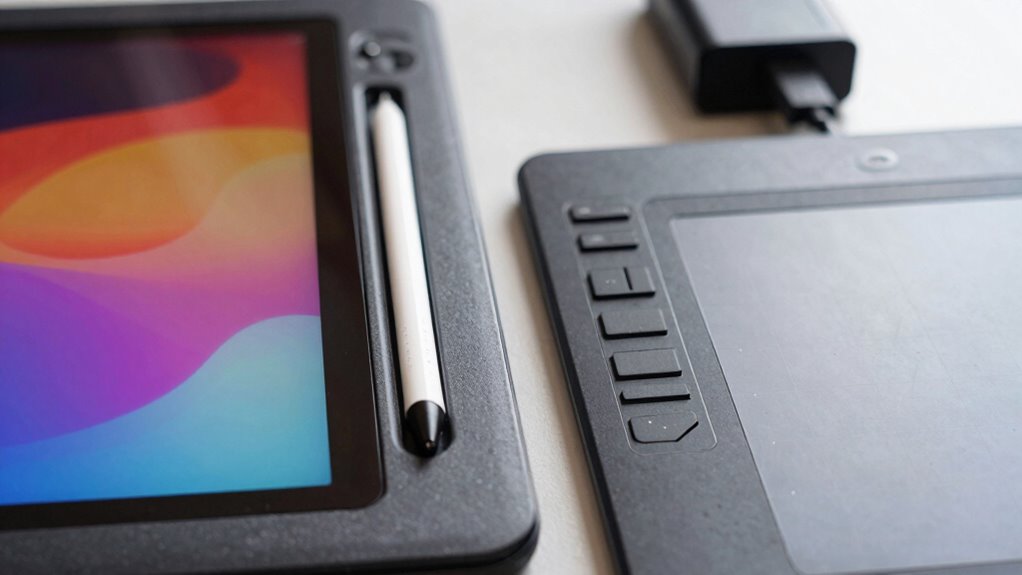
Though pen displays and tablets both serve as effective digital art tools, they come with technical limitations that can impact your workflow. First, hardware compatibility can be restrictive; not all devices support the latest pen displays, causing delays or the need for upgrades. Second, software limitations may hinder your creative process—some apps don’t fully utilize the hardware’s capabilities, leading to lag or reduced precision. Third, driver issues can cause connectivity problems or stylus recognition errors, breaking your focus. These limitations mean you should verify compatibility with your existing setup and test software functionalities before investing. Being aware of these technical constraints ensures you select tools that align with your workflow, minimizing frustration and maximizing productivity.
Frequently Asked Questions
Can Pen Displays Replace Traditional Monitors Entirely?
Pen displays can’t fully replace traditional monitors yet because of digital ergonomics and device portability concerns. You may find pen displays less comfortable for long work sessions, affecting your posture and eye health. Plus, they’re often less portable than traditional monitors, limiting your flexibility to work anywhere. While they’re great for digital art and design, for everyday tasks and extended use, traditional monitors still offer better ergonomics and portability.
How Do Pen Pressure Sensitivity Levels Impact Artwork Quality?
Did you know that higher pen pressure sensitivity levels can markedly enhance your artwork? When you use a pen display with advanced sensitivity, you gain better control over digital blending and texture simulation, resulting in more realistic shading and depth. This improved pressure response allows for nuanced strokes, making your artwork more expressive and polished. In short, higher pressure sensitivity levels directly elevate your creative quality by enabling subtle, natural variations in your digital art.
Are There Compatibility Issues With Different Software Programs?
You might face some compatibility issues with different software programs, especially if your device isn’t fully integrated. Check the device compatibility before purchasing, as some pen displays or tablets work best with specific software. Software integration varies, so confirm your preferred programs support the device’s drivers and features. This way, you avoid frustration and get smooth performance, making your creative process seamless and efficient.
What Is the Learning Curve for Switching Between Devices?
Did you know 60% of artists say switching devices takes less than a week? When you switch between pen displays and tablets, the learning curve is manageable, but you’ll need to think about ergonomics and portability. Pen displays may require adjusting your posture, while tablets are more portable but might need time to get comfortable with their interface. Overall, your familiarity with digital tools will ease the transition.
How Do Pen Displays Handle Color Accuracy and Calibration?
Pen displays generally handle color accuracy well, but you need to perform regular color calibration to guarantee display precision. Many models come with built-in calibration tools or support external calibration devices, helping you maintain consistent color reproduction. Proper calibration is essential for professional work, especially if you’re doing detailed artwork or photo editing. Keep in mind that quality varies across brands, so choose a pen display with reliable color calibration features for best results.
Conclusion
Choosing between pen displays and tablets is like picking a vehicle—you’ll want one that fits your journey. I once watched a painter struggle with a tiny tablet, longing for the expansive feel of a pen display, much like wishing for a spacious garage after squeezing into a compact car. Remember, your creative flow benefits when your tools match your needs. So, weigh your options carefully—your art deserves a setup that drives your imagination forward, smoothly and comfortably.