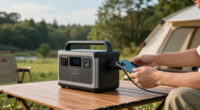
This guide provides clear instructions for setting up and using a portable power station. Designed for beginners and casual users, it covers the entire process from initial setup to troubleshooting common issues. By following these steps, you will be able to power devices safely and efficiently during outdoor activities, emergencies, or off-grid situations. Expect to spend about 30 to 45 minutes completing the entire process.

Get the latest gadgets delivered free with Prime
- Fast, free delivery on millions of items
- Prime Video, Amazon Music and more included
- Member-only deals all year

PECRON F5000LFP Power Station 5120Wh Solar Generator with 7200W AC Output
- ✔ Capacity: 5120Wh
- ✔ Max AC Output: 7200W
- ✔ Expandable Capacity: 35.8kWh

Jackery Explorer 1000 v2 Portable Power Station, 1070Wh, 1500W
- ✔ Capacity: 1070Wh
- ✔ AC Output: 1500W
- ✔ Surge Peak: 3000W

OUPES Guardian 6000 V2 Portable Power Station 4608Wh, 6000W Solar Generator
- ✔ Capacity: 4608Wh
- ✔ Power Output: 6000W continuous, 7200W boost, 9000W surge
- ✔ Input Voltage: 120V/240V dual voltage
Difficulty: Beginner | Time: 30-45 minutes
What You’ll Need
Tools & Materials:
- Power station unit
- AC charging cable
- device charging cables (USB, AC, DC)
- Optional: solar panel (if available)
Knowledge:
- Basic understanding of electrical outlets and device charging
Ensure your power station is fully charged before initial use if it is new or has been stored for a while. Read the manufacturer’s manual for specific features and safety instructions.
PECRON F5000LFP Power Station 5120Wh Solar Generator with 7200W AC Output
<p>The <strong>PECRON F5000LFP</strong> stands out for its exceptional capacity and expandability, making it suitable for those who need large-scale power support. With 5120Wh and a robust 7200W AC output, it can run multiple appliances during outages or support off-grid living. Its ability to expand up to 35.8kWh is ideal for users with serious power demands. However, its weight and complexity make it less suitable for those seeking portability or simple setups. The quiet operation at 30dB is a plus for home or sleeping environments, but the initial cost and setup effort may be barriers for beginners. Compared to smaller units, this generator is a powerhouse designed for long-term, high-capacity applications.</p>
Pros:
- High capacity with expandable options for large power needs
- Supports multiple recharge methods including solar, AC, and generator
- Quiet operation at 30dB suitable for home and sleeping environments
- Multiple output ports for versatile device compatibility
Cons:
- Heavy and may require assistance for portability despite the detachable cart
- Complex setup and configuration may be challenging for beginners
- Higher initial cost due to advanced features and capacity
Best for: Home backup, emergency preparedness, RV owners requiring high capacity
Not ideal for: Lightweight travelers, casual campers, users seeking ultra-portability
Bottom line: This model is perfect for those needing substantial, expandable backup power, though it sacrifices portability for capacity.
“This model is perfect for those needing substantial, expandable backup power, though it sacrifices portability for capacity.”
Jackery Explorer 1000 v2 Portable Power Station, 1070Wh, 1500W
<p>The <strong>Jackery Explorer 1000 v2</strong> offers a compelling mix of power and portability, making it a favorite among campers, road trippers, and those needing reliable emergency power. With 1070Wh and 1500W AC output, it can run most small appliances and charge multiple devices simultaneously. Its fast charging capabilities — reaching full in just over an hour — and durable battery with a 10+ year lifespan make it a practical choice for frequent use. Its main limitation is the absence of a solar panel included, requiring users to purchase Jackery-compatible panels separately. Its weight of nearly 24 pounds makes it portable but less ideal for extended hikes or ultra-light travel. Compared with larger units, it strikes a good balance for those who want enough power without the bulk.</p>
Pros:
- High capacity and powerful output suitable for multiple appliances
- Fast charging with advanced technology
- Durable battery with over 10 years lifespan
- Multiple ports for versatile device charging
Cons:
- Solar panel not included, only compatible with Jackery panels
- Heavy for portability needs
- Limited expandability beyond its core capacity
Best for: Outdoor enthusiasts, emergency preparedness, mobile workers
Not ideal for: Heavy-duty home backup, users needing large-scale power
Bottom line: The Jackery Explorer 1000 v2 is a versatile, reliable choice for outdoor and emergency use, balancing power and portability well.
“The Jackery Explorer 1000 v2 is a versatile, reliable choice for outdoor and emergency use, balancing power and portability well.”
OUPES Guardian 6000 V2 Portable Power Station 4608Wh, 6000W Solar Generator
<p>The <strong>OUPES Guardian 6000 V2</strong> offers a high-capacity, professional-grade power solution with 4608Wh and a continuous 6000W output. Its rapid 64-minute recharge, combined with the ability to expand capacity up to 41,472Wh using additional batteries, makes it ideal for remote work sites, emergency situations, or off-grid living. Multiple outlets—including five AC, USB-C PD 140W, USB-A QC3.0, and a 12V car port—ensure flexibility for various devices. Its complex charging options and weight—over 70 pounds—mean it’s less suited for casual users but perfect for those who need heavy-duty, reliable power. Its advanced features come at a premium, but the expandability and fast recharge time are significant advantages for professional deployments.</p>
Pros:
- High-capacity 4608Wh battery with expandability to 41,472Wh
- Fast recharge in just 64 minutes with combined AC and solar inputs
- Multiple flexible output options including USB-C, USB-A, and AC
- Suitable for off-grid, emergency, and professional applications
Cons:
- Complex charging modes may require user understanding
- Heavy weight limits portability for casual use
- Higher price point typical for advanced features
Best for: Off-grid professionals, emergency responders, heavy-duty mobile setups
Not ideal for: Casual campers, lightweight travelers, users seeking simple solutions
Bottom line: The OUPES Guardian 6000 V2 is a professional-grade, expandable power station ideal for demanding off-grid and emergency scenarios, with tradeoffs in weight and complexity.
“The OUPES Guardian 6000 V2 is a professional-grade, expandable power station ideal for demanding off-grid and emergency scenarios, with tradeoffs in weight and complexity.”
As an Amazon Associate we earn from qualifying purchases.
Before You Start
Check that the power station is placed on a stable, flat surface in a well-ventilated area. Avoid areas with high humidity or extreme temperatures. Confirm that all devices to be powered are within the power station’s output limits. If using solar panels, ensure they are clean and positioned correctly for sunlight exposure.
Step-by-Step Instructions
Step 1: Unpack and inspect the power station
Remove the power station from its packaging and inspect it for any visible damage or defects. Verify that all included cables and accessories are present. Read the user manual for specific controls and safety warnings.
Tip: Check for any physical damage like cracks or loose parts, which could affect operation.
Check: The power station is intact, undamaged, and ready for setup.
Step 2: Charge the power station fully before first use
Connect the included AC charging cable to the power station’s input port and plug it into a wall outlet. Turn on the power station if it has a power switch. Allow it to charge until the indicator shows a full charge, typically indicated by a full battery icon or LED light.
Tip: Avoid disconnecting during initial charging to ensure the battery calibrates properly.
Check: The power station’s display shows a full charge or battery indicator at 100%.
Step 3: Connect devices to the power station
Identify the appropriate output ports for your devices—USB ports for small electronics, AC outlets for larger devices, or DC ports for specific equipment. Plug your device’s charging cable into the corresponding port on the power station. Ensure the device’s power requirements do not exceed the station’s output limits.
Tip: Start with one device to test functionality before connecting multiple devices.
Check: The device begins charging, and the power station’s indicator shows active output.
Step 4: Turn on the power station and select output mode
Press the power button to activate the station. Use any mode selector switches to choose the appropriate output (AC, USB, DC). Confirm the output is active by checking indicator lights or the display panel.
Tip: Ensure the station is in the correct mode for your device before connecting.
Check: Indicators confirm the selected output is active, and connected devices are charging.
Step 5: Monitor usage and battery level during operation
Keep an eye on the display panel or indicator lights for power usage and remaining battery life during use. Disconnect devices if the battery drops below a safe level or if the station indicates low power.
Tip: Avoid overloading the station by exceeding its maximum wattage; check device power requirements beforehand.
Check: Devices operate correctly without unexpected shutdowns or errors, and battery level remains within safe operating range.
Step 6: Recharge the power station as needed
When the battery is low, connect the station to a power source using the AC charger or solar panel if available. Allow it to recharge fully before next use for optimal performance.
Tip: Use the same charging method as initial setup for consistency and efficiency.
Check: Battery indicator shows full charge, and devices continue to operate without interruption.
Common Mistakes to Avoid
- Overloading the power station with devices exceeding its wattage limit. — Check each device’s power requirements and sum them to ensure they stay within the station’s maximum output capacity.
- Not fully charging the station before first use. — Charge the power station to 100% before connecting devices for the first time to calibrate the battery and avoid early depletion.
- Connecting incompatible devices or cables. — Use only compatible charging cables and ensure devices match the output specifications indicated on the station.
Troubleshooting
Problem: Device not charging when connected.
Solution: Verify the station is powered on, check the output port and cable connection, and confirm the device’s compatibility and power requirements.
Problem: Power station shows low battery but devices still not charging.
Solution: Reduce the number of connected devices, disconnect non-essential devices, and allow the station to recharge fully.
Problem: Power station won’t turn on.
Solution: Ensure the device is charged, press and hold the power button firmly, and check for any damage or loose connections.
What Success Looks Like
When finished, the power station is fully charged, connected devices are charging properly, and indicators show normal operation. You can safely power multiple devices simultaneously within the station’s limits, and the station maintains battery health over repeated use.
Next Steps
Store the power station in a cool, dry place when not in use. Regularly recharge it to maintain battery health, especially if stored for extended periods. Consider adding additional batteries or solar panels for extended off-grid use. Periodically check for firmware updates or manufacturer recalls for safety and performance improvements.
Frequently Asked Questions
How long does a portable power station typically last on a full charge?
The runtime depends on the capacity (measured in watt-hours) and the devices’ power consumption. Smaller stations may power smartphones for days, while larger units can run small appliances for several hours. Always check the watt-hour rating and device power requirements to estimate usage time accurately.
Can I leave devices plugged into the station when not in use?
Yes, but it is best to disconnect devices when not actively charging to conserve power and prevent unnecessary drain or potential damage to sensitive electronics.
Is it safe to use solar panels with my power station?
Use only solar panels compatible with the station’s input specifications. Ensure proper connection and avoid direct exposure to damage or moisture. Solar charging is eco-friendly but may take longer than wall charging.
How often should I recharge my power station if I store it unused?
Recharge every 3-6 months to prevent battery degradation. Store it in a cool, dry place and keep the battery level between 50% and 80% for optimal longevity.
Evergreen bestsellers Picks
bestsellers
As an affiliate, we earn on qualifying purchases.