I rank the IBM ISA card with the ESS ES1868F as the best retro ISA sound card for most DOS and Windows 9x builds because it balances broad game support, flexible configuration, and sensible pricing. Its practical compatibility gives it wider appeal than cards aimed mainly at collectors or MIDI enthusiasts. The Creative AWE64 CT4520 is my premium choice for richer General MIDI playback, while the Creative CT4170 offers better value for buyers who want a genuine Sound Blaster lineage. The main tradeoffs are ISA versus PCIe compatibility, authentic FM character versus sample-based music, configuration effort, and the condition of decades-old hardware. Continue reading for the full breakdown and the buyer checks that separate a usable retro card from an expensive display piece.
Complete the kit



Key Takeaways
- The IBM ESS ES1868F card takes the top position because it combines useful DOS compatibility, manageable setup, and lower collector pressure than many Creative boards.
- The Creative SB16 and CT4170 serve different buyers: the broader SB16 listing is the easier starting point, while the CT4170 is the stronger value target when its condition and accessories are verified.
- The AWE64 CT4520 earns the premium role for its onboard sample-based music features, but it is not an automatic upgrade for buyers seeking authentic Yamaha-style FM.
- The unspecified Yamaha ISA card carries the greatest identity risk because the brand name alone does not confirm the chipset, FM implementation, or Sound Blaster compatibility.
- Four products in the lineup are PCIe cards, not ISA cards: the Audigy Fx Pro, Strix SOAR, AE-7, and AE-X belong only in modern systems or emulation-focused setups.
| IBM 16-Bit ISA Audio/Sound Card with ESS ES1868F Chip |  | Best Overall ISA Pick | Interface: ISA | Bus Width: 16-bit ISA | Audio Bit Depth: 16-bit | VIEW LATEST PRICE | See Our Full Breakdown |
| Creative Sound Blaster Audigy Fx Pro Hi-Res PCIe Sound Card with 7.1 Surround and AutoEq |  | Best Low-Profile Modern Alternative | Interface: PCIe | Playback Resolution: 32-bit / 384 kHz | Signal-to-Noise Ratio: 120 dB | VIEW LATEST PRICE | See Our Full Breakdown |
| Asus Strix SOAR 7.1 PCIE Gaming Sound Card |  | Best for Modern Surround Gaming | Interface: PCIe | Audio Channels: 7.1-channel | Primary Use: PC gaming and multimedia | VIEW LATEST PRICE | See Our Full Breakdown |
| Creative Sound Blaster AE-7 Hi-Res Internal PCIe Sound Card |  | Best Premium Headphone Alternative | Interface: PCI Express x4 | DAC: ESS SABRE-class 9018 | Maximum Sample Rate: 384 kHz | VIEW LATEST PRICE | See Our Full Breakdown |
| Creative Labs Sound Blaster Awe64 CT4520 ISA Sound Card |  | Best for Creative-Era Restorations | Interface: ISA | Manufacturer: Creative Labs | Product Family: Sound Blaster AWE64 | VIEW LATEST PRICE | See Our Full Breakdown |
| Yamaha ISA Sound Audio Card |  | Best for Game-Port Builds | Interface: ISA | Bit Depth: 16-bit | Game Port: Included | VIEW LATEST PRICE | See Our Full Breakdown |
| Compaq Soundblaster Vibra 16-bit ISA Sound Card – Refurbished | 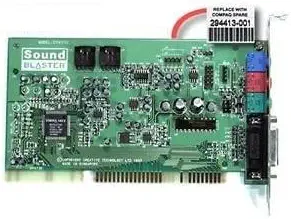 | Best Refurbished Value | Interface: ISA | Bit Depth: 16-bit | Condition: Refurbished | VIEW LATEST PRICE | See Our Full Breakdown |
| Creative SB16 Sound Blaster 16 Channel 2 16-Bit ISA Interface Sound Card |  | Best Classic SB16 Choice | Interface: ISA | Bit Depth: 16-bit | Listed Channels: 16 | VIEW LATEST PRICE | See Our Full Breakdown |
| Creative Sound Blaster CT4170 ISA Sound Card | 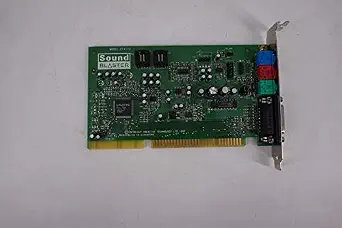 | Best for Exact CT4170 Replacements | Model: CT4170 | Interface: ISA | Hardware Compatibility: Systems with an ISA slot | VIEW LATEST PRICE | See Our Full Breakdown |
| Creative Sound Blaster AE-X Hi-res PCIe DAC with Discrete Headphone Amp Sound Card for PC |  | Best Modern Alternative | Interface: PCIe | DAC: ESS ES9039Q2M | Signal-to-Noise Ratio: 130 dB | VIEW LATEST PRICE | See Our Full Breakdown |
| retro ISA sound card | Interface |
|---|---|
| IBM 16-Bit ISA Audio/Sound Car | ISA |
| Creative Sound Blaster Audigy | PCIe |
| Asus Strix SOAR 7.1 PCIE Gamin | PCIe |
| Creative Sound Blaster AE-7 Hi | PCI Express x4 |
| Creative Labs Sound Blaster Aw | ISA |
| Yamaha ISA Sound Audio Card | ISA |
| Compaq Soundblaster Vibra 16-b | ISA |
| Creative SB16 Sound Blaster 16 | ISA |
| Creative Sound Blaster CT4170 | ISA |
| Creative Sound Blaster AE-X Hi | PCIe |
More Details on Our Top Picks
IBM 16-Bit ISA Audio/Sound Card with ESS ES1868F Chip
I rank the IBM ES1868F sound card first because it directly serves the roundup’s retro purpose, pairing a true 16-bit ISA interface with a documented ESS chipset. Its ISA-native design makes more sense for restoring an older PC than the PCIe-only Creative Sound Blaster Audigy Fx, which cannot occupy a legacy ISA slot. Compared with the Creative Labs Sound Blaster AWE64 CT4520, the IBM card has clearer supplied chipset information, making driver research and system planning less speculative. The tradeoff is that this remains legacy hardware: operating-system support may require archived drivers, and there is no modern digital connection. I see it as the most practical restoration choice here, though buyers seeking authentic Creative hardware or a specific Sound Blaster configuration may prefer the AWE64.
Pros:- True 16-bit ISA interface suits period-correct PC restorations
- Identified ESS ES1868F chipset simplifies compatibility research
- Designed for vintage systems rather than modern desktops
- Straightforward installation in a compatible ISA slot
Cons:- Archived or system-specific drivers may be difficult to locate
- Cannot be installed in PCIe-only motherboards
- Lacks modern digital outputs and multichannel features
Best for: DOS and early Windows PC restorers who have an open 16-bit ISA slot and want a clearly identified ESS chipset
Not ideal for: Owners of PCIe-only computers or buyers who need optical audio, surround sound, or current driver support
- Interface:ISA
- Bus Width:16-bit ISA
- Audio Bit Depth:16-bit
- Chipset:ESS ES1868F
- System Type:Vintage desktop PCs
- Installation:Internal expansion card
Our verdict“This is my first choice for a practical ISA restoration when documented hardware matters more than Creative branding.”
Creative Sound Blaster Audigy Fx Pro Hi-Res PCIe Sound Card with 7.1 Surround and AutoEq
The Sound Blaster Audigy Fx Pro earns a place only as a modern alternative, not as a genuine retro ISA recommendation. Its low-profile format, 120 dB SNR, and 32-bit/384 kHz playback suit a current compact PC far better than the IBM ES1868F card. It also adds 7.1-channel output, SPDIF, multiple analog connections, and app-based tuning—features the ISA models cannot match. That capability does not solve the central compatibility problem: a PCIe card will not work in an ISA motherboard or provide the period-specific behavior sought by DOS builders. Compared with the Creative Sound Blaster AE-7, it is the more accessible modern pick, but it gives up the AE-7’s stronger DAC specification and high-impedance headphone amplification. I would choose it for a low-profile contemporary desktop, never for an authentic retro build.
Pros:- Low-profile design fits many compact desktop cases
- Supports high-resolution 32-bit/384 kHz playback
- Offers 7.1-channel surround and SPDIF connectivity
- Creative Nexus app provides adjustable sound profiles
Cons:- Not an ISA card and cannot serve period-correct retro systems
- Requires compatible modern software for its tuning features
- Less capable for demanding headphones than the Sound Blaster AE-7
Best for: Owners of compact modern PCs who want multichannel analog audio and software tuning from a low-profile card
Not ideal for: Retro PC restorers because the PCIe interface is physically incompatible with ISA motherboards
- Interface:PCIe
- Playback Resolution:32-bit / 384 kHz
- Signal-to-Noise Ratio:120 dB
- Audio Channels:7.1-channel surround
- Connections:Analog multichannel, SPDIF, headset, mic-in, and line-in
- Form Factor:Low-profile
- Included Bracket Type:Half-height
- Audio Software:Creative Nexus with AutoEq
Our verdict“Buy this for a compact PCIe desktop with 7.1 speakers, but remove it from the shortlist for any ISA restoration.”
Asus Strix SOAR 7.1 PCIE Gaming Sound Card
I place the Asus Strix SOAR behind the ISA models because its value lies in modern gaming, not vintage compatibility. Its 7.1-channel surround can create a more directional speaker setup than the stereo-oriented restoration cards, and the internal PCIe format is straightforward for a compatible contemporary motherboard. Against the Creative Sound Blaster Audigy Fx Pro, though, the supplied information is sparse: no sample rate, SNR, connection list, or software details are provided. That makes the Asus harder to judge for recording, headphone use, or compact-case installation. It also cannot fit an ISA slot, so it is irrelevant to a DOS-era machine despite being an internal sound card. My ranking reflects that narrow role: this is the gaming-focused alternative for a newer PC, while the IBM ES1868F remains the better match for the article’s retro objective.
Pros:- Provides 7.1-channel surround for compatible gaming setups
- Uses an internal PCIe connection found on modern motherboards
- High-quality audio components are aimed at clearer game and media sound
Cons:- Physically incompatible with ISA-based retro computers
- Published product data omits major audio-performance specifications
- No supplied connection or software details for direct feature comparison
Best for: Modern desktop gamers with an available PCIe slot and a 7.1 speaker system
Not ideal for: ISA-system owners and spec-focused buyers who need documented SNR, sample-rate, connection, or headphone-output details
- Interface:PCIe
- Audio Channels:7.1-channel
- Primary Use:PC gaming and multimedia
- Installation Type:Internal expansion card
- Audio Components:High-quality components
- Detailed Performance Data:Not provided
Our verdict“This makes sense for a modern 7.1 gaming PC, but its PCIe interface and thin specification sheet rule it out for retro ISA buyers.”
Creative Sound Blaster AE-7 Hi-Res Internal PCIe Sound Card
The Creative Sound Blaster AE-7 is the strongest premium card in this batch, yet it sits outside the true retro ISA category. Its ESS SABRE-class 9018 DAC, 127 dB DNR, and 600-ohm headphone support make it much better suited to demanding headphones than the Sound Blaster Audigy Fx Pro. A dedicated quad-core processor also handles audio effects without leaning as heavily on the host CPU, while Dolby and DTS encoding broaden home-theater use. Those benefits come with higher complexity and no path into an ISA motherboard: the card requires PCI Express connectivity and an internal desktop installation. Its advanced output quality also brings little value to someone recreating period-correct DOS audio behavior. I would reserve this audiophile-oriented choice for a modern listening or gaming PC; the IBM ES1868F is the sounder purchase for an actual vintage restoration.
Pros:- ESS SABRE-class 9018 DAC delivers a strong 127 dB dynamic-range specification
- Discrete bi-amplifier supports headphones rated up to 600 ohms
- Handles 32-bit/384 kHz high-resolution playback
- Dedicated quad-core processor manages onboard audio processing
Cons:- PCIe interface makes it unusable in ISA-based computers
- Internal installation and software configuration may be demanding for beginners
- Premium headphone hardware is excessive for basic retro-style speaker playback
Best for: Modern desktop users pairing high-impedance headphones with high-resolution music, games, or virtual surround
Not ideal for: DOS-era PC builders and casual speaker users who cannot benefit from the premium DAC and 600-ohm amplifier
- Interface:PCI Express x4
- DAC:ESS SABRE-class 9018
- Maximum Sample Rate:384 kHz
- Playback Resolution:32-bit / 384 kHz
- Dynamic Range:127 dB DNR
- Audio Channels:5.1 discrete and 7.1 virtual surround
- Headphone Impedance:Up to 600Ω
- Headphone Amplifier:Xamp discrete bi-amplifier
- Dimensions:0.79 x 5.04 x 5.71 inches
Our verdict“Choose the AE-7 for premium headphones in a modern desktop, not for period-correct ISA audio.”
Creative Labs Sound Blaster Awe64 CT4520 ISA Sound Card
The Sound Blaster AWE64 CT4520 is my specialist pick for restorers who want period Creative hardware rather than a broadly practical ISA card. Its native ISA connection and legacy-system focus make it far more relevant than the PCIe-based Sound Blaster AE-7 or Asus Strix SOAR. Compared with the IBM ES1868F card, however, the supplied listing gives fewer technical details and does not identify supported operating systems, drivers, or connection types. That uncertainty pushes it below the IBM in my ranking, especially for buyers assembling a working machine rather than collecting a particular model. The description also lists no MIDI or digital-output features, limiting the case for buyers seeking a feature-rich vintage audio setup. Still, Creative model authenticity is a meaningful distinction, and the card’s period-correct ISA format makes it a focused choice for an AWE64-era restoration.
Pros:- Genuine ISA format suits legacy desktop systems
- Creative Sound Blaster branding fits many period-themed restorations
- CT4520 model identification helps collectors target a specific revision
- Internal installation is appropriate for vintage PC builds
Cons:- Supplied specifications omit chipset, bit depth, and connection details
- No MIDI or digital-output features are listed
- Modern motherboards generally lack the required ISA slot
Best for: Collectors and restorers building a Creative-branded ISA system around the CT4520 model
Not ideal for: Buyers who need fully documented connections, bundled drivers, MIDI features, or compatibility with a modern motherboard
- Interface:ISA
- Manufacturer:Creative Labs
- Product Family:Sound Blaster AWE64
- Model:CT4520
- Installation Type:Internal expansion card
- Target Systems:Vintage computers with ISA slots
- MIDI and Digital Output:Not listed
Our verdict“Pick the CT4520 when Creative-era authenticity is the priority, but choose the IBM ES1868F when clearer hardware documentation matters more.”
Yamaha ISA Sound Audio Card
I rank the Yamaha ISA Sound Audio Card as the specialist pick for builders who want 16-bit audio and a dedicated game port on one card. That port gives period joysticks and compatible MIDI accessories a practical connection that the Creative SB16 listing does not document. Compared with the Creative Sound Blaster CT4170, the Yamaha also has clearer published specifications, making it easier to match with a planned build. Its weakness is uncertainty: the listing identifies no chipset, drivers, MIDI implementation, or software bundle, so DOS compatibility cannot be judged from the supplied data alone. The ISA-only interface also rules out current PCs. I would choose it for a game-port-focused restoration, but buyers seeking a documented Sound Blaster configuration may find the Creative SB16 easier to research.
Pros:- Dedicated game port supports period gaming peripherals
- 16-bit audio suits vintage games and multimedia
- ISA interface matches compatible legacy motherboards
- Published core specifications are clearer than those for the CT4170
Cons:- Chipset and Sound Blaster compatibility are not documented
- Driver and software availability are unspecified
- Cannot be installed in systems without an ISA slot
Best for: Vintage PC builders who need 16-bit ISA audio and a physical game port for period controllers
Not ideal for: DOS compatibility purists who need a documented chipset, driver package, and confirmed Sound Blaster behavior
- Interface:ISA
- Bit Depth:16-bit
- Game Port:Included
- Hardware Platform:PC
- Intended Applications:Gaming and multimedia
- Driver Support:Not specified
Our verdict“I recommend this Yamaha card for a period PC that needs a game port, provided the buyer can source suitable drivers.”
Compaq Soundblaster Vibra 16-bit ISA Sound Card – Refurbished
The Compaq Soundblaster Vibra earns my value role because its refurbished condition may offer a lower-cost route into branded 16-bit ISA audio. It is more attractive than the sparsely documented Creative CT4170 for buyers who want a listing that identifies bit depth and PC compatibility. The supplied data also claims 5.1 surround and headphone surround, but I would treat those claims cautiously: no connector layout, driver details, or surround implementation is provided. That uncertainty makes the card less predictable than the Creative SB16 for a carefully researched DOS build. Refurbished hardware can also vary in cosmetic condition and remaining life, while the missing warranty terms shift more risk to the buyer. I rank it as a budget-minded restoration part, not the safest choice for collectors demanding exact revision details.
Pros:- Refurbished format may reduce the cost of branded ISA audio
- 16-bit audio is appropriate for later DOS and early Windows systems
- Listing specifies PC compatibility
- Surround and 5.1 modes are claimed in the supplied data
Cons:- No warranty details are provided
- Driver availability and supported operating systems are unknown
- The claimed 5.1 configuration lacks supporting connection details
Best for: Budget restorers seeking a refurbished, branded 16-bit ISA card for an older Compaq or compatible PC
Not ideal for: Collectors who require confirmed board revisions, documented surround connections, or explicit warranty coverage
- Interface:ISA
- Bit Depth:16-bit
- Condition:Refurbished
- Hardware Platform:PC
- Audio Output Mode:Surround
- Channel Configuration:5.1
- Headphone Surround:Yes
- Warranty:Details not provided
Our verdict“I see this as a calculated value buy for restorers comfortable verifying drivers, board condition, and the listing’s surround claims.”
Creative SB16 Sound Blaster 16 Channel 2 16-Bit ISA Interface Sound Card
I place the Creative SB16 Sound Blaster highest among these five for buyers pursuing a recognizable classic ISA gaming identity. Its 16-bit ISA design fits the period better than the PCIe-based Sound Blaster AE-X, while the established SB16 name gives researchers a clearer starting point than the minimally described CT4170. The listing advertises 16-channel audio, though it does not explain how those channels are implemented, so I would not buy on that number alone. More consequential omissions include the exact board revision, MIDI capability, output connectors, drivers, and digital features. Those gaps matter because Sound Blaster 16 variants can suit different restoration goals. I rank it above the Yamaha when brand-specific Sound Blaster appeal matters, but below a fully documented card with a confirmed chipset and accessory set.
Pros:- Sound Blaster 16 branding fits many period-correct gaming builds
- 16-bit audio supports vintage games and multimedia
- ISA interface is appropriate for compatible legacy motherboards
- More recognizable product family than the generic Yamaha listing
Cons:- Exact board revision and chipset are not supplied
- MIDI features, connectors, and driver support are undocumented
- The 16-channel claim is not explained by the listing
Best for: DOS and early Windows builders who want a recognizably branded Sound Blaster 16 ISA card
Not ideal for: Buyers who need confirmed MIDI behavior, digital outputs, included drivers, or a precisely identified board revision
- Interface:ISA
- Bit Depth:16-bit
- Listed Channels:16
- Product Family:Creative Sound Blaster 16
- Target Systems:Vintage computers
- Intended Applications:Audio and multimedia
- MIDI Support:Not specified
Our verdict“I would pick this SB16 for a branded retro gaming build only after confirming the board revision from the seller.”
Creative Sound Blaster CT4170 ISA Sound Card
The Creative Sound Blaster CT4170 has a narrow but defensible role: I would choose it when a restoration specifically calls for the CT4170 model number. That exact identifier can matter more than broad feature claims when replacing a failed card or recreating a known system. For a fresh build, however, the Creative SB16 listing provides more stated audio information, while the Yamaha card confirms both 16-bit playback and a game port. Here, the supplied data omits bit depth, chipset behavior, connectors, drivers, MIDI support, and included accessories. The card promises improved audio for gaming and multimedia, but that is not enough to establish detailed DOS compatibility. Its limited documentation puts verification work on the buyer. I rank it as a targeted replacement rather than a flexible recommendation for newcomers assembling their first ISA machine.
Pros:- Exact CT4170 model identification supports targeted replacement searches
- Creative Sound Blaster branding suits period PC restorations
- ISA format fits compatible legacy systems
- Designed for gaming and multimedia audio
Cons:- Core audio specifications are absent from the supplied data
- Driver, MIDI, and connector information is not provided
- A compatible ISA system is required
Best for: Restorers replacing a known CT4170 board or recreating a system built around that exact Creative model
Not ideal for: First-time retro PC builders who need clear specifications, driver guidance, and documented connector support
- Model:CT4170
- Interface:ISA
- Hardware Compatibility:Systems with an ISA slot
- Intended Applications:Gaming and multimedia
- Bit Depth:Not specified
- Driver Support:Not specified
- MIDI Support:Not specified
Our verdict“I recommend the CT4170 only when its exact model identity matters more than having a fully documented feature set.”
Creative Sound Blaster AE-X Hi-res PCIe DAC with Discrete Headphone Amp Sound Card for PC
The Creative Sound Blaster AE-X is not a retro ISA card, so I rank it as a modern alternative rather than a period-correct pick. Its ESS ES9039Q2M DAC, 130 dB signal-to-noise ratio, and 32-bit/384 kHz playback target high-fidelity listening far beyond the Yamaha or Creative SB16 specifications. A 350 mW headphone amplifier, optical and coaxial connections, AutoEq, and parametric tuning also make it better suited to current headphones and desktop audio systems. Those strengths do nothing for a motherboard with only ISA slots, DOS driver needs, or authentic vintage game compatibility. Compared with the ISA entries, it is more complex and built around PCIe-era software and connectivity. I would choose it for a current PC serving as a retro-gaming station, but it does not belong inside an original ISA restoration.
Pros:- ESS ES9039Q2M DAC supports high-resolution desktop audio
- 130 dB signal-to-noise ratio targets cleaner playback than the ISA cards
- 350 mW headphone output can drive more demanding headphones
- Parametric EQ, AutoEq, optical, and coaxial connections add flexibility
Cons:- Not an ISA card and cannot fit period-correct motherboards
- Advanced tuning controls may be excessive for casual users
- Requires a desktop PCIe slot and is unsuitable for laptops
Best for: Modern desktop owners running retro games through current operating systems who also want high-resolution music and strong headphone output
Not ideal for: Period-correct PC restorers because the card requires PCIe and offers no ISA compatibility
- Interface:PCIe
- DAC:ESS ES9039Q2M
- Signal-to-Noise Ratio:130 dB
- Maximum Playback:32-bit / 384 kHz
- Headphone Power:350 mW at 32 ohms
- Digital Connectivity:Coaxial and optical
- Equalization:10-band parametric EQ and AutoEq
- Format Support:DSD256
- Audio Driver Standard:ASIO 2.3
Our verdict“I would buy the AE-X for a current PC with retro-gaming duties, never as a substitute inside an authentic ISA build.”
How We Picked
I evaluated these products around native 16-bit ISA support, documented DOS game compatibility, configuration demands, music capabilities, and the risks attached to used hardware. Bus compatibility carried the most weight because a card that cannot occupy an ISA slot cannot satisfy the central buying need. I then compared Sound Blaster support, IRQ and DMA flexibility, FM synthesis, MIDI options, and driver availability. Condition, seller clarity, board identification, and likely maintenance shaped my ownership-risk score. Modern PCIe models could earn recognition only as alternatives for current PCs, not as direct retro ISA recommendations.
My ranking places the IBM ESS ES1868F first for its balance of playability, flexibility, and cost. The Creative SB16 listing follows as a beginner-friendly route into genuine Creative hardware, while the AWE64 CT4520 ranks next because its music features are appealing but more specialized. I place the CT4170 after it as the value choice, followed by the refurbished Compaq Vibra for period-correct OEM builds. The Yamaha card ranks lower because its generic description leaves too many chipset questions unanswered. The four PCIe products form the bottom tier because none can replace an ISA card inside a DOS-era motherboard.
| retro ISA sound card | Interface |
|---|---|
| IBM 16-Bit ISA Audio/Sound Car | ISA |
| Creative Sound Blaster Audigy | PCIe |
| Asus Strix SOAR 7.1 PCIE Gamin | PCIe |
| Creative Sound Blaster AE-7 Hi | PCI Express x4 |
| Creative Labs Sound Blaster Aw | ISA |
| Yamaha ISA Sound Audio Card | ISA |
| Compaq Soundblaster Vibra 16-b | ISA |
| Creative SB16 Sound Blaster 16 | ISA |
| Creative Sound Blaster CT4170 | ISA |
| Creative Sound Blaster AE-X Hi | PCIe |
Factors to Consider When Choosing Best Retro ISA Sound Cards
I would begin with the computer rather than the sound-card brand. The motherboard slot, targeted game library, and desired music style narrow the field faster than headline audio specifications. After that, resource configuration, seller evidence, and repair tolerance determine whether a card will be enjoyable or troublesome. The following checks expose the differences that product listings often hide.
Confirm the Bus Before Comparing Audio Features
I would verify the physical expansion bus before comparing brands or sound quality. A 16-bit ISA connector is physically and electrically different from PCI and PCIe, even when every product is described as an internal sound card. The Audigy Fx Pro, Strix SOAR, AE-7, and AE-X cannot plug into a DOS-era ISA slot. Adapter projects exist, but they rarely reproduce the low-level DMA, IRQ, and driver behavior expected by old games. A later Pentium or Windows 98 build may include both ISA and PCI slots, yet that still does not make PCIe cards compatible. This slot check prevents the largest buying mistake in this roundup.
Match Compatibility to the Games You Plan to Run
The phrase Sound Blaster compatible can refer to several standards rather than one universal mode. Many DOS games support Sound Blaster Pro audio, while later titles can use 16-bit playback and a high DMA channel associated with Sound Blaster 16 hardware. I would check the setup menus of several favorite games and note their supported devices before buying. Older titles commonly expect base address 220h, IRQ 5 or 7, and DMA 1, while other hardware may already occupy those resources. Plug-and-Play ISA can simplify Windows 95 setup but may require an initialization utility in pure DOS. Buying without the matching DOS drivers and configuration tools can turn an otherwise compatible card into a difficult project.
Separate Digital Effects, FM Music, and General MIDI
Retro game audio has three distinct jobs: digital sound effects, FM music, and MIDI playback. A card can handle sampled effects well while producing FM music that sounds different from the soundtrack a buyer remembers. Genuine Yamaha OPL hardware, compatible clones, Creative CQM, and sample-based synthesis each have their own character. The AWE64 focuses strongly on onboard wavetable-style music, whereas an ESS card offers a different balance between compatibility and FM reproduction. External MIDI modules add another path, but they may require a gameport cable, MPU-401 support, and awareness of hanging-note behavior. I would choose the music system around the actual game library rather than treating every MIDI-capable card as interchangeable.
Check Board Identity and Seller Evidence
Vintage listings often reuse broad names across several board revisions, so I rely on clear PCB and chipset photographs rather than the title alone. The CT number on a Creative card can reveal more than a seller’s Sound Blaster 16 label. A generic Yamaha description is even less informative because Yamaha chips appeared on cards with different codecs, mixers, and compatibility modes. I would ask for photographs of both sides, the main chip markings, the bracket, and any included driver disks or download links. Missing model details should lower the price because the buyer is accepting compatibility uncertainty. This is especially relevant when a listing promises rare features without showing the components that provide them.
Treat Refurbished as a Claim That Needs Detail
A refurbished label does not reveal whether a seller cleaned the board, replaced capacitors, repaired traces, or merely confirmed that Windows detected it. I would ask what work was performed and whether digital audio, FM music, both channels, and the gameport were checked separately. Scratchy jacks, weak channels, corrosion, and failing capacitors can remain hidden during a quick startup test. OEM boards such as the Compaq Vibra may also have awkward brackets or software packages tied to specific systems. A return policy can be more valuable than cosmetic cleanliness when buying hardware that is several decades old. I would pay a refurbishment premium only when the seller provides specific repair and test evidence.
Pay for Playability or Collectibility Deliberately
Rare Creative models often command prices shaped by collector demand rather than a matching increase in game compatibility. The AWE64 can justify extra cost when onboard MIDI music is part of the goal, but a simpler ESS or Vibra card may serve a conventional DOS game library just as well. Original packaging, pristine brackets, and uncommon revisions matter more to collectors than to players. I would set separate budgets for the card, cables, powered speakers, MIDI hardware, and possible repairs. A cheaper untested board stops being a bargain once troubleshooting tools and replacement parts are added. For a machine built to play games regularly, documented functionality usually beats rarity.
Frequently Asked Questions
Can a PCIe Sound Card Work in a Retro ISA Computer?
No, a PCIe card cannot connect directly to an ISA slot. PCIe uses a different connector, signaling system, and software model from the hardware expected by DOS games. A modern PC can run DOSBox or another emulator and send audio through an AE-7, AE-X, Strix SOAR, or Audigy Fx Pro, but that is a modern emulation setup. It does not provide an old motherboard with ISA DMA, legacy IRQ behavior, or native DOS drivers. I would choose a PCIe model only when the host computer is modern and authentic ISA hardware is not part of the goal.
Should I Choose the ESS ES1868F or a Genuine Creative Sound Blaster?
I would choose the ESS ES1868F when flexible DOS compatibility, manageable configuration, and restrained pricing matter most. It is well suited to a machine that needs broad game coverage without paying heavily for the Creative name. A genuine Creative board makes more sense when a build calls for brand-authentic Sound Blaster hardware, specific Creative drivers, or period-correct presentation. Creative models may cost more, and their FM or noise behavior varies across revisions. For most practical builds, I give the ESS card the advantage; for a historically focused Creative build, I would accept the higher price.
Is the AWE64 CT4520 Worth More Than a Standard Sound Blaster 16?
The AWE64 CT4520 earns its premium when General MIDI playback and onboard sample-based music are central to the build. It suits games whose soundtracks benefit from richer instrument samples and users who want an iconic late-era Creative card. It does not make every digital effect sound better, and it may not satisfy a buyer seeking genuine Yamaha OPL-style FM. Memory limitations, proprietary expansion choices, and collector pricing can also reduce its practical value. I would pay more for the AWE64 only when its music system will actually be used.
How Can I Tell Whether a Yamaha ISA Card Has Genuine OPL Audio?
The Yamaha name alone is not enough because it may describe the codec, the FM block, or simply one component on a third-party board. I would request a sharp photograph and identify every major chip number before buying. A visible Yamaha OPL-series chip or a documented chipset with an integrated genuine OPL core provides much stronger evidence than a generic listing title. I would also check for DOS drivers, Sound Blaster mode, and the resource configuration utility because authentic FM does not guarantee broad game support. Without those details, I would price the card as an unknown rather than as a premium Yamaha model.
Is a Refurbished ISA Sound Card Safer Than an Untested One?
A properly refurbished card can be safer, but refurbished is not a standardized condition. I would ask whether the seller replaced components, cleaned the contacts, repaired the jacks, or only performed a basic detection test. Useful evidence includes recordings from both output channels, successful DOS playback, FM music, mixer operation, and gameport checks. A meaningful return window reduces the risk when the work cannot be independently documented. Untested cards make sense mainly for buyers who can diagnose traces, capacitors, and configuration faults. I would pay extra for documented function and repair work, not for the label by itself.
Conclusion
For the strongest all-round DOS build, I recommend the best overall: IBM ESS ES1868F card because it balances compatibility, setup flexibility, and price. My best value: Creative CT4170 suits buyers who want genuine Creative hardware without paying AWE64 collector prices. The best beginner pick: Creative Sound Blaster 16 is the clearer route when broad documentation and familiar game setup options matter, provided the seller confirms the exact board and condition. For a premium music-focused build, I would choose the AWE64 CT4520; for Yamaha-style FM, I would choose the Yamaha ISA card only after verifying its chipset. The refurbished Compaq Vibra fits a period-correct OEM project, while the PCIe models belong in modern emulation systems. These premium and specialist choices make sense only when their particular strengths match the computer and game library.