

The best wireless mechanical keyboard depends on whether you value a compact layout, a full-size number pad, quiet office typing, or gaming features. I’d put the Keychron K8 Ultra 8K first for its versatile wireless design, with the Logitech MX Mechanical standing out for quieter workspaces and the AULA F75 Pro for a space-saving 75% layout. The main tradeoffs are layout size, wireless flexibility, battery demands, and how much customization you want. A feature-rich board can be less convenient if its layout or software does not suit your routine. Read on for the full breakdown and recommendations by buyer type.

Get the latest gadgets delivered free — and shop member deals
- Fast, free delivery on millions of items
- Access to Prime Big Deal Days deals on October 6–7
- Prime Video, Amazon Music and more included
Complete the kit



Key Takeaways
- The Keychron K8 Ultra 8K is the roundup’s best all-rounder: it suits buyers who want a modern wireless mechanical board without committing to a full-size footprint.
- The Logitech MX Mechanical prioritizes office usability: its tactile quiet configuration is a stronger match for shared spaces than gaming-focused boards with more attention on RGB effects.
- Compact layouts are a meaningful choice, not just a smaller version: the AULA F75 Pro and Kisnt KN85 save desk space, but buyers should check that their daily shortcuts and number-entry habits fit the layout.
- Connectivity and sound features vary more than the word “wireless” suggests: tri-mode models offer connection flexibility, while gasket-oriented boards such as the Redragon K745 PRO focus more on the typing experience.
- Special features are most useful when they match a real routine: the Keychron K10 HE targets Hall Effect gaming, while the RK Royal Kludge S98 adds a display and knob that may matter more to customization-minded users than typists seeking simplicity.
| Redragon K556 PRO Wireless RGB Mechanical Gaming Keyboard |  | Best Full-Size Value | Layout: 104-key QWERTY | Connectivity: USB-C, Bluetooth, 2.4GHz wireless | Switches: Linear Red mechanical | VIEW LATEST PRICE | See Our Full Breakdown |
| AULA F99 Tri-Mode Wireless Mechanical Keyboard |  | Best for Quieter Multidevice Setups | Layout: 96%, 99 keys | Connectivity: Bluetooth 5.0, 2.4GHz wireless, USB-C wired | Device support: Up to 5 devices | VIEW LATEST PRICE | See Our Full Breakdown |
| GEODMAER G87 Tri-Mode Wireless Mechanical Keyboard |  | Best for Cross-Device Compatibility | Layout: QWERTY | Connectivity: 2.4GHz wireless, Bluetooth 5.0, USB-C | Switches: Pre-lubed linear | VIEW LATEST PRICE | See Our Full Breakdown |
| Keychron K10 HE Full-Size Wireless Hall Effect Keyboard |  | Best for Adjustable Gaming Actuation | Layout: Full-size, 104-key QWERTY | Switches: Gateron Double-Rail Nebula linear magnetic | Actuation range: 0.2–3.8 mm | VIEW LATEST PRICE | See Our Full Breakdown |
| Keychron K8 Ultra 8K Wireless Mechanical Keyboard |  | Best Compact High-Polling Pick | Layout: 80% tenkeyless, QWERTY | Polling rate: Up to 8000Hz in 2.4GHz wireless and wired modes | Connectivity: 2.4GHz wireless, Bluetooth 5.2, USB-C wired | VIEW LATEST PRICE | See Our Full Breakdown |
| Logitech MX Mechanical Wireless Illuminated Keyboard, Tactile Quiet, Graphite |  | Best for Quiet, Cross-Device Productivity | Layout: Full-size QWERTY, 104 keys | Switches: Low-profile Tactile Quiet mechanical | Connectivity: Bluetooth Low Energy or Logi Bolt USB receiver | VIEW LATEST PRICE | See Our Full Breakdown |
| Redragon K745 PRO Wireless 108-Key Gasket Gaming Keyboard |  | Best for Customizable Full-Size Typing | Layout: QWERTY, 108 keys | Switches: Custom linear | Switch compatibility: 3-pin or 5-pin | VIEW LATEST PRICE | See Our Full Breakdown |
| Redragon K671KS Wireless Mechanical Gaming Keyboard |  | Best Compact Multi-Device Gaming Pick | Layout: QWERTY, 81 keys | Switches: Linear Cherry MX Red; hot-swappable | Connectivity: USB-C, Bluetooth 3.0/5.0, 2.4GHz | VIEW LATEST PRICE | See Our Full Breakdown |
| Redragon K710 Wireless Typewriter-Style Mechanical Gaming Keyboard, Black | 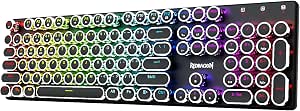 | Best Retro Full-Size Design | Layout: 104-key QWERTY | Switches: Clicky blue mechanical | Connectivity: USB-C wired, Bluetooth 3.0/5.0, 2.4GHz | VIEW LATEST PRICE | See Our Full Breakdown |
| RK Royal Kludge S98 Wireless Mechanical Keyboard with Smart Display and Knob |  | Best for On-Board Controls and Customization | Layout: QWERTY, 98 keys | Switches: Linear; hot-swappable 3-pin and 5-pin switches | Connectivity: Bluetooth 5.0, 2.4GHz RF, USB-C | VIEW LATEST PRICE | See Our Full Breakdown |
| AULA F75 Pro 75% Wireless Mechanical Keyboard |  | Best for Multi-Device Flexibility | Layout: 75%, 81 keys | Keyboard layout: QWERTZ | Connectivity: Bluetooth 5.0, 2.4 GHz wireless, USB-C wired | VIEW LATEST PRICE | See Our Full Breakdown |
| Kisnt KN85 75% Wireless Mechanical Keyboard, Retro Beige |  | Best for a QWERTY Gasket-Mount Compact Build | Layout: 75%, 85 keys, QWERTY | Connectivity: USB-C, 2.4 GHz wireless, Bluetooth 5.0 | Switches: Pre-lubed linear, 45–50 gf actuation | VIEW LATEST PRICE | See Our Full Breakdown |
| wireless mechanical keyboard | Layout | Connectivity | Switches | Backlighting |
|---|---|---|---|---|
| Redragon K556 PRO Wireless RGB | 104-key QWERTY | USB-C, Bluetooth, 2.4GHz wireless | Linear Red mechanical | RGB, 20 preset modes |
| AULA F99 Tri-Mode Wireless Mec | 96%, 99 keys | Bluetooth 5.0, 2.4GHz wireless, USB-C wired | Pre-lubed linear | RGB, 16 lighting effects |
| GEODMAER G87 Tri-Mode Wireless | QWERTY | 2.4GHz wireless, Bluetooth 5.0, USB-C | Pre-lubed linear | RGB |
| Keychron K10 HE Full-Size Wire | Full-size, 104-key QWERTY | Bluetooth 5.2, 2.4GHz wireless, USB-C wired | Gateron Double-Rail Nebula linear magnetic | RGB |
| Keychron K8 Ultra 8K Wireless | 80% tenkeyless, QWERTY | 2.4GHz wireless, Bluetooth 5.2, USB-C wired | Pre-lubed Keychron Apex; hot-swappable | — |
| Logitech MX Mechanical Wireles | Full-size QWERTY, 104 keys | Bluetooth Low Energy or Logi Bolt USB receiver | Low-profile Tactile Quiet mechanical | Single-color smart illumination |
| Redragon K745 PRO Wireless 108 | QWERTY, 108 keys | USB-C, Bluetooth, 2.4GHz wireless | Custom linear | — |
| Redragon K671KS Wireless Mecha | QWERTY, 81 keys | USB-C, Bluetooth 3.0/5.0, 2.4GHz | Linear Cherry MX Red; hot-swappable | RGB with 16 preset effects and per-key customization |
| Redragon K710 Wireless Typewri | 104-key QWERTY | USB-C wired, Bluetooth 3.0/5.0, 2.4GHz | Clicky blue mechanical | Customizable RGB with up to 16 presets |
| RK Royal Kludge S98 Wireless M | QWERTY, 98 keys | Bluetooth 5.0, 2.4GHz RF, USB-C | Linear; hot-swappable 3-pin and 5-pin switches | RGB |
| AULA F75 Pro 75% Wireless Mech | 75%, 81 keys | Bluetooth 5.0, 2.4 GHz wireless, USB-C wired | Pre-lubricated linear LEOBOG Reaper | — |
| Kisnt KN85 75% Wireless Mechan | 75%, 85 keys, QWERTY | USB-C, 2.4 GHz wireless, Bluetooth 5.0 | Pre-lubed linear, 45–50 gf actuation | — |
More Details on Our Top Picks
Redragon K556 PRO Wireless RGB Mechanical Gaming Keyboard
The Redragon K556 PRO is the straightforward pick for someone who wants a full numpad, three connection modes, and room to customize switches without soldering. Its aluminum frame and plate give the 104-key layout a substantial base, while linear Red switches suit buyers who prefer a smooth, uninterrupted press. Compared with the AULA F99, it takes up more desk space and has fewer documented sound-dampening touches, but its conventional full-size layout may be easier for spreadsheet work and number entry. Bluetooth, 2.4GHz, and USB-C let it move between wireless use and a wired setup. The tradeoff is physical: at 1074 g and 17.1 inches wide, it is less convenient to move or fit on a crowded desk. Its 20 RGB modes and macros add flexibility, though this is a broad feature set rather than a compact specialist’s design.
Pros:- USB-C, Bluetooth, and 2.4GHz connectivity cover wired and wireless setups.
- Hot-swappable sockets support most 3-pin and 5-pin switches without soldering.
- Aluminum frame and plate provide a stable base for the full-size layout.
- RGB presets and programmable macros allow lighting and key customization.
Cons:- The full-size layout occupies more desk space than the AULA F99’s 96% layout.
- Its 1074 g weight makes it less portable than smaller wireless keyboards.
- The listed linear switches may not suit typists who want a distinct tactile bump.
Best for: Full-size keyboard buyers who regularly use a numpad and want hot-swappable switches plus wired and wireless connections.
Not ideal for: Small-desk users or frequent travelers who need a lighter, compact keyboard; the 104-key body is wide and weighs 1074 g.
- Layout:104-key QWERTY
- Connectivity:USB-C, Bluetooth, 2.4GHz wireless
- Switches:Linear Red mechanical
- Hot-swappable:Supports most 3-pin and 5-pin switches
- Backlighting:RGB, 20 preset modes
- Frame and plate:Aluminum
- Dimensions and weight:17.1 × 4.9 × 1.1 in; 1074 g
- Warranty:1 year
Our verdict“Choose the K556 PRO if you want a customizable, aluminum-built wireless keyboard with a numpad and can spare the desk space.”
AULA F99 Tri-Mode Wireless Mechanical Keyboard
The AULA F99 makes a strong case for buyers who want near-full-size functionality without giving over as much room as a conventional 104-key board. Its 96% layout, five-device support, and three connection modes suit a desk shared by a work computer, tablet, and other devices. Compared with the Redragon K556 PRO, it drops some keys while adding a gasket structure with five layers of sound-dampening material, pre-lubed linear switches, and double-shot PBT keycaps. Those details target a more muted, finished typing setup, though the available information does not specify a particular sound level. Hot-swap support leaves room to change switches later. The main caveats are practical: the listed AZERTY layout may frustrate QWERTY users, and water-repellent does not mean waterproof. Its Windows compatibility listing is also narrower than the GEODMAER G87’s stated range of compatible devices.
Pros:- Bluetooth, 2.4GHz, and USB-C connections support up to five devices.
- The 96%, 99-key layout saves space while retaining a near-full-size feel.
- Five sound-dampening layers, a gasket structure, and pre-lubed linear switches prioritize a more muted setup.
- Double-shot PBT keycaps and hot-swap support combine durable keycaps with switch customization.
Cons:- The listed AZERTY layout may not match buyers accustomed to QWERTY.
- Water-repellent construction is not the same as waterproof protection.
- Compatibility is listed for Windows, while the GEODMAER G87 names a wider range of device types.
Best for: Windows users who switch among several devices and want a compact, hot-swappable keyboard with sound-dampening construction.
Not ideal for: Buyers who require a QWERTY layout, broad stated operating-system compatibility, or protection against spills beyond water repellency.
- Layout:96%, 99 keys
- Connectivity:Bluetooth 5.0, 2.4GHz wireless, USB-C wired
- Device support:Up to 5 devices
- Switches:Pre-lubed linear
- Hot-swappable:Supports 3-pin and 5-pin switches
- Keycaps:Double-shot PBT
- Battery:8000mAh rechargeable
- Backlighting:RGB, 16 lighting effects
- Compatibility:Windows
Our verdict“Pick the AULA F99 if you want a space-saving, sound-dampened wireless board for a Windows multidevice desk and its AZERTY layout suits you.”
GEODMAER G87 Tri-Mode Wireless Mechanical Keyboard
The GEODMAER G87 suits buyers who want the core wireless mechanical features without the larger footprint of the Redragon K556 PRO. Its three modes—2.4GHz, Bluetooth 5.0, and USB-C—make it adaptable to different setups, and the product data lists compatibility with consoles, PCs, laptops, and tablets. Pre-lubed linear switches and hot-swap support offer a smooth starting point with the option to change switches later. Side-printed PBT keycaps give the design a distinct look compared with the AULA F99’s double-shot PBT caps, though keycap printing style is more a preference than a performance advantage. The G87’s listed features are simpler than the F99’s: there is no stated multidevice count, large battery capacity, or layered sound-dampening structure. Its battery needs recharging, and linear switches are a poor fit for buyers who want a tactile bump. A three-year warranty is a useful differentiator among these picks.
Pros:- 2.4GHz, Bluetooth 5.0, and USB-C provide three ways to connect.
- Listed compatibility spans gaming consoles, laptops, PCs, and tablets.
- Hot-swappable sockets allow switch changes without soldering.
- PBT side-printed keycaps and a three-year warranty distinguish it from more minimally specified alternatives.
Cons:- Battery-powered use requires recharging, with no battery capacity or runtime specified.
- Linear switches lack the tactile bump some typists prefer.
- The feature list is less detailed than the AULA F99’s for sound-dampening and multidevice support.
Best for: Buyers moving a wireless keyboard among a PC, laptop, tablet, or gaming console who prefer linear switches and a QWERTY layout.
Not ideal for: Typists who want tactile feedback or shoppers seeking documented long battery life, multidevice switching counts, or layered sound-dampening details.
- Layout:QWERTY
- Connectivity:2.4GHz wireless, Bluetooth 5.0, USB-C
- Switches:Pre-lubed linear
- Hot-swappable:Yes
- Keycaps:PBT, side-printed
- Backlighting:RGB
- Compatible devices:Gaming console, laptop, PC, tablet
- Power:Battery powered
- Warranty:3 years
Our verdict“Choose the G87 if broad device compatibility, QWERTY keys, and a three-year warranty matter more than detailed battery or acoustic specifications.”
Keychron K10 HE Full-Size Wireless Hall Effect Keyboard
The Keychron K10 HE is the specialist choice here: its Hall Effect magnetic switches let buyers adjust actuation from 0.2 to 3.8 mm, with rapid trigger support for responsive gaming input. That makes it a different proposition from the Redragon K556 PRO, whose standard linear Red switches offer a simpler mechanical feel rather than adjustable magnetic actuation. The K10 HE keeps a full 104-key layout and adds Bluetooth 5.2, 2.4GHz, and USB-C, so it can serve as a general desk keyboard as well as a gaming board. Its PBT keycaps and aluminum-and-wood frame give it a more distinctive build than the plastic-and-metal details listed for some alternatives. The tradeoffs are that the full-size footprint remains, and its keycaps are not shine-through, so legends will not light up from below. Setup through Launcher may also require clearing browser cookies and cache.
Pros:- Adjustable 0.2–3.8 mm actuation and rapid trigger support give gamers input tuning absent from the K556 PRO.
- Bluetooth 5.2, 2.4GHz wireless, and USB-C cover multiple desk setups.
- PBT keycaps and an aluminum-and-wood frame offer a distinctive materials mix.
- Listed compatibility includes Windows, macOS, and Linux.
Cons:- The 104-key layout needs more desk space than the tenkeyless K8 Ultra 8K.
- Keycaps are not shine-through, so RGB does not illuminate the legends from underneath.
- Launcher setup may require clearing browser cookies and cache.
Best for: PC gamers and full-size keyboard users who want to fine-tune magnetic-switch actuation while keeping Bluetooth and wired options.
Not ideal for: Buyers seeking a compact board, illuminated key legends, or a conventional switch setup without browser-based configuration.
- Layout:Full-size, 104-key QWERTY
- Switches:Gateron Double-Rail Nebula linear magnetic
- Actuation range:0.2–3.8 mm
- Sensitivity:0.1 mm
- Connectivity:Bluetooth 5.2, 2.4GHz wireless, USB-C wired
- Keycaps:OSA-profile double-shot PBT
- Frame:Aluminum and wood
- Compatibility:Windows, macOS, Linux
- Backlighting:RGB
Our verdict“Choose the K10 HE if adjustable Hall Effect actuation and rapid trigger matter more to you than compact size or illuminated legends.”
Keychron K8 Ultra 8K Wireless Mechanical Keyboard
The Keychron K8 Ultra 8K trims the numpad while retaining a function row, arrow keys, and navigation keys, making it a practical middle ground between full-size boards and smaller layouts. Its defining feature is an 8000Hz polling rate in 2.4GHz wireless and wired modes, paired with pre-lubed hot-swappable switches and customizable ZMK firmware. Compared with the full-size Keychron K10 HE, it gives up the numpad and adjustable magnetic actuation but takes up less desk width and uses conventional mechanical switches. Bluetooth 5.2 can switch among up to three devices, while the 4000mAh battery is rated for up to 760 hours with the backlight off. That runtime condition matters: RGB use changes the power picture, and the listed figure should not be read as an always-lit estimate. The six-month warranty is shorter than the GEODMAER G87’s three-year coverage.
Pros:- 8000Hz polling is supported in both 2.4GHz wireless and wired modes.
- Tenkeyless layout keeps the function row, arrow keys, and navigation keys while freeing space versus the K10 HE.
- Hot-swappable pre-lubed switches and customizable ZMK firmware support personalization.
- Bluetooth switching supports up to three devices, and the 4000mAh battery is rated for up to 760 hours with backlight off.
Cons:- No numpad, unlike the full-size K10 HE and Redragon K556 PRO.
- The stated 760-hour battery life applies with the backlight off.
- The six-month warranty is shorter than the GEODMAER G87’s listed three-year warranty.
Best for: Competitive PC users and compact-layout fans who want high polling in wireless mode, programmable firmware, and a retained function and navigation row.
Not ideal for: Numpad-dependent users, buyers who keep RGB on and expect the stated maximum battery runtime, or shoppers prioritizing a longer listed warranty.
- Layout:80% tenkeyless, QWERTY
- Polling rate:Up to 8000Hz in 2.4GHz wireless and wired modes
- Connectivity:2.4GHz wireless, Bluetooth 5.2, USB-C wired
- Bluetooth switching:Up to 3 devices
- Battery:4000mAh; up to 760 hours with backlight off
- Firmware:ZMK, customizable with Keychron Launcher
- Switches:Pre-lubed Keychron Apex; hot-swappable
- Keycaps and lighting:OSA double-shot PBT; south-facing RGB
- Warranty:6 months
Our verdict“Pick the K8 Ultra 8K if you want a space-saving TKL board with high polling and firmware customization, and do not need a numpad.”
Logitech MX Mechanical Wireless Illuminated Keyboard, Tactile Quiet, Graphite
The Logitech MX Mechanical is the most office-focused choice here: its low-profile Tactile Quiet switches retain a distinct typing bump while keeping noise lower than the clicky Redragon K710. Smart illumination activates as your hands approach and responds to room lighting, so the backlight is useful without staying on needlessly. Pairing with up to three devices also makes it a stronger fit for switching among a work computer, tablet, and phone than the more gaming-oriented Redragon K745 PRO. The tradeoff is a less customizable setup: some controls depend on Logi Options+ software, and the single-color lighting lacks the K745 PRO’s RGB effects. Mac users who rely on FileVault may also need the Logi Bolt receiver for keyboard access at startup.
Pros:- Low-profile tactile switches provide feedback with less noise than clicky options.
- Pairs with up to three devices and supports a broad range of operating systems.
- Smart backlighting responds to nearby hands and ambient conditions.
- USB-C charging and a stated battery life of up to 15 days with backlighting.
Cons:- Single-color illumination offers less visual customization than the RGB Redragon models.
- Some customization features require Logi Options+ software.
- Bluetooth may not allow password entry at startup on some FileVault Macs; Logi Bolt is suggested.
Best for: Office workers and multi-device users who want a full-size mechanical layout with quieter feedback and easy switching across operating systems.
Not ideal for: RGB enthusiasts, switch-modification hobbyists, and FileVault Mac users who want reliable startup typing over Bluetooth without a receiver.
- Layout:Full-size QWERTY, 104 keys
- Switches:Low-profile Tactile Quiet mechanical
- Connectivity:Bluetooth Low Energy or Logi Bolt USB receiver
- Device pairing:Up to 3 devices
- Backlighting:Single-color smart illumination
- Battery:Rechargeable 1500 mAh Li-Po; up to 15 days, or up to 10 months with backlighting off
- Charging:USB-C
- Compatibility:Windows, macOS, Linux, Chrome OS, iOS, iPadOS, Android
Our verdict“Choose the MX Mechanical for quieter full-size typing and multi-device work, but pick the Redragon K745 PRO if RGB and switch customization matter more.”
Redragon K745 PRO Wireless 108-Key Gasket Gaming Keyboard
The Redragon K745 PRO brings enthusiast-style customization to a full-size wireless layout. Its gasket mount and five-layer noise dampening aim for a cushioned, less sharp typing sound, while hot-swap sockets accept both 3-pin and 5-pin switches without soldering. That makes it a more flexible project keyboard than the Logitech MX Mechanical, whose low-profile switches and restrained lighting are aimed at ready-to-work simplicity. The K745 PRO also offers Bluetooth, 2.4GHz, and USB-C, plus dedicated shortcut keys for frequent commands. There are compromises: the enclosure is plastic rather than a more substantial premium shell, and the water-resistance level is not specified, so I would not treat it as spill-proof. Its linear switches may also feel less deliberate than the Logitech’s tactile option.
Pros:- Tri-mode connectivity supports USB-C, Bluetooth, and 2.4GHz wireless.
- Gasket mounting and five layers of dampening are designed for a cushioned typing feel.
- Hot-swap sockets support 3-pin and 5-pin switches.
- PBT keycaps, customizable RGB lighting, and four dedicated shortcut keys.
Cons:- Plastic enclosure feels less substantial than a metal-panel alternative such as the Redragon K671KS.
- Water resistance is mentioned without a specific protection level.
- Custom linear switches may not suit users who prefer a tactile bump or click.
Best for: Full-size keyboard owners who want to experiment with compatible switches, tune the typing feel, and use RGB lighting across wired and wireless connections.
Not ideal for: Buyers seeking a metal enclosure, a clearly rated spill-protection level, or quiet tactile feedback without changing switches.
- Layout:QWERTY, 108 keys
- Switches:Custom linear
- Switch compatibility:3-pin or 5-pin
- Mounting:Gasket-mounted with five-layer noise dampening
- Connectivity:USB-C, Bluetooth, 2.4GHz wireless
- Keycaps and lighting:Translucent PBT keycaps; customizable RGB
- Weight:0.88 kg
- Other features:Four dedicated shortcut keys; water resistant
Our verdict“Pick the K745 PRO if you want a full-size wireless board to customize, and choose the Logitech MX Mechanical instead for quieter tactile typing with less setup.”
Redragon K671KS Wireless Mechanical Gaming Keyboard
With 81 keys and support for up to five connected devices, the Redragon K671KS suits buyers who want a smaller footprint without giving up several wireless connection choices. Its USB-C, Bluetooth, and 2.4GHz modes give it more flexibility for moving among a PC, laptop, tablet, or phone than the full-size Redragon K710, though the listed operating-system compatibility is limited to Windows. The K671KS adds hot-swappable linear switches, programmable macros, PBT keycaps, and a metal panel, making it more customizable than the Logitech MX Mechanical. RGB can be adjusted per key, but that feature set comes with missing practical details: there is no stated battery-life figure, and the supplied compatibility information does not confirm support beyond Windows. Its 81-key layout also omits keys found on full-size boards.
Pros:- Three connection modes and switching for up to five devices.
- Hot-swappable linear switches with eight spare switches included.
- Per-key RGB customization and programmable macros.
- PBT keycaps and a metal panel.
Cons:- Compatibility information specifies Windows only.
- Battery-life details are not provided.
- The 81-key layout is less suited to number-heavy work than the full-size K710 or MX Mechanical.
Best for: Windows gamers and desk-space-conscious users who want wireless device switching, per-key RGB, macros, and the option to replace switches.
Not ideal for: Mac or Linux users who need confirmed compatibility, buyers who rely on a full-size number pad, or anyone who needs a published battery-life estimate.
- Layout:QWERTY, 81 keys
- Switches:Linear Cherry MX Red; hot-swappable
- Connectivity:USB-C, Bluetooth 3.0/5.0, 2.4GHz
- Device capacity:Up to 5 devices
- Keycaps:Double-injection PBT
- Backlighting:RGB with 16 preset effects and per-key customization
- Compatibility:Windows
- Other features:Programmable macros, spill-proof design, rechargeable
Our verdict“Choose the K671KS for a compact, customizable Windows gaming setup, but favor the Logitech MX Mechanical for broader stated OS support and a full-size layout.”
Redragon K710 Wireless Typewriter-Style Mechanical Gaming Keyboard, Black
The Redragon K710 is the standout choice for buyers who want their keyboard’s round, retro-style keycaps to be part of the desk setup, rather than an understated office tool. It keeps a conventional 104-key layout and pairs a metal panel with clicky blue switches, giving it a more pronounced sound and feel than the quieter Logitech MX Mechanical. That audible feedback can suit solo gaming or typing, but it makes the K710 a poor fit for shared offices and quiet rooms. Its USB-C wired, Bluetooth, and 2.4GHz connections offer flexibility similar to the Redragon K745 PRO, while RGB presets and programmable keys add gaming-focused customization. The stated operating-system support lists Windows only, and the large 4000 mAh battery capacity is provided without a runtime estimate.
Pros:- Distinctive round retro keycaps paired with a metal panel.
- USB-C wired, Bluetooth, and 2.4GHz wireless connectivity.
- Customizable RGB lighting with up to 16 presets and programmable keys.
- Full-size 104-key layout with anti-ghosting support and a 4000 mAh rechargeable battery.
Cons:- Clicky blue switches can be disruptive in quiet or shared spaces.
- Windows is the only compatible operating system listed.
- Battery capacity is given, but no battery-life estimate is provided.
Best for: Windows users who want a full-size wireless keyboard with a retro typewriter look, audible clicky feedback, and multiple connection modes.
Not ideal for: Shared-office workers, quiet-room typists, or users outside Windows who need clearly stated operating-system support.
- Layout:104-key QWERTY
- Switches:Clicky blue mechanical
- Connectivity:USB-C wired, Bluetooth 3.0/5.0, 2.4GHz
- Backlighting:Customizable RGB with up to 16 presets
- Battery:Rechargeable, 4000 mAh
- Panel:Metal
- Compatibility:Windows
- Other features:Programmable keys; 104-key anti-ghosting support
Our verdict“The K710 fits Windows buyers who value retro styling and clicky feedback, while the Logitech MX Mechanical is the better office choice for quieter typing.”
RK Royal Kludge S98 Wireless Mechanical Keyboard with Smart Display and Knob
The RK Royal Kludge S98 makes a strong case for buyers who want more controls built into the keyboard itself. Its customizable display and multifunction knob put information and adjustments within reach, while the 98-key layout keeps a number pad without taking up as much space as a conventional full-size board. That is a different priority from the Redragon K745 PRO, which emphasizes gasket mounting and switch tuning, or the Logitech MX Mechanical, which prioritizes quiet, cross-device productivity. The S98 combines Bluetooth 5.0, 2.4GHz, and USB-C with hot-swap support and sound-dampening layers. Its linear switches will not provide the tactile bump of the Logitech or the click of the Redragon K710. Listed OS compatibility is limited to Windows, and no battery runtime is supplied.
Pros:- Customizable display and multifunction knob provide accessible on-board controls.
- 98-key layout retains a number pad in a more compact format than a standard full-size board.
- Bluetooth 5.0, 2.4GHz wireless, and USB-C connectivity.
- Hot-swappable 3-pin and 5-pin switches, double-shot PBT keycaps, and sound-dampening layers.
Cons:- Linear switches lack the tactile feedback of the Logitech MX Mechanical or the click of the Redragon K710.
- Listed operating-system compatibility is limited to Windows.
- Battery-life information is not provided.
Best for: Windows users who want a nearly full-size layout, a built-in knob and display, and the option to change switches or connection modes.
Not ideal for: Mac or Linux buyers needing confirmed compatibility, typists who prefer tactile or clicky switches, and users who want a stated wireless runtime.
- Layout:QWERTY, 98 keys
- Switches:Linear; hot-swappable 3-pin and 5-pin switches
- Connectivity:Bluetooth 5.0, 2.4GHz RF, USB-C
- Controls:Customizable display and multifunction knob
- Backlighting:RGB
- Keycaps:Double-shot PBT
- Build features:Top-mount design with sound-dampening layers
- Compatibility:Windows
Our verdict“Choose the S98 for its display, knob, and compact number-pad layout; the Logitech MX Mechanical is a better fit for quieter tactile feedback and broader stated compatibility.”
AULA F75 Pro 75% Wireless Mechanical Keyboard
The AULA F75 Pro is a strong fit for someone who wants a compact board that can move between a gaming setup, laptop, and tablet without reconnecting from scratch. Its Bluetooth, 2.4 GHz, and USB-C modes pair with support for up to five devices, a broader switching range than the Kisnt KN85’s listed connectivity details. The 81-key layout keeps arrow keys and adds a programmable knob, giving it more hands-on control than a basic compact keyboard.
Pre-lubricated linear switches and hot-swap sockets make it appealing to players who may want to change the feel later. The tradeoff is the QWERTZ layout, which may frustrate buyers accustomed to QWERTY, and its water-repellent description is not a promise of waterproof protection. Choose the Kisnt KN85 instead if you specifically want its QWERTY layout and gasket mount.
Pros:- Bluetooth, 2.4 GHz, and USB-C connections, with support for up to five devices
- Hot-swap sockets accept both 3-pin and 5-pin switches
- Compact 81-key layout retains arrow keys and includes a programmable knob
- PBT keycaps and RGB lighting support a durable, customizable setup
Cons:- QWERTZ layout may require an adjustment for users who type on QWERTY
- Water-repellent wording does not make it suitable for spill-prone use
- Compact layout omits a dedicated number pad
Best for: People who regularly switch a compact keyboard among several computers or mobile devices and want room to customize switches.
Not ideal for: QWERTY typists and buyers who need a waterproof keyboard or a full-size number pad.
- Layout:75%, 81 keys
- Keyboard layout:QWERTZ
- Connectivity:Bluetooth 5.0, 2.4 GHz wireless, USB-C wired
- Multi-device support:Up to 5 devices
- Switches:Pre-lubricated linear LEOBOG Reaper
- Hot-swap compatibility:3-pin and 5-pin switches
- Battery:4000 mAh rechargeable
- Additional features:RGB lighting, programmable keys, multifunction knob, N-key rollover, Win-key lock
Our verdict“Pick the AULA F75 Pro if multi-device switching and switch customization matter more to you than a familiar QWERTY layout or a number pad.”
Kisnt KN85 75% Wireless Mechanical Keyboard, Retro Beige
The Kisnt KN85 suits buyers who want a compact wireless mechanical keyboard with a standard QWERTY layout and a softer gasket-mounted build. Its 85-key format retains arrow and function keys while freeing desk space compared with full-size options such as the Logitech MX Mechanical. Tri-mode connectivity and a 4000 mAh battery let it serve as a shared keyboard across wired and wireless setups.
Its hot-swappable linear switches give customization-minded users room to change the typing feel, much like the AULA F75 Pro. The KN85’s tradeoffs are more specific: it is not water resistant, and its software customization is limited to Windows when connected by cable or 2.4 GHz. Choose the AULA if switching among up to five devices is a priority; choose this model for its stated QWERTY layout and gasket mount.
Pros:- QWERTY 75% layout keeps arrow and function keys while saving desk space
- USB-C, 2.4 GHz, and Bluetooth 5.0 provide wired and wireless connection options
- Gasket mount and pre-lubed linear switches offer a distinct typing setup
- Hot-swap support accepts 3-pin and 5-pin switches
Cons:- Not water resistant, so spills can damage the keyboard
- Companion software is limited to Windows and wired or 2.4 GHz connections
- No dedicated number pad
Best for: QWERTY typists building a compact Windows-centered desk setup who want a gasket-mounted keyboard and replaceable linear switches.
Not ideal for: People who need spill protection, rely on macOS software customization, or frequently enter numbers on a dedicated keypad.
- Layout:75%, 85 keys, QWERTY
- Connectivity:USB-C, 2.4 GHz wireless, Bluetooth 5.0
- Switches:Pre-lubed linear, 45–50 gf actuation
- Mounting:Gasket mount
- Hot-swap compatibility:3-pin and 5-pin switches
- Battery:4000 mAh rechargeable
- Dimensions:13.68 × 5.51 × 1.77 in
- Compatibility:Android, Linux, macOS, Windows; gaming consoles, laptops, MacBooks, smartphones, and tablets
- Water resistance:Not water resistant
Our verdict“Choose the Kisnt KN85 if you want a QWERTY compact keyboard with gasket mounting, but skip it if spill resistance or broad software support is a requirement.”

How We Picked
I compared these 12 wireless mechanical keyboards by looking at the factors that change daily use: layout, connection options, typing and gaming focus, controls, and the amount of customization the design invites. I gave weight to whether a keyboard’s standout feature solves a clear need, such as Hall Effect controls for gaming or a quieter tactile setup for an office, rather than treating extra features as automatic advantages. I also considered practical fit, including whether a board’s layout leaves room for a mouse or keeps number entry within easy reach.
The ranking favors versatility and fit for a broad range of buyers near the top, then places more specialized options where their distinct advantages make sense. A premium feature set does not outrank a simpler board if it serves a narrower audience, and a compact model does not suit everyone just because it saves desk space. Since the lineup spans gaming, office, compact, and feature-heavy designs, the best pick depends on which compromise a buyer is willing to make.
| wireless mechanical keyboard | Backlighting | Compatibility |
|---|---|---|
| Redragon K556 PRO Wireless RGB | RGB, 20 preset modes | — |
| AULA F99 Tri-Mode Wireless Mec | RGB, 16 lighting effects | Windows |
| GEODMAER G87 Tri-Mode Wireless | RGB | — |
| Keychron K10 HE Full-Size Wire | RGB | Windows, macOS, Linux |
| Keychron K8 Ultra 8K Wireless | — | — |
| Logitech MX Mechanical Wireles | Single-color smart illumination | Windows, macOS, Linux, Chrome OS, iOS, iPadOS, Android |
| Redragon K745 PRO Wireless 108 | — | — |
| Redragon K671KS Wireless Mecha | RGB with 16 preset effects and per-key customization | Windows |
| Redragon K710 Wireless Typewri | Customizable RGB with up to 16 presets | Windows |
| RK Royal Kludge S98 Wireless M | RGB | Windows |
| AULA F75 Pro 75% Wireless Mech | — | — |
| Kisnt KN85 75% Wireless Mechan | — | Android, Linux, macOS, Windows; gaming consoles, laptops, MacBooks, smartphones, and tablets |
Factors to Consider When Choosing Wireless Mechanical Keyboards
Before choosing a model, I’d match the keyboard to the way you work or play, then check whether its wireless setup and layout will support that routine. A few broad decisions can prevent buying a board that looks appealing but adds friction to everyday use.
Choose a layout by the keys you actually use
Layout affects more than desk space: it changes how often you reach for a function layer and whether number entry feels natural. A full-size board is convenient for spreadsheets and frequent numeric input, while a 75% model keeps most everyday keys in a smaller area. Compact layouts can also leave more room for mouse movement, a practical benefit for gaming or small desks. Before buying, list the keys you use daily, including navigation keys, function-row shortcuts, and the number pad. A common mistake is choosing a compact board for appearance and only then discovering that a key workflow depends on dedicated keys. If you switch between tasks often, a slightly larger layout may be a better compromise than the smallest option.
Treat wireless modes as a workflow feature
Wireless connection options matter most when you regularly move between devices or want a cable-free desk. Tri-mode designs can provide more ways to connect, but extra modes do not help if you only use one computer. Check which connection method your devices support and whether switching between them is straightforward. Also consider where the keyboard will sit: a desk setup near a console, tablet, or work laptop can benefit from flexible pairing, while a single-device setup may favor simplicity. Do not assume every wireless keyboard offers the same switching behavior or that a wireless gaming label guarantees the connection you prefer. Keep a charging or wired-use plan in mind if the keyboard will be used for long sessions.
Match the switch experience to your room and routine
Switch feel and sound are personal, but the people around you are part of the decision too. A quieter tactile model can suit shared offices better than a board chosen mainly for gaming effects, while a more characterful typing sound may be welcome in a private room. Product descriptions can indicate intended feel, yet they do not tell you exactly how a keyboard will sound on your desk or in your space. If you are sensitive to noise, look for a design that explicitly emphasizes quiet use and check whether the switch type is replaceable before assuming you can tune it later. Buyers often focus on switch labels and overlook the case, keycaps, and desk surface, all of which affect the sound. When possible, prioritize a return policy that lets you decide whether the feel suits you.
Pay for specialized gaming features only when you will use them
Gaming-oriented boards can add features aimed at speed, lighting, or control, but those additions are not equally useful to every player. Hall Effect sensing is a more specialized choice than ordinary mechanical input, so it makes the most sense for someone who understands why adjustable actuation or related controls matter to their games. A casual player may get more practical benefit from a comfortable layout and reliable connection than from advanced input options. Think about your actual game types, key habits, and whether you plan to tune settings. RGB can help personalize a setup, but it does not improve typing comfort on its own. Avoid paying for gaming features simply because they appear more advanced than office-focused alternatives.
Decide how much customization and extra hardware you want
Knobs, displays, lighting controls, and configurable keys can make a keyboard feel tailored, but each extra feature adds another thing to learn or manage. A smart display and knob may be useful if you expect to adjust settings or media often; they can be needless clutter for someone who wants a straightforward typing tool. Likewise, a gasket-style build appeals to buyers who care about a particular typing character, but it should not outweigh layout and connection fit. Check what can be changed after purchase, such as keycaps or switches, and what is fixed by the model. A frequent misstep is assuming that customization automatically improves usability. Choose extras that support a repeated task, not just a feature list.
Think through power and desk setup before committing
Wireless convenience depends on a keyboard being ready when you need it, so battery habits belong in the buying decision. Backlighting and frequent wireless use can affect how often charging becomes part of your routine, though real battery life depends on settings and usage. If you use lighting all day, decide whether you are comfortable charging more often or would rather keep effects restrained. Consider whether a cable can remain connected neatly at your desk and whether the keyboard will travel between locations. Buyers sometimes judge wireless models only by their ability to run without a cable, then overlook charging access and desk placement. A practical setup should make both normal use and recharging easy.
Frequently Asked Questions
Should I choose a 75% wireless keyboard or a full-size one?
I’d choose full-size if you enter numbers often or rely on a dedicated number pad for work. A 75% model can free desk space while keeping many commonly used keys close by, but it asks you to adapt to a denser layout or function-layer shortcuts. The AULA F75 Pro and Kisnt KN85 represent the compact side of this roundup, while the Keychron K10 HE offers a full-size direction. Think about your daily key habits rather than judging by footprint alone. If you are unsure, compare the key layout diagrams with your current keyboard before deciding.
Is a tri-mode keyboard worth choosing if I use only one computer?
It can be, but the extra connection choices may not add much if the keyboard will stay paired to one device. Tri-mode is more useful when you switch between a computer, tablet, or other compatible device, or want flexibility in how the keyboard connects. For a single-device setup, I’d put layout, typing feel, and the connection method you actually plan to use ahead of the number of modes. Also check whether changing devices is easy for your routine rather than assuming multiple modes mean effortless switching. The value is in flexibility you will use, not the feature label by itself.
Are gaming-focused wireless mechanical keyboards a good choice for office work?
They can work well for office tasks, but gaming features do not automatically make a keyboard comfortable or appropriate for a shared workspace. Consider sound, lighting, layout, and whether the extra controls suit your work habits. The Logitech MX Mechanical is a more direct fit for quiet office typing, while gaming-focused options in this roundup emphasize different priorities. A model with a number pad may help spreadsheet work, while a compact board can make a small desk feel less crowded. Choose based on the work environment and keys you need, not the gaming label alone.
Do I need a Hall Effect keyboard for competitive gaming?
No; Hall Effect input is a specialized feature, not a requirement for competitive play. The Keychron K10 HE is the lineup’s dedicated option for buyers drawn to that kind of gaming-focused control, but a conventional mechanical keyboard may be a better fit if you do not plan to use its distinctive capabilities. Consider the games you play and whether adjustable input behavior would affect how you play. If your main priorities are a familiar layout and dependable wireless use, a less specialized model can make more sense. Choose Hall Effect for a clear use case rather than as a general upgrade.
What should I prioritize if I want one keyboard for work and gaming?
Start with a layout that supports your work, then check that the connection and typing feel also suit gaming sessions. A versatile model such as the Keychron K8 Ultra 8K is the strongest general-purpose direction in this roundup, while the Keychron K10 HE is more specialized for gaming input and the Logitech MX Mechanical favors office use. Decide whether you need a number pad, how much desk space your mouse needs, and whether quiet typing matters around other people. Extra lighting or controls should come after those practical choices. The right hybrid board is the one that does not make either half of your routine feel awkward.
Conclusion
For most buyers, I’d start with the Keychron K8 Ultra 8K as the best overall because it offers a versatile middle ground between compactness and everyday usability. For best value, compare the Redragon K556 PRO and AULA F99 against your preferred layout and connection needs rather than paying for features you will not use. The Logitech MX Mechanical is my best premium office pick for buyers who prioritize quieter tactile typing, while the AULA F75 Pro is a strong beginner-friendly choice for someone who wants a compact layout without a more specialized feature set. For specific needs, choose the Keychron K10 HE for Hall Effect gaming, the RK Royal Kludge S98 for its display and knob, or the Redragon K745 PRO for a gasket-focused build. Match the board to your layout and routine first; the best wireless keyboard is the one whose tradeoffs you will barely notice day to day.
Fall Picks
fall essentials
As an affiliate, we earn on qualifying purchases.