The best wireless mechanical keyboard for most people in this lineup is the Keychron K8 Ultra 8K, which pairs a practical compact layout with a high-polling wireless focus. The AULA F99 stands out for buyers who want a larger layout, while the Logitech MX Mechanical is a strong fit for quieter office typing. The main tradeoffs are layout size, wireless flexibility, gaming responsiveness, and how much you value extras such as a display, knob, or lighting. A feature-rich model is not always the best daily choice if its layout or sound does not suit your desk. Read on for the full breakdown and advice on choosing the right wireless mechanical keyboard for your needs.

Get the latest gadgets delivered free — and shop member deals
- Fast, free delivery on millions of items
- Access to Prime Big Deal Days deals on October 6–7
- Prime Video, Amazon Music and more included
Complete the kit



Key Takeaways
The lineup’s clearest split is layout: the full-size Keychron K10 HE and Logitech MX Mechanical keep the number pad, while 75% and 87-key options reclaim desk space.
Tri-mode connectivity appears across several picks, including the AULA F99, AULA F75 Pro, and GEODMAER G87; compare device-switching needs rather than assuming wireless labels mean the same workflow.
Gaming-focused choices vary in approach: the K10 HE highlights Hall Effect controls, while the K8 Ultra 8K makes high polling a central differentiator.
Extras divide the field: the RK S98 adds a display and knob, but buyers who prefer a simpler board may get more practical value from a less feature-heavy layout.
There is no single best size or sound: compact boards save room, while full-size models preserve familiar keys; the quiet-leaning Logitech also serves a different typing environment from gaming-styled RGB options.
| Keychron K10 HE Full-Size Wireless Hall Effect Keyboard |  | Best for Adjustable Gaming Performance | Layout: Full-size, 104-key QWERTY | Switches: Gateron Double-Rail Nebula linear magnetic | Actuation: Adjustable from 0.2–3.8 mm; 0.1 mm sensitivity | VIEW LATEST PRICE | See Our Full Breakdown |
| RK Royal Kludge S98 Wireless Mechanical Keyboard with Smart Display and Knob |  | Best for On-Keyboard Controls | Layout: 98-key QWERTY | Switch type: Linear | Hot-swap support: Compatible with 3-pin and 5-pin switches | VIEW LATEST PRICE | See Our Full Breakdown |
| AULA F99 Tri-Mode Wireless Mechanical Keyboard |  | Best for Multi-Device Setups | Layout: 96%, 99 keys | Connectivity: Bluetooth 5.0, 2.4 GHz wireless, USB-C wired | Multi-device support: Up to 5 devices | VIEW LATEST PRICE | See Our Full Breakdown |
| Keychron K8 Ultra 8K Wireless Mechanical Keyboard |  | Best Compact TKL Pick | Layout: 80% tenkeyless, QWERTY | Polling rate: Up to 8000Hz in 2.4 GHz wireless and wired modes | Connectivity: 2.4 GHz wireless, Bluetooth 5.2, USB-C wired | VIEW LATEST PRICE | See Our Full Breakdown |
| Redragon K745 PRO Wireless 108-Key Gasket Gaming Keyboard |  | Best Full-Size Cushioned Typing Pick | Layout: 108-key QWERTY | Switches: Custom linear; hot-swappable 3-pin or 5-pin sockets | Connectivity: USB-C, Bluetooth, 2.4 GHz wireless | VIEW LATEST PRICE | See Our Full Breakdown |
| Kisnt KN85 75% Wireless Mechanical Keyboard, Retro Beige |  | Best for Switch Customization | Layout: 75%, 85-key QWERTY | Connectivity: USB-C, 2.4GHz wireless, Bluetooth 5.0 | Switches: Pre-lubed linear, 45–50 gf actuation | VIEW LATEST PRICE | See Our Full Breakdown |
| AULA F75 Pro 75% Wireless Mechanical Keyboard |  | Best for Multi-Device Setups | Layout: 75%, 81 keys, QWERTZ | Connectivity: Bluetooth 5.0, 2.4GHz wireless, USB-C wired | Multi-device support: Up to 5 devices | VIEW LATEST PRICE | See Our Full Breakdown |
| Logitech MX Mechanical Wireless Illuminated Keyboard, Tactile Quiet, Graphite |  | Best for Quiet Office Typing | Layout: Full-size QWERTY, 104 keys | Switches: Tactile Quiet, low-profile mechanical | Connectivity: Bluetooth Low Energy or Logi Bolt USB receiver | VIEW LATEST PRICE | See Our Full Breakdown |
| Redragon K671KS Wireless Mechanical Gaming Keyboard |  | Best for Wireless Gaming Customization | Layout: 81-key QWERTY | Connectivity: USB-C, Bluetooth 3.0/5.0, 2.4GHz wireless | Device capacity: Up to 5 devices | VIEW LATEST PRICE | See Our Full Breakdown |
| Redragon K556 PRO Wireless RGB Mechanical Gaming Keyboard |  | Best Full-Size Wireless Value | Layout: 104-key QWERTY | Connectivity: USB-C, Bluetooth, 2.4GHz wireless | Switches: Linear Red mechanical | VIEW LATEST PRICE | See Our Full Breakdown |
| GEODMAER G87 Tri-Mode Wireless Mechanical Keyboard |  | Best for Switch Customization | Layout: QWERTY | Connectivity: 2.4GHz wireless, Bluetooth 5.0, USB-C | Switches: Pre-lubed linear; hot-swappable | VIEW LATEST PRICE | See Our Full Breakdown |
| Redragon K710 Wireless Typewriter-Style Mechanical Gaming Keyboard, Black | 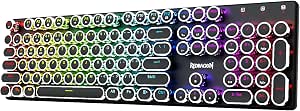 | Best Full-Size Retro-Style Pick | Layout: 104-key QWERTY | Switches: Clicky blue mechanical | Connectivity: USB-C wired, Bluetooth 3.0/5.0, 2.4GHz wireless | VIEW LATEST PRICE | See Our Full Breakdown |
| wireless mechanical keyboard | Layout | Connectivity | Switches | Keycaps |
|---|---|---|---|---|
| Keychron K10 HE Full-Size Wire | Full-size, 104-key QWERTY | Bluetooth 5.2, 2.4 GHz wireless, USB-C wired | Gateron Double-Rail Nebula linear magnetic | OSA-profile double-shot PBT |
| RK Royal Kludge S98 Wireless M | 98-key QWERTY | Bluetooth 5.0, 2.4 GHz RF, USB-C | — | Double-shot PBT |
| AULA F99 Tri-Mode Wireless Mec | 96%, 99 keys | Bluetooth 5.0, 2.4 GHz wireless, USB-C wired | Pre-lubed linear; hot-swappable 3-pin and 5-pin | Double-shot PBT |
| Keychron K8 Ultra 8K Wireless | 80% tenkeyless, QWERTY | 2.4 GHz wireless, Bluetooth 5.2, USB-C wired | Pre-lubed Keychron Apex; hot-swappable | — |
| Redragon K745 PRO Wireless 108 | 108-key QWERTY | USB-C, Bluetooth, 2.4 GHz wireless | Custom linear; hot-swappable 3-pin or 5-pin sockets | Translucent PBT |
| Kisnt KN85 75% Wireless Mechan | 75%, 85-key QWERTY | USB-C, 2.4GHz wireless, Bluetooth 5.0 | Pre-lubed linear, 45–50 gf actuation | — |
| AULA F75 Pro 75% Wireless Mech | 75%, 81 keys, QWERTZ | Bluetooth 5.0, 2.4GHz wireless, USB-C wired | Linear LEOBOG Reaper | Side-printed PBT |
| Logitech MX Mechanical Wireles | Full-size QWERTY, 104 keys | Bluetooth Low Energy or Logi Bolt USB receiver | Tactile Quiet, low-profile mechanical | — |
| Redragon K671KS Wireless Mecha | 81-key QWERTY | USB-C, Bluetooth 3.0/5.0, 2.4GHz wireless | Linear Cherry MX Red | Double-injection PBT |
| Redragon K556 PRO Wireless RGB | 104-key QWERTY | USB-C, Bluetooth, 2.4GHz wireless | Linear Red mechanical | — |
| GEODMAER G87 Tri-Mode Wireless | QWERTY | 2.4GHz wireless, Bluetooth 5.0, USB-C | Pre-lubed linear; hot-swappable | Side-printed PBT |
| Redragon K710 Wireless Typewri | 104-key QWERTY | USB-C wired, Bluetooth 3.0/5.0, 2.4GHz wireless | Clicky blue mechanical | — |
More Details on Our Top Picks
Keychron K10 HE Full-Size Wireless Hall Effect Keyboard
The K10 HE is the standout here for buyers who want Hall Effect controls without giving up a full-size layout. Its adjustable 0.2–3.8 mm actuation range and rapid trigger let players tune key response, while Bluetooth, 2.4 GHz, and USB-C cover wireless and wired setups. Compared with the standard mechanical switches in the RK Royal Kludge S98, its magnetic switches offer more control over actuation, but they make this a more specialized pick than a general-purpose typing board. The aluminum-and-wood frame and PBT keycaps add a distinctive finish; however, the keycaps are not shine-through, so RGB is more decorative than useful in a dark room. Customization also asks for patience: Launcher setup may require clearing browser cookies and cache.
Pros:- Adjustable magnetic-switch actuation and rapid trigger support
- Bluetooth, 2.4 GHz, and USB-C connectivity
- Hot-swappable magnetic switches
- PBT keycaps and an aluminum-and-wood frame
Cons:- Launcher setup may require clearing browser cookies and cache
- Non-shine-through keycaps limit RGB usefulness in the dark
Best for: Full-size keyboard users who play games and want adjustable actuation, rapid trigger, and multiple connection options.
Not ideal for: Buyers who want simple setup, illuminated legends in low light, or conventional tactile and clicky mechanical switches.
- Layout:Full-size, 104-key QWERTY
- Switches:Gateron Double-Rail Nebula linear magnetic
- Actuation:Adjustable from 0.2–3.8 mm; 0.1 mm sensitivity
- Connectivity:Bluetooth 5.2, 2.4 GHz wireless, USB-C wired
- Keycaps:OSA-profile double-shot PBT
- Frame:Aluminum and wood
- Lighting:RGB
- Compatibility:Windows, macOS, Linux
Our verdict“Choose the K10 HE if you want a full-size wireless board with fine-grained magnetic-switch control; skip it if conventional switch feel and straightforward setup matter more.”
RK Royal Kludge S98 Wireless Mechanical Keyboard with Smart Display and Knob
The S98’s defining advantage is that its display and multifunction knob put customization and quick adjustments on the keyboard itself. Its 98-key layout keeps a number pad while taking up less space than a full-size board, making it a more desk-conscious choice than the Keychron K10 HE. Tri-mode connectivity and hot-swap support add flexibility, while sound-dampening layers and double-shot PBT keycaps make it feel more considered than a bare-bones wireless option. The tradeoff is a conventional linear switch setup: unlike the K10 HE’s adjustable magnetic switches, the S98 does not offer adjustable actuation or rapid trigger. Its listed operating-system compatibility is Windows only, so buyers using macOS or Linux should check support before choosing it.
Pros:- 98-key layout retains a number pad in a more compact footprint than full-size models
- Customizable display and multifunction knob provide on-board controls
- Bluetooth, 2.4 GHz, and USB-C connectivity
- Hot-swappable switches, double-shot PBT keycaps, and sound-dampening layers
Cons:- Linear switches may not suit users who want tactile or clicky feedback
- Listed operating-system compatibility is limited to Windows
Best for: Windows users who want a compact-with-numpad layout, a built-in control knob, and a customizable display.
Not ideal for: Mac or Linux users seeking clearly listed compatibility, or typists who prefer tactile or clicky feedback.
- Layout:98-key QWERTY
- Switch type:Linear
- Hot-swap support:Compatible with 3-pin and 5-pin switches
- Connectivity:Bluetooth 5.0, 2.4 GHz RF, USB-C
- Keycaps:Double-shot PBT
- Features:Customizable display and multifunction knob
- Dampening:Sound-dampening layers
- Compatibility:Windows
- Weight:3 pounds
Our verdict“Pick the S98 for its screen, knob, and space-saving number-pad layout, but choose another option if broad OS compatibility or adjustable gaming actuation is a priority.”
AULA F99 Tri-Mode Wireless Mechanical Keyboard
The F99 makes the most sense for a desk shared by several computers: it supports up to five devices across Bluetooth, 2.4 GHz, and USB-C, more device connections than the S98’s listed setup. Its 99-key, 96% layout keeps a number pad while trimming the footprint, and hot-swappable sockets let owners change compatible switches without soldering. A gasket structure, five layers of sound-dampening material, and pre-lubed linear switches are aimed at a more muted, smoother typing feel than the Redragon K745 PRO’s gasket-focused build, though both emphasize cushioned construction. The F99’s substantial 8000mAh battery suits wireless use, but the supplied data lists Windows compatibility and an AZERTY layout concern; buyers should verify the actual layout they need. Water resistance is described as water repellent, not waterproof.
Pros:- Supports up to five devices with Bluetooth, 2.4 GHz, and USB-C
- 96% layout keeps 99 keys and a number pad in a compact footprint
- Hot-swappable sockets accept 3-pin and 5-pin switches
- Gasket structure, five dampening layers, and double-shot PBT keycaps
Cons:- Listed operating-system compatibility is Windows
- Water resistance is described as water repellent, not waterproof
- AZERTY layout may not suit buyers who need another layout
Best for: Windows users switching among several devices who want a compact number-pad layout and room to customize switches.
Not ideal for: Buyers who need a confirmed non-AZERTY layout, broad listed operating-system support, or a keyboard they can treat as waterproof.
- Layout:96%, 99 keys
- Connectivity:Bluetooth 5.0, 2.4 GHz wireless, USB-C wired
- Multi-device support:Up to 5 devices
- Switches:Pre-lubed linear; hot-swappable 3-pin and 5-pin
- Lighting:RGB with 16 lighting effects
- Keycaps:Double-shot PBT
- Battery:8000mAh rechargeable
- Compatibility:Windows
- Color:Black, grey, and white
Our verdict“Choose the F99 if multi-device switching and a compact number pad are your priorities, after confirming its layout and OS support match your setup.”
Keychron K8 Ultra 8K Wireless Mechanical Keyboard
The K8 Ultra 8K is the clearest fit for buyers who want to reclaim desk space without losing the function row, arrow keys, or navigation keys. Its tenkeyless layout is more compact than the K10 HE and Redragon K745 PRO, but that saving comes with no number pad. A standout feature is its 8000Hz polling rate in 2.4 GHz and wired modes, paired with pre-lubed hot-swappable switches and customizable ZMK firmware. For everyday wireless typing, though, the 760-hour battery figure applies with the backlight off, so RGB use will change the real-world runtime. Bluetooth supports switching among three devices, and USB-C provides a wired alternative. Buyers should also weigh the listed six-month warranty against the one-year warranty stated for the K745 PRO.
Pros:- TKL layout retains function, arrow, and navigation keys
- 8000Hz polling rate in 2.4 GHz wireless and wired modes
- Hot-swappable pre-lubed switches and customizable ZMK firmware
- Bluetooth device switching for up to three devices
Cons:- No number pad
- 760-hour battery rating is specified with the backlight off
- Listed warranty is six months
Best for: Desk-conscious users who want a compact TKL layout, customizable firmware, and high-polling-rate wireless or wired operation.
Not ideal for: People who depend on a number pad, expect the stated battery life with RGB enabled, or want a longer listed warranty.
- Layout:80% tenkeyless, QWERTY
- Polling rate:Up to 8000Hz in 2.4 GHz wireless and wired modes
- Connectivity:2.4 GHz wireless, Bluetooth 5.2, USB-C wired
- Bluetooth switching:Up to 3 devices
- Battery:4000mAh; up to 760 hours with backlight off
- Firmware:Customizable ZMK via Keychron Launcher
- Switches:Pre-lubed Keychron Apex; hot-swappable
- Keycaps and frame:OSA double-shot PBT keycaps; aluminum frame and plate
- Lighting:South-facing RGB
Our verdict“Choose the K8 Ultra 8K for a feature-rich TKL layout and high polling rate, but look to a full-size or 96% model if you need a number pad.”
Redragon K745 PRO Wireless 108-Key Gasket Gaming Keyboard
The K745 PRO is for buyers who want a full-size wireless board with a softer, dampened typing character rather than the adjustable gaming controls of the Keychron K10 HE. Its gasket mount and five-layer noise dampening aim to cushion keystrokes, while hot-swappable sockets make its custom linear switches replaceable with compatible 3-pin or 5-pin options. Tri-mode connectivity covers Bluetooth, 2.4 GHz, and USB-C, and four dedicated shortcut keys add quick access beyond the standard layout. The translucent PBT keycaps pair naturally with customizable RGB, unlike the K10 HE’s non-shine-through caps. The main compromise is the plastic enclosure, which lacks the more distinctive aluminum-and-wood construction of the Keychron. Water resistance is listed, but no protection level is given, so it is not a safe pick for spill-prone workspaces.
Pros:- Bluetooth, 2.4 GHz wireless, and USB-C connectivity
- Gasket mount and five-layer dampening for a cushioned typing feel
- Hot-swappable sockets support 3-pin and 5-pin switches
- Translucent PBT keycaps and customizable RGB lighting
Cons:- Plastic enclosure lacks the premium materials used by the Keychron K10 HE
- Water resistance level is not specified
- Custom linear switches may not suit buyers seeking tactile or clicky feedback
Best for: Full-size keyboard users who want a cushioned, quieter-feeling linear board, hot-swap flexibility, and RGB-friendly keycaps.
Not ideal for: Buyers seeking a metal enclosure, magnetic adjustable actuation, or a clearly specified level of spill protection.
- Layout:108-key QWERTY
- Switches:Custom linear; hot-swappable 3-pin or 5-pin sockets
- Connectivity:USB-C, Bluetooth, 2.4 GHz wireless
- Mounting:Gasket-mounted
- Dampening:Five-layer noise dampening
- Keycaps:Translucent PBT
- Lighting:Customizable RGB
- Weight:0.88 kg
- Warranty:1 year
Our verdict“Pick the K745 PRO for a full-size, dampened wireless typing setup with customizable switches; choose the K10 HE instead for adjustable magnetic actuation and a more distinctive frame.”
Kisnt KN85 75% Wireless Mechanical Keyboard, Retro Beige
The KN85 is a strong fit for buyers who want a compact wireless board they can tune later. Its 75% layout keeps the arrow and function keys while freeing desk space compared with the full-size Logitech MX Mechanical and Redragon K556 PRO. Tri-mode connectivity makes it practical for switching among a computer, tablet, and phone, while the hot-swappable sockets let you change compatible switches without soldering. Gasket mounting and pre-lubed linear switches give it a more customization-focused feature set than the Logitech, which instead prioritizes quiet low-profile typing and smart illumination.
The tradeoffs are a missing number pad and Windows-only customization software, which works only in wired or 2.4GHz mode. The KN85 also lacks water resistance, so it is a less suitable desk companion around drinks than the spill-proof Redragon K671KS. I’d choose it for a compact setup with room to experiment, not for spreadsheet-heavy work or users who want robust spill protection.
Pros:- 75% layout retains arrow and function keys while saving desk space.
- USB-C, 2.4GHz, and Bluetooth 5.0 support flexible device connections.
- Hot-swappable sockets accept compatible 3-pin and 5-pin switches.
- Gasket mounting, RGB lighting, and programmable keys allow personalization.
Cons:- No dedicated number pad for data entry or frequent calculations.
- Not water resistant, so spills can pose a risk.
- Customization software is limited to Windows and wired or 2.4GHz connections.
Best for: Wireless keyboard buyers who want a compact layout, three connection options, and the freedom to swap compatible switches later.
Not ideal for: Number-pad users, people who need spill protection, and Mac users who want full software customization.
- Layout:75%, 85-key QWERTY
- Connectivity:USB-C, 2.4GHz wireless, Bluetooth 5.0
- Switches:Pre-lubed linear, 45–50 gf actuation
- Hot-swappable:Compatible with 3-pin and 5-pin switches
- Backlighting:RGB
- Battery:4000mAh rechargeable
- Dimensions:13.68 × 5.51 × 1.77 in
- Operating systems:Android, Linux, macOS, Windows
Our verdict“Choose the KN85 if compact size and solder-free switch changes matter more than a number pad or broad software support.”
AULA F75 Pro 75% Wireless Mechanical Keyboard
The F75 Pro earns its place for people who regularly move between several devices: it supports up to five connections across Bluetooth, 2.4GHz, and USB-C. That is more device capacity than the Logitech MX Mechanical’s three-device pairing, and its compact 75% layout is easier to fit on a crowded desk than the full-size Redragon K556 PRO. A programmable multifunction knob adds quick control without giving up the arrow keys, while hot-swap support gives enthusiasts a path to change compatible switches.
Its specific QWERTZ layout is the biggest buying filter; shoppers accustomed to QWERTY may find the key arrangement unsuitable. Side-printed PBT keycaps and RGB lighting add useful durability and customization, but the listing describes the board as water repellent rather than waterproof. I’d pick it over the Kisnt KN85 when five-device switching and the knob matter more than layout flexibility.
Pros:- Connects to as many as five devices using Bluetooth, 2.4GHz, or USB-C.
- Compact 81-key layout retains arrow keys and adds a multifunction knob.
- Hot-swappable sockets support compatible 3-pin and 5-pin switches.
- Side-printed PBT keycaps and RGB lighting support durability and customization.
Cons:- QWERTZ layout may not suit buyers who expect QWERTY.
- Water-repellent description does not establish waterproof protection.
Best for: People who alternate among several computers or mobile devices and prefer a compact board with a programmable control knob.
Not ideal for: QWERTY typists who do not want to adapt to QWERTZ, or anyone needing a keyboard confirmed as waterproof.
- Layout:75%, 81 keys, QWERTZ
- Connectivity:Bluetooth 5.0, 2.4GHz wireless, USB-C wired
- Multi-device support:Up to 5 devices
- Switches:Linear LEOBOG Reaper
- Hot-swappable:Supports 3-pin and 5-pin switches
- Keycaps:Side-printed PBT
- Backlighting:RGB, 16.8 million colors
- Battery:4000mAh rechargeable
Our verdict“Pick the F75 Pro for a multi-device desk where its five-device support and knob outweigh the QWERTZ layout limitation.”
Logitech MX Mechanical Wireless Illuminated Keyboard, Tactile Quiet, Graphite
The MX Mechanical is the office-minded choice here: its low-profile Tactile Quiet switches provide feedback with less noise than the linear switches on the Kisnt KN85 or Redragon K556 PRO. Its full-size 104-key layout includes a number pad, making it the more practical option for spreadsheets and data entry than either compact 75% board. Smart illumination responds to ambient conditions and nearby hands, so the backlight is more restrained than the RGB-focused customization on the AULA F75 Pro.
That productivity focus comes with tradeoffs. The full-size frame takes more desk room, and it does not offer the hot-swappable switches found on the Kisnt and Redragon models. Pairing supports up to three devices rather than the five-device capacity of the AULA F75 Pro. Logitech also notes a possible Bluetooth startup password issue on some FileVault-enabled Macs, where the Logi Bolt receiver may be preferable. I’d choose this for quieter shared workspaces, not switch-modification projects.
Pros:- Low-profile Tactile Quiet switches provide feedback with less typing noise.
- Full-size 104-key layout includes a dedicated number pad.
- Smart backlighting adjusts to ambient conditions and hand proximity.
- Pairs with up to three devices and recharges through USB-C.
Cons:- Full-size layout occupies more desk space than the compact Kisnt KN85 or AULA F75 Pro.
- Switches are not listed as hot-swappable.
- Bluetooth may complicate startup password entry on some FileVault-enabled Macs.
Best for: Office users who need a full-size number pad, quieter tactile typing, and wireless pairing across a few operating systems and devices.
Not ideal for: Buyers who want a compact footprint, RGB effects, or hot-swappable switches; Mac users who rely on Bluetooth at FileVault startup should also check the receiver option.
- Layout:Full-size QWERTY, 104 keys
- Switches:Tactile Quiet, low-profile mechanical
- Connectivity:Bluetooth Low Energy or Logi Bolt USB receiver
- Multi-device pairing:Up to 3 devices
- Backlighting:Single-color smart illumination
- Battery life:Up to 15 days; up to 10 months with backlighting off
- Charging:USB-C
- Compatible operating systems:Windows, macOS, Linux, Chrome OS, iOS, iPadOS, Android
Our verdict“Choose the MX Mechanical for quieter, full-size office typing, but look elsewhere if you want switch swaps or a smaller board.”
Redragon K671KS Wireless Mechanical Gaming Keyboard
The K671KS brings a gaming-oriented feature mix to a compact wireless format: RGB effects, programmable macros, and hot-swappable linear switches give players several ways to tailor controls and lighting. Its 81-key layout preserves space better than the full-size Redragon K556 PRO, while three connection modes and switching for up to five devices make it more flexible across a gaming PC and mobile devices. Double-injection PBT keycaps and a metal panel add a sturdier material mix than the KN85’s listed feature set.
The main limitation is platform clarity: the supplied compatibility information specifies Windows only, so I would not buy it expecting confirmed software support on macOS or Linux. Battery-life details are also absent, which makes it harder to plan wireless use than with the Logitech MX Mechanical, whose battery estimates are provided. Spill-proof construction is a practical plus, but it does not offset those unknowns for every buyer. This is best for Windows players who value customization over documented battery endurance.
Pros:- USB-C, Bluetooth 3.0/5.0, and 2.4GHz provide three connection options.
- Supports switching among up to five devices.
- Hot-swappable linear switches, programmable macros, and per-key RGB allow extensive customization.
- Double-injection PBT keycaps, metal panel, and listed spill-proof construction suit gaming use.
Cons:- Compatibility information specifies Windows only.
- Battery-life details are not provided.
Best for: Windows gamers seeking a compact wireless board with macros, customizable RGB, hot-swappable linear switches, and spill protection.
Not ideal for: Mac or Linux users seeking confirmed compatibility, and buyers who need published battery-life expectations.
- Layout:81-key QWERTY
- Connectivity:USB-C, Bluetooth 3.0/5.0, 2.4GHz wireless
- Device capacity:Up to 5 devices
- Switches:Linear Cherry MX Red
- Hot-swappable:Yes
- Keycaps:Double-injection PBT
- Backlighting:RGB, 16 preset effects, per-key customization
- Compatibility:Windows
- Additional features:Programmable macros, rechargeable, spill-proof
Our verdict“Choose the K671KS for a Windows gaming setup that benefits from macros and switch customization, not for clearly documented cross-platform use.”
Redragon K556 PRO Wireless RGB Mechanical Gaming Keyboard
The K556 PRO is the straightforward pick for buyers who want full-size wireless functionality without giving up switch customization. Its 104-key QWERTY layout includes a number pad, unlike the compact Kisnt KN85 and Redragon K671KS, while USB-C, Bluetooth, and 2.4GHz offer flexible connections. The aluminum plate and frame provide a stable base, and hot-swappable sockets support most 3-pin and 5-pin switches, giving it more room for future tuning than the Logitech MX Mechanical.
That larger format is also its chief compromise: at 1074 g and 17.1 inches long, it takes more desk space and is less convenient to move than the compact 75% options. Its linear Red switches, RGB presets, and programmable macros suit a gaming setup, but buyers wanting quiet tactile typing may prefer the Logitech’s Tactile Quiet switches. I’d select the K556 PRO for a stationary desk where number-pad access and customization matter more than portability.
Pros:- Full-size 104-key layout includes a dedicated number pad.
- USB-C, Bluetooth, and 2.4GHz support wired and wireless use.
- Hot-swappable sockets support most 3-pin and 5-pin switches.
- Aluminum plate and frame provide a stable typing base.
Cons:- Full-size footprint takes more desk space than the Kisnt KN85 or Redragon K671KS.
- At 1074 g, it is less convenient to carry between workspaces.
Best for: Desktop users who need a number pad and want a sturdy tri-mode wireless keyboard with room to change switches.
Not ideal for: Small-desk users, frequent travelers, or people who prefer quiet tactile switches over linear Red switches.
- Layout:104-key QWERTY
- Connectivity:USB-C, Bluetooth, 2.4GHz wireless
- Switches:Linear Red mechanical
- Hot-swappable:Supports most 3-pin and 5-pin switches
- Backlighting:RGB with 20 preset modes
- Frame and plate:Aluminum
- Dimensions:17.1 × 4.9 × 1.1 in
- Weight:1074 g
- Warranty:1 year
Our verdict“Choose the K556 PRO for a stationary desk that needs a number pad and switch flexibility; pick a compact model to save space.”
GEODMAER G87 Tri-Mode Wireless Mechanical Keyboard
The GEODMAER G87 makes the most sense for buyers who want wireless flexibility and room to change the typing feel later. Its hot-swappable linear switches let owners replace switches without soldering, a useful advantage over the Redragon K710’s fixed clicky-switch approach. The G87 also offers 2.4GHz, Bluetooth 5.0, and USB-C connections, so it can move between a computer, tablet, and wired setup without relying on one connection type. Side-printed PBT keycaps and RGB lighting add visual distinction, though the side legends may be less familiar than standard top-printed legends. Its rechargeable, battery-powered operation means charging is part of ownership, and linear switches lack the tactile bump some typists prefer. I’d choose it over the K710 for switch flexibility and a less click-focused setup, but not for users who want a full-size layout or tactile feedback.
Pros:- Three connection modes cover wireless and wired setups.
- Hot-swappable switches allow changes to the typing feel without soldering.
- PBT keycaps and RGB backlighting give the board a distinctive look.
- Three-year warranty provides a longer stated coverage period.
Cons:- Linear switches may feel too smooth for users who want a tactile bump.
- Battery-powered use requires periodic recharging.
- The G87 layout is less suitable than the full-size Redragon K710 for number-heavy work.
Best for: Wireless keyboard owners who want to experiment with different switch types and use one board across a PC, laptop, or tablet.
Not ideal for: Typists who need tactile feedback, users who want a full-size number pad, or buyers who prefer not to manage battery charging.
- Layout:QWERTY
- Connectivity:2.4GHz wireless, Bluetooth 5.0, USB-C
- Switches:Pre-lubed linear; hot-swappable
- Backlighting:RGB
- Keycaps:Side-printed PBT
- Power:Battery powered
- Compatible devices:Gaming console, laptop, PC, tablet
- Color:White and black
- Warranty:3 years
Our verdict“Choose the G87 if switch swapping and three-mode connectivity matter more to you than tactile feedback or a full-size layout.”
Redragon K710 Wireless Typewriter-Style Mechanical Gaming Keyboard, Black
The Redragon K710 is the standout choice here for buyers who want a full-size wireless keyboard with a conspicuous retro look. Its 104-key layout keeps the number pad and adds anti-ghosting support, making it more suited to number entry and gaming than the GEODMAER G87’s more compact presentation. Clicky blue switches deliver audible feedback, while round keycaps and a metal panel give the board a typewriter-inspired style. That sound is a real limitation in shared offices or quiet rooms, and the listed operating-system compatibility is Windows only. Connection options include Bluetooth, 2.4GHz wireless, and USB-C wired mode, with a 4000 mAh rechargeable battery for untethered use. Compared with the G87, the K710 favors a complete key layout and bold clicky feel over hot-swappable switches and a more customization-friendly build.
Pros:- 104-key layout includes a number pad and anti-ghosting support.
- Bluetooth, 2.4GHz wireless, and USB-C wired modes offer flexible connections.
- Rechargeable 4000 mAh battery supports wireless use.
- Metal panel and customizable RGB lighting pair function with a distinctive style.
Cons:- Clicky blue switches can be disruptive in quiet rooms or shared workplaces.
- Windows is the only compatible operating system listed.
- Unlike the GEODMAER G87, the supplied details do not list hot-swappable switches.
Best for: Windows users who want a full-size keyboard with a number pad, audible clicky switches, and a retro typewriter-style design.
Not ideal for: People working in quiet shared spaces, users who prefer linear or tactile-but-quiet switches, and buyers needing listed compatibility beyond Windows.
- Layout:104-key QWERTY
- Switches:Clicky blue mechanical
- Connectivity:USB-C wired, Bluetooth 3.0/5.0, 2.4GHz wireless
- Backlighting:Customizable RGB with up to 16 presets
- Battery:Rechargeable, 4000 mAh
- Panel:Metal
- Compatible devices:Gaming console, laptop, PC, smartphone, tablet
- Compatible operating system:Windows
- Color:Black
Our verdict“Pick the K710 if you want a full-size Windows keyboard with a retro look and enjoy loud, clicky feedback.”

How We Picked
I ranked these wireless mechanical keyboards by how well their features answer distinct buyer needs, not by counting specifications. I weighed layout usefulness, connection options, stated gaming features, typing-oriented design, and practical extras such as a knob or display. I also considered whether a keyboard’s format makes sense for its likely setting: a number pad can matter for data entry, while a smaller layout may better suit a crowded desk or mouse-heavy gaming setup.
The order favors picks with a clear, useful role and a convincing balance of everyday usability and wireless capability. Specialized options still earn a place when their focus is valuable to a particular buyer, but features that only matter to a narrow group do not automatically outrank a versatile choice. Since the lineup spans different layouts and priorities, the rankings are a guide to fit—not a claim that every buyer should choose the same board.
| wireless mechanical keyboard | Keycaps | Backlighting |
|---|---|---|
| Keychron K10 HE Full-Size Wire | OSA-profile double-shot PBT | — |
| RK Royal Kludge S98 Wireless M | Double-shot PBT | — |
| AULA F99 Tri-Mode Wireless Mec | Double-shot PBT | — |
| Keychron K8 Ultra 8K Wireless | — | — |
| Redragon K745 PRO Wireless 108 | Translucent PBT | — |
| Kisnt KN85 75% Wireless Mechan | — | RGB |
| AULA F75 Pro 75% Wireless Mech | Side-printed PBT | RGB, 16.8 million colors |
| Logitech MX Mechanical Wireles | — | Single-color smart illumination |
| Redragon K671KS Wireless Mecha | Double-injection PBT | RGB, 16 preset effects, per-key customization |
| Redragon K556 PRO Wireless RGB | — | RGB with 20 preset modes |
| GEODMAER G87 Tri-Mode Wireless | Side-printed PBT | RGB |
| Redragon K710 Wireless Typewri | — | Customizable RGB with up to 16 presets |
Factors to Consider When Choosing Wireless Mechanical Keyboards
Before choosing a model, I would match the keyboard to the way it will be used day to day. A wireless connection can reduce desk clutter, but layout, switching habits, typing sound, and gaming needs have a greater effect on whether the board feels right after setup.
Choose a layout by the keys you actually use
Full-size keyboards keep the number pad and familiar navigation cluster, which can help with spreadsheets, finance work, and established muscle memory. Compact layouts free desk space and can leave more room to move a mouse, but some omit or relocate keys you may use regularly. Before buying a smaller board, check how it handles the function row, arrows, and navigation keys rather than judging size by the percentage label alone. A common mistake is to buy compact for a cleaner desk and then rely on awkward key combinations all day. If several people will share the keyboard, a familiar layout may be easier than a space-saving one that requires relearning.
Match wireless modes to your device routine
Think through which devices you will connect and how often you will switch between them. A keyboard with multiple connection modes can be useful for moving between a computer, tablet, or other compatible device, but only if its switching method fits your routine. Check the product’s connection details and compatibility rather than assuming every wireless mode works with every device or offers the same behavior. For a single desktop, a simpler setup may be easier to manage than a feature set you rarely use. If you regularly move between work and personal devices, convenient switching can matter more than a headline wireless specification.
Separate gaming response from general wireless convenience
Gaming-focused features matter most when your games or play style benefit from rapid, consistent input. Hall Effect controls and high polling claims speak to different aspects of gaming performance, so do not treat them as interchangeable labels. Also check the connection mode used for play and whether the keyboard’s layout leaves enough room for your mouse. For office work and casual games, comfortable typing and easy device pairing may be more valuable than specialized input features. Avoid paying attention to gaming language alone: decide which performance difference you expect to notice in your own games.
Decide how much sound and lighting matter
Mechanical keyboards can be more audible than laptop-style keyboards, and a quiet-leaning design may be a better fit for shared rooms or calls. Lighting adds visibility and style, but it can be distracting in a dim workspace and may affect how often you need to manage power. Consider where you type, when you use the keyboard, and whether other people share the room. A popular mistake is to prioritize RGB effects before checking whether the overall typing sound suits the environment. If quiet use is a priority, look for a model explicitly positioned around quieter tactile typing and confirm that its layout also fits.
Pay for extras only when they simplify a real task
A display, knob, or extra controls can make frequent adjustments easier, but they also add features you may never touch. Ask which task each extra would improve: changing volume, checking status, or controlling a frequently used setting. If the answer is unclear, a straightforward keyboard may be a better everyday fit. Dedicated controls can be especially useful when they replace repeated key combinations, but they should not outweigh layout or connection needs. I would treat accessory features as a tie-breaker after confirming the keyboard works for your desk, devices, and typing habits.
Frequently Asked Questions
Is a wireless mechanical keyboard suitable for competitive gaming?
It can be, but the answer depends on the specific connection and gaming features rather than the word “wireless.” This roundup includes gaming-oriented options such as the Keychron K10 HE and K8 Ultra 8K, which emphasize different performance angles. Check which wireless mode is intended for play and whether the keyboard’s features match the games you play. A full-size layout may also take space away from mouse movement, so desk fit matters. For casual gaming, general usability may count more than specialized performance claims.
Should I choose a full-size keyboard or a 75% layout?
Choose full-size if you regularly use a number pad or prefer familiar key placement, as offered by options such as the Keychron K10 HE and Logitech MX Mechanical. A 75% layout is a better space-saving choice if you want a compact board but still value a function row and arrow keys. Compact formats can require learning alternate key combinations, so consider your daily shortcuts before switching. If you use a mouse extensively, the extra room beside a smaller keyboard may be useful. The right choice depends more on your routine than on which layout is more popular.
Do I need tri-mode wireless connectivity?
Tri-mode connectivity is most useful when you plan to connect the keyboard in more than one way or switch among devices. Models such as the AULA F99, AULA F75 Pro, and GEODMAER G87 make this flexibility a prominent part of their appeal. If your keyboard will stay connected to one computer, extra connection options may add little value. Check the supported modes and device compatibility before treating “tri-mode” as a guarantee that every setup will work. Your switching habits should determine whether the added flexibility is worth prioritizing.
Which features should I prioritize for a shared office?
Start with typing sound, layout familiarity, and whether the keyboard’s lighting is comfortable in your workspace. The Logitech MX Mechanical is specifically positioned around tactile, quieter typing, making it a more office-oriented choice than boards styled primarily for gaming. A full-size layout can help with number-heavy work, while a compact board may leave more room on a shared desk. Also think about whether you need to move between work devices during the day. Check the keyboard’s stated sound and connection details rather than assuming that wireless automatically means unobtrusive.
Is a display or control knob worth choosing over a simpler keyboard?
Those extras are worthwhile when you use them often enough to make common adjustments easier. The RK Royal Kludge S98 is the standout in this lineup for buyers drawn to a smart display and knob. If you mainly type and rarely change settings, a simpler model may be easier to live with and may let layout or connection fit guide your choice. Treat the display and knob as useful conveniences, not proof that the keyboard is better for every user. Decide what you would control with them before making them a deciding factor.
Conclusion
For most buyers, I recommend the Keychron K8 Ultra 8K as the best overall because its compact layout and gaming-focused polling make it a versatile shortlist pick. The AULA F99 is my best value-style choice for someone who wants a larger layout with tri-mode flexibility, while the Logitech MX Mechanical is the best premium-leaning office option for quieter tactile typing. Beginners who want a familiar full-size format should start by comparing the K10 HE and MX Mechanical, then choose based on whether gaming features or office use matters more. For specific needs, choose the RK S98 for its display and knob, an AULA F75 Pro for a compact tri-mode format, or the K10 HE if Hall Effect controls are your priority. The best pick is the one whose layout, connection options, and sound fit your daily setup—not the board with the longest feature list.
Halloween Picks
halloween
As an affiliate, we earn on qualifying purchases.