
Budget Android tablets trade some speed and polish for practical screens and everyday utility. My best overall pick is the Samsung Galaxy Tab A11+ 8GB/256GB, which pairs the lineup’s familiar Samsung software with more memory and storage than the 6GB models. The Lenovo Idea Tab stands out for its sharper 2.5K display and included pen, while the Lenovo Tab One makes more sense if you want a smaller tablet that is easier to carry. The main tradeoffs are performance under heavier workloads, display quality, storage headroom, and whether bundled accessories are genuinely useful. Read on for the full breakdown and help matching a tablet to the way you plan to use it.

Get the latest gadgets delivered free — and shop member deals
- Fast, free delivery on millions of items
- Access to Prime Big Deal Days deals on October 6–7
- Prime Video, Amazon Music and more included
Complete the kit



Key Takeaways
The Samsung Galaxy Tab A11+ 8GB/256GB is the most balanced pick on paper. It offers twice the memory and storage of the listed 6GB/128GB A11+ configurations, making it the stronger choice for multitasking and keeping more apps or files locally.
The Lenovo Idea Tab prioritizes screen detail and creative use. Its 2.5K display, Tab Pen, and folio case give it a distinct role; buyers who mainly stream video or browse may not benefit enough to prefer it over a simpler tablet.
Compactness is a real differentiator, not a minor spec. The 8.7-inch Lenovo Tab One is easier to carry and hold than the 10- or 11-inch options, but its smaller HD screen is less suited to split-screen work or detailed reading.
Large RAM claims on lesser-known models need careful interpretation. Several listings advertise expanded or combined memory figures, but those numbers do not necessarily translate to the same sustained performance as physical RAM in a more established device.
Storage and accessories can change the value equation. Expandable storage, cases, pens, or speaker docks may reduce add-on needs, but check what is included and whether the tablet’s base storage and performance suit your apps before relying on bundled extras.
| Samsung Galaxy Tab A11+ 11-inch Wi-Fi Tablet, 128GB, 6GB RAM, Gray, with Generic 20W Charger |  | Best for Family Entertainment | Display: 11-inch TFT LCD, 1920 × 1200, up to 90Hz | Operating system: Android 16 with One UI 8; up to 7 major upgrades | Processor: MediaTek Dimensity 7300, octa-core | VIEW LATEST PRICE | See Our Full Breakdown |
| Lenovo Idea Tab 11-Inch 2.5K Tablet with Tab Pen and Folio Case | 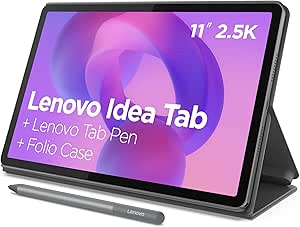 | Best Bundle for Notes and Media | Display: 11-inch 2.5K IPS touchscreen, 90Hz | Processor: MediaTek Dimensity 6300, up to 2.4GHz | Memory: 8GB | VIEW LATEST PRICE | See Our Full Breakdown |
| TCL TAB 10 Gen 4 Android Tablet, 10.1-Inch FHD Display, 4GB RAM, 128GB Storage |  | Best for Expandable Storage | Display: 10.1-inch IPS FHD, 1920 × 1200, 16:10 | Operating system: Android 15 | Processor: Octa-core MediaTek | VIEW LATEST PRICE | See Our Full Breakdown |
| ECOPAD 10.1-Inch Android 15 Tablet, 12GB RAM, 64GB Storage, Expandable to 1TB |  | Best for Basic, Expandable Use | Display: 10.1-inch IPS, 1280 × 800 | Operating system: Android 15 | Processor: Quad-core, up to 1.2GHz | VIEW LATEST PRICE | See Our Full Breakdown |
| URAO Tablet 11″ Android 16-Octa-core 36GB+128GB Gemini AI |  | Best Accessory Bundle | Display: 11-inch IPS, 1280 × 800 | Operating system: Android 16 | Processor: Octa-core | VIEW LATEST PRICE | See Our Full Breakdown |
| Jeazans X10APRO 10.1-Inch Android 16 Tablet with Speaker Dock |  | Best for a Docked Bedside Setup | Operating system: Android 16 | Display: 10-inch IPS, 800 × 1280 | Processor: 8-core Allwinner | VIEW LATEST PRICE | See Our Full Breakdown |
| Evermyth Android 16 Tablet 10-inch, 24 GB RAM, 64 GB ROM, 1 TB Expandable, HD IPS Display, Wi-Fi 6, Bluetooth 5.4 |  | Best for Expandable Media Storage | Operating system: Android 16 | Display: 10-inch HD IPS, 1280 × 800 | Processor: 5-core, 1.8GHz | VIEW LATEST PRICE | See Our Full Breakdown |
| NOVOJOY ZB10 10.1-Inch Android 15 Tablet with Case and Stylus |  | Best for First-Time Tablet Buyers | Operating system: Android 15 | Display: 10.1-inch IPS touchscreen, 1280 × 800 | Processor: 64-bit, 2.0GHz quad-core | VIEW LATEST PRICE | See Our Full Breakdown |
| URAO X109 10.1-Inch Android 16 Tablet, 36GB RAM, 128GB Storage |  | Best Budget Pick for Built-In Storage | Operating system: Android 16 | Display: 10.1-inch IPS touchscreen, 1280 × 800 | Processor: 1.8GHz octa-core Allwinner | VIEW LATEST PRICE | See Our Full Breakdown |
| Samsung Galaxy Tab A11+ 8GB RAM, 256GB Storage, AI Assist, Slim Light, Gray |  | Best Premium Step-Up | Display: 11-inch, 90Hz | Processor: MediaTek MT8775 octa-core | RAM: 8GB | VIEW LATEST PRICE | See Our Full Breakdown |
| Lenovo Tab One 8.7-Inch HD Tablet, 4GB RAM, 64GB Storage, MediaTek Helio G85, Folio Case Included | 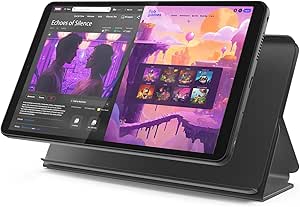 | Best Compact Pick | Display: 8.7-inch HD, 480 nits, 60Hz | Processor: MediaTek Helio G85 | Memory: 4GB RAM | VIEW LATEST PRICE | See Our Full Breakdown |
| Samsung Galaxy Tab A11+ 11-Inch Tablet, 6GB RAM, 128GB Storage, Expandable, Gray |  | Best Mainstream All-Rounder | Display: 11 inches, refresh rate up to 90Hz | Memory: 6GB RAM | Storage: 128GB, expandable via microSD | VIEW LATEST PRICE | See Our Full Breakdown |
| WXUNJA C5 11-Inch Android 16 Tablet, 28GB RAM, 128GB Storage, Blue |  | Best for Expandable Media Storage | Display: 11 inches, 1280 × 800 | Processor: Unisoc T606 octa-core, 1600 MHz | RAM: 28GB advertised (4GB physical RAM + 24GB expansion) | VIEW LATEST PRICE | See Our Full Breakdown |
| Nesusthin Android 16 Tablet 10-Inch, Octa-Core, 16GB RAM + 32GB Storage, 1TB Expandable, Gray |  | Best for Wi-Fi 6 on a Tight Setup | Display: 10-inch 1280 × 800 HD IPS In-Cell | Operating system: Android 16 | Processor: Octa-core T7200, up to 1.8GHz | VIEW LATEST PRICE | See Our Full Breakdown |
| budget Android tablet | Display | Processor | Storage | Operating system |
|---|---|---|---|---|
| Samsung Galaxy Tab A11+ 11-inc | 11-inch TFT LCD, 1920 × 1200, up to 90Hz | MediaTek Dimensity 7300, octa-core | 128GB | Android 16 with One UI 8; up to 7 major upgrades |
| Lenovo Idea Tab 11-Inch 2.5K T | 11-inch 2.5K IPS touchscreen, 90Hz | MediaTek Dimensity 6300, up to 2.4GHz | 256GB | — |
| TCL TAB 10 Gen 4 Android Table | 10.1-inch IPS FHD, 1920 × 1200, 16:10 | Octa-core MediaTek | 128GB internal; microSD support up to 1TB | Android 15 |
| ECOPAD 10.1-Inch Android 15 Ta | 10.1-inch IPS, 1280 × 800 | Quad-core, up to 1.2GHz | 64GB; expandable up to 1TB via SD card | Android 15 |
| URAO Tablet 11" Android 16-Oct | 11-inch IPS, 1280 × 800 | Octa-core | 128GB internal; expandable up to 1TB | Android 16 |
| Jeazans X10APRO 10.1-Inch Andr | 10-inch IPS, 800 × 1280 | 8-core Allwinner | 64GB, expandable to 1TB via TF card | Android 16 |
| Evermyth Android 16 Tablet 10- | 10-inch HD IPS, 1280 × 800 | 5-core, 1.8GHz | 64GB, expandable to 1TB via TF card | Android 16 |
| NOVOJOY ZB10 10.1-Inch Android | 10.1-inch IPS touchscreen, 1280 × 800 | 64-bit, 2.0GHz quad-core | 32GB, expandable to 1TB | Android 15 |
| URAO X109 10.1-Inch Android 16 | 10.1-inch IPS touchscreen, 1280 × 800 | 1.8GHz octa-core Allwinner | 128GB, expandable to 1TB with a TF card | Android 16 |
| Samsung Galaxy Tab A11+ 8GB RA | 11-inch, 90Hz | MediaTek MT8775 octa-core | 256GB, expandable via microSD | Android with Samsung UI |
| Lenovo Tab One 8.7-Inch HD Tab | 8.7-inch HD, 480 nits, 60Hz | MediaTek Helio G85 | 64GB | Android 14 |
| Samsung Galaxy Tab A11+ 11-Inc | 11 inches, refresh rate up to 90Hz | — | 128GB, expandable via microSD | — |
| WXUNJA C5 11-Inch Android 16 T | 11 inches, 1280 × 800 | Unisoc T606 octa-core, 1600 MHz | — | — |
| Nesusthin Android 16 Tablet 10 | 10-inch 1280 × 800 HD IPS In-Cell | Octa-core T7200, up to 1.8GHz | — | Android 16 |
More Details on Our Top Picks
Samsung Galaxy Tab A11+ 11-inch Wi-Fi Tablet, 128GB, 6GB RAM, Gray, with Generic 20W Charger
The Galaxy Tab A11+ pairs a sharp 11-inch screen with a 90Hz refresh rate, so scrolling and everyday navigation can feel smoother than on the TCL TAB 10 Gen 4. Its quad Dolby Atmos speakers also make it a stronger choice for shared video watching, while Samsung Kids gives parents controls suited to a family tablet. With 6GB of RAM and 128GB of storage, it has a more balanced everyday setup than the entry-level ECOPAD, whose 64GB capacity and lower-resolution screen call for more compromises.
The catches are specific to this listing: it is a Wi-Fi-only international model without a manufacturer warranty, and the included charger is generic. I’d favor it for home use, but buyers who value local warranty support or mobile data should look elsewhere.
Pros:- 11-inch WUXGA display with refresh rates up to 90Hz
- Quad stereo speakers with Dolby Atmos
- 6GB RAM and 128GB storage suit everyday apps and media
- Samsung Kids includes parental controls
Cons:- International model has no manufacturer warranty
- Wi-Fi only, with no SIM card slot
- Included 20W charger is generic rather than Samsung-branded
Best for: Families seeking an 11-inch tablet for streaming, browsing, and child-managed use at home.
Not ideal for: Buyers who need cellular connectivity, a U.S. manufacturer warranty, or a Samsung-branded charger.
- Display:11-inch TFT LCD, 1920 × 1200, up to 90Hz
- Operating system:Android 16 with One UI 8; up to 7 major upgrades
- Processor:MediaTek Dimensity 7300, octa-core
- Memory:6GB RAM
- Storage:128GB
- Audio:Quad stereo speakers with Dolby Atmos
- Battery:7040mAh
- Connectivity:Wi-Fi, Bluetooth 5.1, USB Type-C 2.0; no SIM slot
- Warranty and included charger:International model without manufacturer warranty; generic 20W charger included
Our verdict“Choose this Samsung for family media use and parental controls if you’re comfortable with Wi-Fi-only connectivity and no manufacturer warranty.”
Lenovo Idea Tab 11-Inch 2.5K Tablet with Tab Pen and Folio Case
The Lenovo Idea Tab is the most ready-to-use bundle here for note-taking and casual work: the Tab Pen and folio case are included, alongside 8GB of memory and 256GB of storage. Its 11-inch 2.5K, 90Hz IPS display gives text and images more detail than the TCL TAB 10 Gen 4’s FHD panel, making it the better fit for reading, sketching, and watching high-resolution video. Quad Dolby Atmos-tuned speakers and a stated YouTube playback life of up to 12 hours round out its media credentials.
The tradeoff is that this bundle prioritizes screen detail and accessories over a clearly specified storage expansion option; the product data doesn’t say whether storage is expandable. Compared with the Samsung Galaxy Tab A11+, it offers more built-in storage and bundled tools, but the Samsung lists a faster processor. I’d pick Lenovo for bundled versatility, not maximum processing headroom.
Pros:- 11-inch 2.5K IPS display with 90Hz refresh rate
- Tab Pen and folio case are included
- 8GB memory and 256GB built-in storage
- Quad Dolby Atmos-tuned speakers and up to 12 hours of YouTube playback
Cons:- Expandable storage is not specified
- Dimensity 6300 is a less powerful listed processor than the Samsung Galaxy Tab A11+’s Dimensity 7300
Best for: Students and casual note-takers who want a high-resolution screen, a pen, and a folio in one package.
Not ideal for: Buyers who need confirmed microSD expansion or prioritize processor performance over the included accessories.
- Display:11-inch 2.5K IPS touchscreen, 90Hz
- Processor:MediaTek Dimensity 6300, up to 2.4GHz
- Memory:8GB
- Storage:256GB
- Speakers:Quad Dolby Atmos-tuned speakers
- Battery:7216mAh
- Stated playback life:Up to 12 hours of YouTube playback
- Included accessories:Lenovo Tab Pen and folio case
- Warranty:1-year limited parts and labor
Our verdict“Pick the Lenovo if the included pen and case plus its detailed 2.5K display matter more than confirmed storage expansion or stronger processing.”
TCL TAB 10 Gen 4 Android Tablet, 10.1-Inch FHD Display, 4GB RAM, 128GB Storage
The TCL TAB 10 Gen 4 makes a practical case for buyers who want room for downloaded shows, photos, and files without relying on a large internal drive: its microSD slot supports cards up to 1TB. The 10.1-inch FHD screen keeps the resolution at 1920 × 1200, and its slim metal body weighs 0.87 lb, making it easier to carry than the larger-feeling ECOPAD. Compared with the Samsung Galaxy Tab A11+, TCL offers a headphone jack and stated microSD support, though it has less RAM and its description lists no high-refresh-rate display.
Its 4GB of RAM is the clearest performance limitation, especially beside Lenovo’s 8GB. The 6000mAh battery is paired with 18W fast-charging support, but a compatible charger is not included. This is a sensible pick for portable media and expandable capacity, not demanding multitasking or buyers who want everything needed to fast-charge in the box.
Pros:- FHD 1920 × 1200 IPS display with NXTVISION enhancement
- Supports microSD cards up to 1TB
- Lightweight 0.87 lb metal construction
- Includes Kids Space and Family Link parental controls
Cons:- 4GB of RAM is less than the Lenovo Idea Tab’s 8GB
- Compatible charger for 18W fast charging is not included
- Sound Booster is unavailable when using headphones
Best for: Travelers and media collectors who want a light tablet with a headphone jack and microSD expansion.
Not ideal for: Heavy multitaskers or buyers who want a high-refresh-rate screen and a fast-charging adapter included.
- Display:10.1-inch IPS FHD, 1920 × 1200, 16:10
- Operating system:Android 15
- Processor:Octa-core MediaTek
- Memory:4GB RAM, plus up to 8GB expandable RAM
- Storage:128GB internal; microSD support up to 1TB
- Battery:6000mAh
- Charging:18W fast charging; compatible charger required and not included
- Connectivity:Wi-Fi 5, Bluetooth 5.1, USB-C, 3.5mm headphone jack
- Weight and construction:0.87 lb; unibody metal
Our verdict“Choose the TCL for a portable FHD tablet with generous microSD expansion, but skip it if you need stronger multitasking or an included fast charger.”
ECOPAD 10.1-Inch Android 15 Tablet, 12GB RAM, 64GB Storage, Expandable to 1TB
The ECOPAD 10.1-inch is a straightforward choice for reading, basic browsing, and occasional video when expandable storage matters more than screen detail. It has 64GB built in and supports an SD card up to 1TB, which can help keep media on the tablet without filling internal storage. Its listed 12GB of RAM is described as 4GB plus 8GB, so buyers should not read that figure as 12GB of physical memory. Against the TCL TAB 10 Gen 4, ECOPAD offers a similar 10.1-inch size and expandable capacity, but TCL’s 1920 × 1200 screen is sharper than ECOPAD’s 1280 × 800 panel.
That lower resolution is the main compromise for text and fine detail, and the quad-core processor is modestly specified at up to 1.2GHz. The SD card is sold separately. I’d keep this pick to lighter tasks rather than choose it over the Lenovo for more demanding use or richer screen detail.
Pros:- 10.1-inch IPS touchscreen
- Storage expandable up to 1TB via a separately sold SD card
- 6000mAh battery rated for up to 8 hours of video playback
- Android 15 and dual cameras
Cons:- 1280 × 800 resolution is lower than the TCL TAB 10 Gen 4’s FHD display
- Quad-core processor is specified at up to 1.2GHz
- SD card needed for expansion is sold separately
Best for: Readers and casual users who want a basic large-screen tablet with room to add a separate SD card.
Not ideal for: People who watch lots of high-resolution video, read fine text for long sessions, or expect demanding multitasking.
- Display:10.1-inch IPS, 1280 × 800
- Operating system:Android 15
- Processor:Quad-core, up to 1.2GHz
- Memory:12GB listed (4GB + 8GB)
- Storage:64GB; expandable up to 1TB via SD card
- Battery:6000mAh
- Stated video playback:Up to 8 hours
- Cameras:2MP front, 8MP rear
- Connectivity:Dual-band Wi-Fi, Bluetooth 5.0
Our verdict“Choose the ECOPAD for light everyday tasks and optional high-capacity storage, but opt for the TCL if screen sharpness is a priority.”
URAO Tablet 11″ Android 16-Octa-core 36GB+128GB Gemini AI
The URAO X7L stands out among these budget Android tablets by including a keyboard, stylus, and headphones, making it the most accessory-rich option in this group. Wi-Fi 6 and Bluetooth 5.4 are also newer wireless standards than the Wi-Fi 5 and Bluetooth 5.1 listed for the TCL TAB 10 Gen 4. Its 128GB of internal storage can be expanded up to 1TB, and the 7800mAh battery has more stated capacity than the 6000mAh units in the TCL and ECOPAD.
Don’t let the 36GB RAM headline decide the purchase by itself: the product data does not explain how that memory figure is configured. The 11-inch screen is listed at 1280 × 800, so it lacks the detail of the Lenovo Idea Tab’s 2.5K panel and is not clearly “FHD” by resolution. Camera resolution is modest, too. I’d choose it for the bundled typing-and-stylus setup, not for display quality or verified memory performance.
Pros:- Keyboard, stylus, and headphones are included
- Wi-Fi 6 and Bluetooth 5.4 connectivity
- 128GB internal storage with expansion up to 1TB
- 7800mAh battery capacity
Cons:- 1280 × 800 resolution is lower than the Lenovo Idea Tab’s 2.5K display
- 36GB RAM figure is not explained in the provided specifications
- Modest 5MP rear and 8MP front camera resolution
Best for: Casual users who want a keyboard and stylus included for light typing, browsing, and handwritten notes.
Not ideal for: Buyers who prioritize a sharp screen, detailed camera specifications, or clearly documented physical RAM.
- Display:11-inch IPS, 1280 × 800
- Operating system:Android 16
- Processor:Octa-core
- Memory:36GB listed; configuration not specified
- Storage:128GB internal; expandable up to 1TB
- Battery:7800mAh
- Wireless connectivity:Wi-Fi 6 (802.11ax), Bluetooth 5.4
- Cameras:5MP rear, 8MP front
- Included accessories:Keyboard, stylus, and headphones
Our verdict“Pick the URAO if you want a ready-made keyboard-and-stylus bundle, but choose the Lenovo Idea Tab for a sharper screen and clearer memory specification.”
Jeazans X10APRO 10.1-Inch Android 16 Tablet with Speaker Dock
I’d choose the Jeazans X10APRO for its included speaker dock, not for a sharper screen or stronger performance claim. The dock adds practical bedside functions—magnetic wireless charging, ambient lighting, white noise, a clock, and a photo frame—so it can serve as more than a tablet when it’s parked. Its 64GB storage can grow with a TF card, though the card is sold separately, and Wi-Fi 6 and Bluetooth 5.4 provide current wireless standards.
The tradeoff is the 800 × 1280 display, which is modest for a 10-inch screen. Compared with the URAO X109, Jeazans gives up the larger 128GB built-in storage and 18W charging in exchange for the dock. I’d skip it if a dock would sit unused or screen detail matters more than the bedside extras.
Pros:- Included dock combines magnetic charging with clock, lighting, white-noise, and photo-frame modes
- 64GB built-in storage can be expanded with a TF card
- Wi-Fi 6 and Bluetooth 5.4
- USB Type-C charging is supported alongside dock charging
Cons:- 800 × 1280 resolution is limited for a 10-inch display
- TF card for expanded storage is not included
- The dock’s extra functions add little value if the tablet will not stay parked
Best for: Readers who want a 10-inch Android tablet that can double as a bedside clock, white-noise player, and charging station.
Not ideal for: Buyers who prioritize a sharper display, higher built-in storage, or a tablet they will mainly use away from its dock.
- Operating system:Android 16
- Display:10-inch IPS, 800 × 1280
- Processor:8-core Allwinner
- Memory:36GB (6GB + 30GB)
- Storage:64GB, expandable to 1TB via TF card
- Battery:6000mAh, 18Wh
- Connectivity:Wi-Fi 6, Bluetooth 5.4
- Charging and included component:Type-C; magnetic wireless charging via included speaker dock
Our verdict“Pick the Jeazans if its multifunction speaker dock will earn a place on your nightstand; otherwise, the URAO X109 offers more built-in storage and faster wired charging.”
Evermyth Android 16 Tablet 10-inch, 24 GB RAM, 64 GB ROM, 1 TB Expandable, HD IPS Display, Wi-Fi 6, Bluetooth 5.4
The Evermyth makes the most sense for a buyer who wants an inexpensive 10-inch screen and room for a sizable offline media library. Its 64GB internal storage can be expanded up to 1TB with a TF card, while Wi-Fi 6 and Bluetooth 5.4 cover newer wireless connections. The listed battery capacity is 6000mAh, with up to eight hours of mixed use claimed in the product details.
I would treat its 24GB RAM figure cautiously: 21GB is virtual memory, not physical RAM, so it is not equivalent to a tablet with 24GB of installed memory. The five-core processor and 1280 × 800 screen also point to basic browsing, reading, and video rather than demanding work or fine-detail viewing. Compared with the NOVOJOY ZB10, Evermyth doubles the internal storage and uses a newer listed Android version, but NOVOJOY includes a case and stylus.
Pros:- 64GB internal storage with TF-card expansion up to 1TB
- Wi-Fi 6 and Bluetooth 5.4
- 6000mAh battery with up to eight hours of mixed use claimed
- Android 16 is listed as the operating system
Cons:- Only 3GB of the advertised 24GB RAM is physical; the rest is virtual memory
- 1280 × 800 resolution is modest on a 10-inch screen
- TF card is not included
Best for: Budget-conscious streamers and readers who want a 10-inch tablet with expandable space for downloaded videos, books, and music.
Not ideal for: Buyers who expect the advertised 24GB memory to mean 24GB of physical RAM, or who need a high-resolution screen for detailed work.
- Operating system:Android 16
- Display:10-inch HD IPS, 1280 × 800
- Processor:5-core, 1.8GHz
- RAM:24GB total (3GB physical + 21GB virtual)
- Storage:64GB, expandable to 1TB via TF card
- Cameras:5MP front, 8MP rear
- Battery:6000mAh; up to 8 hours of mixed use claimed
- Connectivity and port:Wi-Fi 6, Bluetooth 5.4, Type-C
Our verdict“Choose the Evermyth for expandable media storage and newer listed wireless standards, but favor the NOVOJOY ZB10 if included case-and-stylus accessories matter more.”
NOVOJOY ZB10 10.1-Inch Android 15 Tablet with Case and Stylus
The NOVOJOY ZB10 is a straightforward starter package: it includes a protective case and stylus, so a buyer can get basic note-taking and everyday tablet use underway without sourcing those accessories separately. Its 10.1-inch IPS touchscreen has 1280 × 800 resolution, and Wi-Fi 6, Bluetooth 5.0, and GPS give it a useful mix of wireless and location features. Storage can be expanded up to 1TB, which helps offset its small 32GB built-in capacity.
This is a basic-use choice rather than a performance pick. Its quad-core processor and listed 8GB RAM, which includes 5GB of expansion, are a more modest proposition than the octa-core URAO X109. That URAO also starts with 128GB of storage, while NOVOJOY’s appeal is the included accessories and GPS. I’d pass if you keep many apps or large downloads installed and do not want to add a TF card.
Pros:- Protective case and stylus are included
- GPS is listed alongside Wi-Fi 6 and Bluetooth 5.0
- Expandable storage supports TF cards up to 1TB
- 6000mAh battery is rated for up to 6–8 hours of continuous use
Cons:- 32GB built-in storage leaves limited room before expansion
- 1280 × 800 resolution is modest for a 10.1-inch screen
- Quad-core processor is less capable on paper than the octa-core URAO X109
Best for: First-time tablet owners, students, or families who want a case and stylus included for light browsing, reading, and handwritten notes.
Not ideal for: Multitaskers or users who keep many apps and downloads on-device, since built-in storage is 32GB and the processor is quad-core.
- Operating system:Android 15
- Display:10.1-inch IPS touchscreen, 1280 × 800
- Processor:64-bit, 2.0GHz quad-core
- RAM:8GB, including 5GB expansion
- Storage:32GB, expandable to 1TB
- Battery:6000mAh; up to 6–8 hours of continuous use
- Cameras:2MP front, 8MP rear
- Connectivity and port:Wi-Fi 6, Bluetooth 5.0, GPS, Type-C
- Included accessories:Protective case, stylus, Type-C cable
Our verdict“Pick the NOVOJOY if you want a basic tablet with a case and stylus included, but choose the URAO X109 for more built-in storage and an octa-core processor.”
URAO X109 10.1-Inch Android 16 Tablet, 36GB RAM, 128GB Storage
The URAO X109 is the strongest fit here for buyers who want to keep more content on the tablet before adding accessories or a memory card. Its 128GB built-in storage is twice the capacity of the Jeazans X10APRO and Evermyth, and it can be expanded up to 1TB with a TF card. The octa-core Allwinner processor, Wi-Fi 6, Bluetooth 5.4, and 18W USB-C fast charging make for a better-equipped everyday package than the entry-level NOVOJOY ZB10.
There are limits: the 10.1-inch screen remains 1280 × 800, and the 36GB RAM figure includes 30GB of expansion rather than representing 36GB of physical memory. GPS is not included, so this is a weaker fit for location-dependent use than NOVOJOY. I’d shortlist it for browsing, streaming, and downloads, but not for readers seeking a sharper panel or navigation support.
Pros:- 128GB built-in storage, expandable up to 1TB with a TF card
- Octa-core Allwinner processor
- 18W fast charging via USB Type-C
- Wi-Fi 6, Bluetooth 5.4, and front and rear cameras
Cons:- 1280 × 800 resolution is limited for a 10.1-inch display
- 30GB of the advertised 36GB RAM is expansion memory, not physical RAM
- GPS is not included, and the TF card is sold separately
Best for: Budget buyers who want a general-purpose 10.1-inch tablet with more built-in space for apps and downloaded media.
Not ideal for: Travelers who need GPS, or readers who prioritize a high-resolution screen over storage and charging features.
- Operating system:Android 16
- Display:10.1-inch IPS touchscreen, 1280 × 800
- Processor:1.8GHz octa-core Allwinner
- RAM:36GB total (6GB + 30GB)
- Storage:128GB, expandable to 1TB with a TF card
- Cameras:5MP front, 8MP rear
- Battery and charging:6000mAh, 18Wh; 18W USB Type-C fast charging
- Connectivity:Wi-Fi 6, Bluetooth 5.4; GPS not included
- Warranty:2 years
Our verdict“Choose the URAO X109 if you want more built-in storage and 18W charging than the Jeazans or Evermyth provide, but skip it if GPS or a sharper display is a priority.”
Samsung Galaxy Tab A11+ 8GB RAM, 256GB Storage, AI Assist, Slim Light, Gray
Among these five, the Samsung Galaxy Tab A11+ is the clearest step-up for buyers willing to put display smoothness, audio, and built-in capacity ahead of bundled extras. Its 11-inch screen runs at 90Hz, while Dolby Atmos quad speakers give movies and shows a more audio-focused setup than the listed 10-inch tablets. The 8GB RAM and 256GB storage also provide substantially more stated capacity than the Jeazans X10APRO, Evermyth, and NOVOJOY ZB10; microSD expansion adds room for files.
That richer setup does not make it the best fit for every budget-tablet buyer. The other models include more distinctive low-cost extras, such as the Jeazans speaker dock or NOVOJOY’s case and stylus, while Samsung includes neither a stylus nor a keyboard. Its 25W fast charger is sold separately, too. I’d favor Samsung for media and everyday multitasking, but not if accessory value is the main goal.
Pros:- 11-inch display with a 90Hz refresh rate
- Dolby Atmos quad speakers
- 8GB RAM and 256GB storage, expandable via microSD
- MediaTek octa-core processor and fast-charging support
Cons:- 25W fast charger is sold separately
- No stylus or keyboard is included
- Larger than the 10-inch Jeazans, Evermyth, NOVOJOY, and URAO tablets
Best for: Buyers who can stretch beyond basic entry-level tablets for a larger, smoother display, stronger listed audio features, and ample onboard storage.
Not ideal for: Shoppers focused on bundled accessories or keeping the setup simple, since no stylus or keyboard is included and the 25W charger is sold separately.
- Display:11-inch, 90Hz
- Processor:MediaTek MT8775 octa-core
- RAM:8GB
- Storage:256GB, expandable via microSD
- Operating system:Android with Samsung UI
- Audio:Dolby Atmos quad speakers
- Battery:26.34Wh
- Warranty:2 years
Our verdict“Choose the Galaxy Tab A11+ if smoother visuals, quad-speaker audio, and more storage matter more than a lower-cost tablet’s included dock, case, or stylus.”
Lenovo Tab One 8.7-Inch HD Tablet, 4GB RAM, 64GB Storage, MediaTek Helio G85, Folio Case Included
The Lenovo Tab One is the clearest choice here for readers who want a tablet that is easy to carry and hold one-handed. Its 8.7-inch HD screen is smaller than the Galaxy Tab A11+’s 11-inch display, but the tradeoff is a more portable body and a folio case with a built-in stand already included. Dual Dolby Atmos speakers and a stated YouTube runtime of up to 12.5 hours make it suited to casual viewing without adding a separate stand or speaker. The Helio G85 and 4GB RAM fit everyday browsing and video better than demanding multitasking, while 64GB of storage can fill quickly with downloaded media. I’d choose the Samsung for a larger workspace and more memory; this Lenovo makes more sense when compact size matters most.
Pros:- Compact 8.7-inch form is easier to carry than the 11-inch tablets in this group
- Folio case with built-in stand is included
- Dual Dolby Atmos speakers support casual video and music listening
- Rated for up to 12.5 hours of YouTube streaming
Cons:- 4GB RAM is a modest fit for demanding apps and heavy multitasking
- 64GB internal storage may be limiting for downloaded shows and games
- HD resolution offers less screen detail than higher-resolution alternatives
Best for: Commuters, younger users, and casual viewers who want a compact Android tablet with a stand case included
Not ideal for: People who need a roomy screen for schoolwork, frequent multitasking, or a large offline media library
- Display:8.7-inch HD, 480 nits, 60Hz
- Processor:MediaTek Helio G85
- Memory:4GB RAM
- Storage:64GB
- Operating system:Android 14
- Battery life:Up to 12.5 hours of YouTube streaming
- Audio:Dual Dolby Atmos speakers
- Included accessory:Folio case with built-in stand
Our verdict“Choose the Lenovo Tab One if portability and an included stand case matter more than a large display or generous memory.”
Samsung Galaxy Tab A11+ 11-Inch Tablet, 6GB RAM, 128GB Storage, Expandable, Gray
Among these four, the Galaxy Tab A11+ offers the most balanced setup for shared household use: an 11-inch screen, 6GB RAM, and 128GB of storage with room to expand by microSD. That gives it a more comfortable canvas for schoolwork and split-screen tasks than the compact Lenovo Tab One, while its quad speakers and refresh rate up to 90Hz suit everyday streaming and scrolling. The Samsung is a more established-brand alternative to the WXUNJA C5, whose larger advertised RAM figure includes virtual expansion rather than all physical memory. The tradeoff is that the microSD card and 25W charger are separate purchases, so the included package is less ready-to-go than the Lenovo’s. I’d favor it for a more capable general-purpose tablet, not for shoppers seeking the smallest or simplest option.
Pros:- 11-inch display with refresh rate up to 90Hz
- 6GB RAM and 128GB internal storage provide a stronger everyday starting point than the 4GB/64GB Lenovo
- Storage can be expanded with a separately purchased microSD card
- Quad Dolby Atmos speakers and fast-charging support
Cons:- MicroSD card is not included
- 25W wall charger is sold separately
- Larger 11-inch size is less convenient to carry than the Lenovo Tab One
Best for: Households and students who want an 11-inch tablet for streaming, school tasks, browsing, and expandable storage
Not ideal for: Buyers who want a charger and storage card included or prioritize a highly portable, one-handed tablet
- Display:11 inches, refresh rate up to 90Hz
- Memory:6GB RAM
- Storage:128GB, expandable via microSD
- Processor speed:1.85
- Battery energy:26.34 watt-hours
- Audio:Quad speakers with Dolby Atmos
- Front camera:5MP
- Warranty:2 years
Our verdict“Pick the Galaxy Tab A11+ for a versatile large-screen tablet with more physical memory and storage flexibility, provided you are prepared to buy accessories separately.”
WXUNJA C5 11-Inch Android 16 Tablet, 28GB RAM, 128GB Storage, Blue
The WXUNJA C5 is aimed at budget buyers who want a large screen and room for a sizeable media library. Its 128GB storage plus support for an SD card up to 1TB gives it an advantage over the Lenovo Tab One’s 64GB capacity for downloaded video, while Widevine L1 certification supports compatible high-definition streaming services. The 11-inch, 1280 × 800 display is spacious, but it is not especially sharp; the Samsung Galaxy Tab A11+ is the more appealing alternative if you want a smoother display, with a refresh rate up to 90Hz. WXUNJA advertises 28GB RAM, but that combines 4GB physical RAM with 24GB of expansion, so I would not treat it as equivalent to 28GB of installed memory. Its included case and two-year warranty add practical value, but the modest resolution and entry-level processor define its limits.
Pros:- Widevine L1 certification supports HD playback on compatible streaming services
- 128GB internal storage and microSD support up to 1TB
- Includes a case and supports GPS and Bluetooth 5.0
- 8000mAh battery is rated for 8–10 hours of playback
Cons:- The stated 28GB RAM includes 24GB of virtual expansion; physical RAM is 4GB
- 1280 × 800 resolution is relatively low for an 11-inch display
- Unisoc T606 is a modest processor for demanding games and intensive multitasking
Best for: Streaming-focused buyers who want an 11-inch screen, Widevine L1 support, and substantial expandable media storage
Not ideal for: Multitaskers who expect 28GB of physical RAM or readers who want sharper display detail and smoother motion
- Display:11 inches, 1280 × 800
- Processor:Unisoc T606 octa-core, 1600 MHz
- RAM:28GB advertised (4GB physical RAM + 24GB expansion)
- Internal storage:128GB
- Expandable storage:Up to 1TB via SD card
- Battery:8000mAh; rated for 8–10 hours of playback
- Streaming certification:Widevine L1
- Included components:USB-C cable, power adapter, and case
Our verdict“Choose the WXUNJA C5 for expandable streaming storage and included accessories, not for high-resolution viewing or heavy multitasking.”
Nesusthin Android 16 Tablet 10-Inch, Octa-Core, 16GB RAM + 32GB Storage, 1TB Expandable, Gray
The Nesusthin P10 Pro stands out for wireless connectivity rather than raw memory: it lists Wi-Fi 6 and Bluetooth 5.0 in a 10-inch package. Its 1280 × 800 screen is a practical size for browsing and video, though the WXUNJA C5 offers a larger 11-inch viewing area and Widevine L1 certification. The advertised 16GB RAM needs context: only 4GB is physical memory, with the remainder supplied as virtual expansion, so it should not be read as a high-memory multitasking machine. Its 32GB internal storage is also the smallest starting capacity here, and filling that gap requires a separate microSD card. Compared with the Lenovo Tab One, this model gives up the included folio case and its longer stated streaming runtime, but adds Wi-Fi 6 and storage expansion up to 1TB.
Pros:- Wi-Fi 6 support for compatible networks
- Expandable storage supports microSD cards up to 1TB
- 10-inch HD IPS In-Cell display with low-blue-light technology
- Octa-core processor and Bluetooth 5.0
Cons:- Only 4GB of the advertised 16GB RAM is physical memory
- 32GB internal storage is limited, and the microSD card is not included
- 1280 × 800 resolution is less detailed than a higher-resolution screen
Best for: Budget buyers who want a 10-inch tablet with Wi-Fi 6 and are comfortable adding a microSD card for more storage
Not ideal for: People who keep many apps or videos on-device, need strong multitasking, or want accessories included
- Display:10-inch 1280 × 800 HD IPS In-Cell
- Operating system:Android 16
- Processor:Octa-core T7200, up to 1.8GHz
- RAM:16GB advertised; 4GB physical RAM
- Internal storage:32GB
- Expandable storage:Up to 1TB via microSD; card not included
- Battery:6000mAh; up to 8 hours of mixed use
- Connectivity:Wi-Fi 6 and Bluetooth 5.0
Our verdict“Consider the Nesusthin if Wi-Fi 6 and expandable storage matter more than generous built-in capacity, bundled accessories, or heavy multitasking.”
How We Picked
I ranked these tablets by how convincingly their listed features support common budget-tablet jobs: web browsing, streaming, reading, video calls, light schoolwork, and casual multitasking. I gave more weight to usable memory and storage, screen resolution and size, recognizable processor information, and practical extras than to headline figures that are difficult to compare. The Samsung Galaxy Tab A11+ 8GB/256GB leads because its configuration offers the clearest headroom within the Samsung group; the 6GB/128GB versions remain relevant but are less equipped for heavier app use. The Lenovo Idea Tab earns a separate place for its sharper screen and included pen, while the compact Lenovo Tab One ranks for portability rather than screen or workspace size.
I also considered the tradeoffs that matter when choosing a lower-cost Android device: whether a tablet’s configuration is clearly specified, how much storage can be added, and whether bundled accessories serve a real need. Less familiar models with high advertised RAM totals are not treated as automatic performance leaders because memory figures alone do not establish processor speed or sustained responsiveness. The ranking favors stronger evidence of a balanced everyday experience, while preserving niche picks for buyers who value a particular screen size, accessory bundle, or expandable storage more than broad versatility.
| budget Android tablet | Operating system |
|---|---|
| Samsung Galaxy Tab A11+ 11-inc | Android 16 with One UI 8; up to 7 major upgrades |
| Lenovo Idea Tab 11-Inch 2.5K T | — |
| TCL TAB 10 Gen 4 Android Table | Android 15 |
| ECOPAD 10.1-Inch Android 15 Ta | Android 15 |
| URAO Tablet 11" Android 16-Oct | Android 16 |
| Jeazans X10APRO 10.1-Inch Andr | Android 16 |
| Evermyth Android 16 Tablet 10- | Android 16 |
| NOVOJOY ZB10 10.1-Inch Android | Android 15 |
| URAO X109 10.1-Inch Android 16 | Android 16 |
| Samsung Galaxy Tab A11+ 8GB RA | Android with Samsung UI |
| Lenovo Tab One 8.7-Inch HD Tab | Android 14 |
| Samsung Galaxy Tab A11+ 11-Inc | — |
| WXUNJA C5 11-Inch Android 16 T | — |
| Nesusthin Android 16 Tablet 10 | Android 16 |
Factors to Consider When Choosing Budget Android Tablets
Before choosing among these budget Android tablets, I would start with the job the device needs to do and the limits you are willing to accept. A large screen, extra storage, or a bundled pen can look compelling, but none fixes a poor match between the tablet’s performance and your daily apps.
Match Screen Size to How You Hold and Use It
An 8.7-inch tablet is easier to carry in a small bag and hold for long reading sessions, while a 10- or 11-inch display gives video, documents, and split-screen apps more room. Larger does not automatically mean better: it can make a tablet less comfortable to use one-handed and less convenient for travel. Think about where the device will live when you are not using it, since a tablet that stays at home can benefit from a larger panel. For schoolwork or frequent typing, screen area matters more than it does for casual reading. If you mostly stream, compare resolution as well as diagonal size because a larger screen can still look less detailed. A smaller model can be the smarter budget purchase when portability is your primary need.
Treat RAM Numbers and Processor Details Separately
RAM helps a tablet keep several apps active, but it is only one part of responsiveness. Some listings advertise unusually large totals that may include virtual memory drawn from storage; that is not equivalent to the same amount of physical RAM. Look for a clearly identified processor and read the memory configuration in context rather than choosing by the biggest number. For browsing, video, and a few everyday apps, modest hardware may be adequate. Gaming, demanding creative apps, or frequent switching between many apps call for a more capable, clearly specified configuration. A tablet with believable specifications and balanced hardware is often a safer choice than one promoted mainly through a headline memory figure.
Choose Storage for Your Offline Habits
Installed apps, downloaded shows, photos, and school files can use up internal storage faster than expected. A 32GB or 64GB configuration may work for streaming-first use, but it leaves less room for offline media and large apps. Expandable storage can help with files and downloads, though not every app can be moved to a card and a card may not match internal storage speed. Buyers who rarely have reliable Wi-Fi should prioritize more built-in storage or confirm the tablet supports the kind of expansion they plan to use. Do not treat a large expansion limit as a substitute for adequate base storage. Choose based on what you will keep on the device, not on a maximum capacity figure alone.
Pay for Display Quality When Your Tasks Benefit
A sharper screen is most useful for reading small text, viewing detailed diagrams, or working with documents for long stretches. For occasional streaming and casual browsing, a standard HD or FHD panel may be a reasonable compromise if it leaves room in the budget for better memory or storage. Resolution is not the only factor: brightness, viewing angles, and text clarity also affect comfort, though listings may not provide enough information to compare them. Pen support can make handwriting and annotation more practical, but only if you expect to use those features regularly. Avoid paying for a high-resolution display simply because the number looks impressive. Match screen quality to the hours and tasks you will actually spend on it.
Check Accessories, Connectivity, and Bundle Details
A folio case, stylus, charger, or speaker dock can make a tablet more convenient from day one, but a bundle is valuable only when the accessory fits your routine. Verify exactly what is included, especially when a listing names a generic charger or bundled pen. A case can protect a device and support hands-free viewing, while a speaker dock may suit a stationary kitchen or desk setup better than travel. Also check Wi-Fi needs and Bluetooth support if you rely on wireless headphones, keyboards, or other accessories. Do not assume every included item is equivalent to a separately chosen accessory in quality or compatibility. Compare the complete setup you need, rather than counting bundle items as automatic savings.
Set Expectations for Updates and Long-Term Use
A budget tablet can be a sound choice for straightforward tasks, but buyers should think about how long they expect to keep it and what software support is stated by the manufacturer. A newer Android version in a product title does not, by itself, reveal the update schedule or the device’s longer-term support. For a child’s first tablet or an occasional streaming screen, short-term simplicity may matter more than years of heavy use. For school, work, or regular multitasking, a more established model with a clearly described configuration can reduce uncertainty. Check warranty, repair options, and return terms before buying, since these affect the practical cost of ownership. Choose a device with enough performance headroom for the apps you expect to use next, not only the ones you use today.
Frequently Asked Questions
Is the Samsung Galaxy Tab A11+ with 8GB RAM worth choosing over the 6GB version?
I would favor the 8GB/256GB configuration if you keep many apps open, download media, or want more room before managing files. The 6GB/128GB versions still suit basic browsing, video, reading, and lighter app use, so extra capacity may not change your experience if your needs are simple. The larger configuration offers more headroom, not a guarantee that every app will run faster. Compare the exact listing and included accessories, since the A11+ names appear in several configurations. If you expect to keep the tablet for several years, the additional memory and storage make the higher configuration the more flexible choice.
Should I choose the Lenovo Idea Tab’s 2.5K screen or a tablet with more memory?
Choose the sharper screen if you spend long sessions reading small text, annotating documents, or viewing detailed content, especially since the Idea Tab includes a pen and folio case. More memory is the better priority if your main frustration is apps reloading or switching between tasks. A high-resolution display improves what you see, but it cannot compensate for limited performance in demanding apps. For casual streaming, the screen advantage may matter less than storage or a smoother multitasking setup. Decide by identifying the limitation you are most likely to notice every day.
Are tablets advertising 24GB or 36GB of RAM necessarily faster?
No. A listing’s advertised figure may combine physical RAM with virtual memory that uses internal storage, and the processor also has a major role in speed. Virtual memory can help with keeping tasks available, but it is not a direct substitute for physical memory. Compare the processor, storage configuration, software support, and clarity of the product specifications rather than ranking devices by the largest RAM total. If the listing does not explain how its memory figure is calculated, treat it cautiously. For demanding use, favor a well-specified device over an impressive but unclear headline number.
Is an 8.7-inch tablet too small for schoolwork or video calls?
It can handle reading, notes, and video calls, but the smaller display gives documents and on-screen controls less room. The Lenovo Tab One is more portable than the 10- and 11-inch options, which can be a meaningful advantage for commuting or carrying it between classes. Long writing sessions and split-screen work are generally more comfortable on a larger tablet, particularly with a keyboard. For occasional assignments, a compact model may be enough; for daily study, compare screen space and accessory support before choosing. Consider whether portability or a more open workspace matters more in your routine.
Should I buy a tablet with expandable storage instead of a larger built-in capacity?
Expandable storage can be a sensible way to carry photos, downloads, and documents without relying only on internal space. It may not support every app or deliver the same speed as built-in storage, so it is not a full replacement for a larger internal configuration. If you install many apps or keep games offline, prioritize adequate built-in capacity. If your main need is storing media files, a supported memory card can offer flexibility. Confirm the expansion limit and card support on the exact model listing before making that plan.
Conclusion
For the broadest everyday fit, I recommend the Samsung Galaxy Tab A11+ 8GB/256GB as best overall, thanks to its stronger listed memory and storage combination within the A11+ lineup. The best value for basic use is a 6GB/128GB Galaxy Tab A11+ configuration if browsing, video, and reading are your main tasks and you do not need extra capacity. For a more premium-feeling screen and pen-based work, choose the Lenovo Idea Tab; for beginners who want a straightforward, portable first tablet, the Lenovo Tab One is the easiest size to carry. Buyers who need a bundled speaker dock or expandable storage should compare those specific options against their actual setup rather than treating the largest advertised RAM figure as a shortcut to performance. Match the device to your main use: screen detail, portability, memory headroom, or accessory convenience.
Halloween Picks
halloween
As an affiliate, we earn on qualifying purchases.