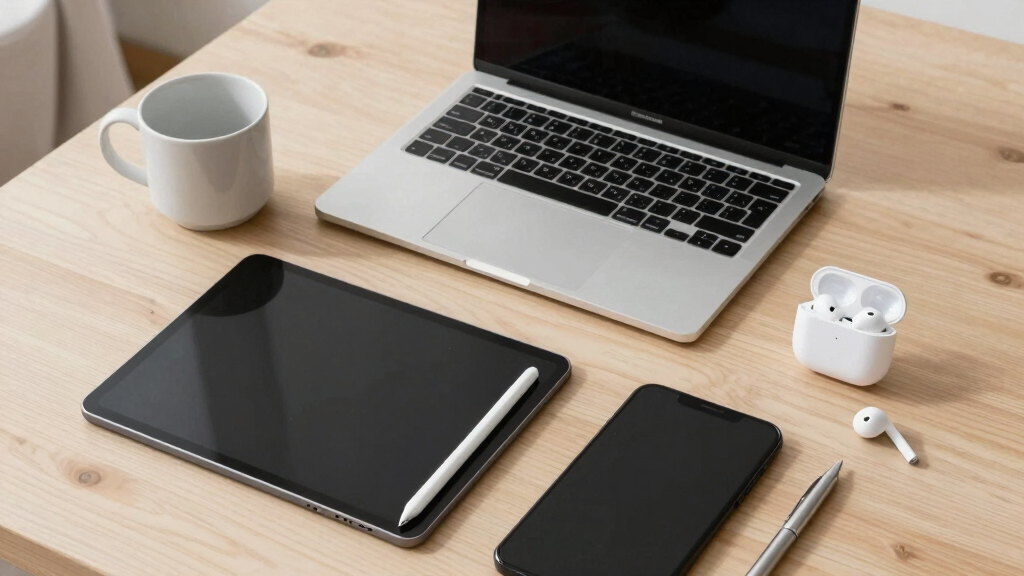

The Apple iPad 11-Inch With A16 Chip is my best overall pick because it offers the strongest mix of speed, display quality, app support, and long-term usefulness in this lineup. The Samsung Galaxy Tab A11+ stands out as the better Android value, while the Fusion5 Helios 12 makes more sense for buyers who need a Windows tablet with more storage and included pen support. The biggest tradeoff is ecosystem: iPad models feel smoother for apps and media, Android gives better budget flexibility, and Windows tablets work better for desktop software but can feel less polished as pure tablets. Storage, keyboard support, processor strength, and renewed-device risk separate the top picks from the rest. Keep reading for the full breakdown by buyer type, budget, and daily workload.

Get the latest gadgets delivered free — and shop member deals
- Fast, free delivery on millions of items
- Access to Prime Big Deal Days deals on October 6–7
- Prime Video, Amazon Music and more included
Key Takeaways
- The Apple iPad 11-Inch With A16 Chip is the strongest all-around choice because it combines the best app ecosystem, fastest everyday performance, and broadest accessory path.
- The Samsung Galaxy Tab A11+ offers the clearest value play for buyers who want a modern tablet with more built-in storage than the renewed 7th-generation iPad.
- Windows models in this roundup split into two camps: the Fusion5 Helios 12 and QAZIPO 2-in-1 favor laptop-like productivity, while the rugged Fusion5 WIN PRO is more specialized.
- Renewed Apple and Microsoft picks can save money, but they carry more risk around battery health, cosmetic condition, and long-term update expectations.
- The lineup shows that RAM and storage matter more on Windows tablets than on iPads, because desktop apps, updates, and background tasks can fill resources quickly.
| Apple iPad (7th Generation), 10.2-Inch, Wi-Fi, 32GB, Space Gray (Renewed) |  | Best Budget iPad | Brand: Apple | Model: iPad 7th Generation | Display: 10.2-inch | VIEW LATEST PRICE | See Our Full Breakdown |
| Samsung Galaxy Tab A11+ 6GB RAM, 128GB Storage |  | Best Android Value | Brand: Samsung | Model: Galaxy Tab A11+ | Screen Size: 11 inches | VIEW LATEST PRICE | See Our Full Breakdown |
| 10.1″ Windows 11 Tablet with 6GB RAM, 128GB Storage, Intel Processor |  | Best Low-Cost Windows Tablet | Display: 10.1 inches | Operating System: Windows 11 Home | Processor: Intel processor | VIEW LATEST PRICE | See Our Full Breakdown |
| Apple iPad 11-inch with A16 Chip, Liquid Retina Display, and Blue Color |  | Best Overall Tablet | Brand: Apple | Model Number: MD4A4LL/A | Display: 11-inch Liquid Retina with True Tone | VIEW LATEST PRICE | See Our Full Breakdown |
| QAZIPO 2-in-1 Laptop Tablet with Magnetic Keyboard, 12″ 2K IPS Touchscreen, 12GB RAM, 512GB SSD, Intel Pentium Gold 6500Y Processor, Windows 11 |  | Best 2-in-1 Productivity Pick | Display: 12-inch 2K IPS touchscreen | Color Coverage: 100% sRGB | Processor: Intel Pentium Gold 6500Y, up to 3.4GHz | VIEW LATEST PRICE | See Our Full Breakdown |
| Fusion5 Helios 12 Windows 11 Tablet | 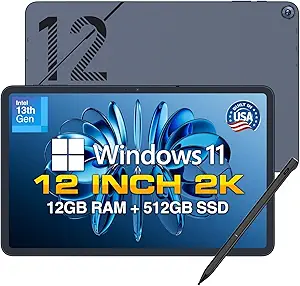 | Best Premium Windows Tablet | Display: 12-inch IPS touchscreen | Resolution: 2000 x 1200 pixels | Processor: Intel 13th Gen CPU | VIEW LATEST PRICE | See Our Full Breakdown |
| Fusion5 WIN PRO Rugged Windows 11 Tablet |  | Best Rugged Worksite Pick | Display: 10.1-inch Full HD IPS touchscreen | Brightness: 500 nits | Processor: Intel 13th Gen Alder Lake N100 | VIEW LATEST PRICE | See Our Full Breakdown |
| Microsoft Surface Go 2 |  | Best Lightweight Windows Value | Display: 10.5-inch PixelSense touchscreen | Resolution: 1920 x 1280, 216 ppi | Processor: Intel Core m3 up to 3.4Hz | VIEW LATEST PRICE | See Our Full Breakdown |
More Details on Our Top Picks
Apple iPad (7th Generation), 10.2-Inch, Wi-Fi, 32GB, Space Gray (Renewed)
I’d rank the Apple iPad 7th Generation as the budget entry for buyers who want iPadOS without paying for the newer Apple iPad 11-inch with A16 chip. The 10.2-inch screen, Touch ID, and A10 Fusion chip still make sense for browsing, streaming, email, school portals, and light app use. Compared with the Samsung Galaxy Tab A11+, it has less storage and an older design, but it gets the stronger iPad app ecosystem. The main compromise is clear: 32GB fills up fast, especially with games, downloads, and photos. I’d treat this as a low-cost secondary tablet, not a long-term creative workstation. The renewed status and 90-day warranty also make it less reassuring than newer models.
Pros:- Lower-cost access to iPadOS and the Apple app ecosystem
- 10.2-inch display is comfortable for reading, streaming, and schoolwork
- Touch ID adds simple secure access
- A10 Fusion chip is adequate for everyday tablet tasks
Cons:- 32GB storage is restrictive for downloads, games, and media libraries
- Renewed model includes only a 90-day limited warranty
- Wi-Fi only design limits use away from home or campus networks
Best for: Apple-focused families, students, or casual users who want an affordable iPad for streaming, web use, email, and school apps.
Not ideal for: App-heavy users, mobile gamers, and creators who need roomy storage or a newer processor for longer service life.
- Brand:Apple
- Model:iPad 7th Generation
- Display:10.2-inch
- Storage:32GB
- Chip:A10 Fusion
- Connectivity:Wi-Fi
- Battery Life:Up to 10 hours
- Cameras:8MP rear, 1.2MP FaceTime HD front
- Warranty:90 days limited warranty
Bottom line: Pick this if price matters most and basic iPadOS access is more valuable than storage, speed, or future headroom.
Samsung Galaxy Tab A11+ 6GB RAM, 128GB Storage
The Samsung Galaxy Tab A11+ earns its spot as the Android value pick because it gives buyers more breathing room than the Apple iPad 7th Generation. Its 128GB expandable storage is a big practical win for offline video, family apps, and files, while the 11-inch display with up to 90Hz motion feels better suited to scrolling and casual games. Against the Windows 11 Tablet with 6GB RAM, it is less like a mini PC, but easier for entertainment and app-based use. The Dolby Atmos quad speakers also make it a stronger media tablet than the budget iPad. The tradeoff is accessory cost: fast charging needs a separate 25W wall charger, and Samsung does not give a precise battery capacity here. I’d buy this for comfort, storage, and media value.
Pros:- 11-inch display with up to 90Hz refresh rate makes scrolling feel smoother
- 128GB storage with expansion is roomier than the 32GB iPad
- Quad speakers with Dolby Atmos suit movies, classes, and video calls
- Two-year warranty is stronger than the renewed iPad warranty
Cons:- Fast charging requires a separate 25W wall charger
- No specific battery capacity is listed
- Android tablet apps may be less polished than iPad versions in some creative workflows
Best for: Android households, streaming-heavy families, and students who want a roomy tablet for media, notes, browsing, and light multitasking.
Not ideal for: Buyers who need full Windows desktop apps, precise battery specs, or a charger bundled for the fastest charging speed.
- Brand:Samsung
- Model:Galaxy Tab A11+
- Screen Size:11 inches
- Refresh Rate:Up to 90Hz
- RAM:6GB
- Storage:128GB, expandable
- Speakers:Quad speakers with Dolby Atmos
- Front Camera:5MP
- Warranty:2 years
Bottom line: Choose this if you want the best mix of screen size, storage, audio, and price in a general-purpose Android tablet.
10.1″ Windows 11 Tablet with 6GB RAM, 128GB Storage, Intel Processor
I’d place the 10.1-inch Windows 11 Tablet below the QAZIPO 2-in-1 for performance and polish, but it has a useful role for buyers who need Windows in the smallest, cheapest-feeling package. The appeal is desktop app compatibility: browser-based work, legacy utilities, file management, and basic Office tasks are easier here than on the Samsung Galaxy Tab A11+. Its USB 3.0, Micro HDMI, Bluetooth 5.0, and microSD support also give it more hardware flexibility than the older iPad. The downside is that the plastic shell and unspecified display quality make it feel more functional than refined. The 6000mAh battery claim is attractive, yet I would not expect this Intel tablet to replace a real laptop for heavier multitasking. It is best as a compact Windows companion.
Pros:- Runs Windows 11 Home for desktop-style apps and file handling
- USB 3.0 and Micro HDMI add more connection options than many tablets
- microSD expansion supports larger local file libraries
- 6000mAh battery is rated for up to 12 hours of use
Cons:- Plastic shell may feel less sturdy than premium tablets
- Display resolution and camera quality are not clearly specified
- 6GB RAM can limit heavier Windows multitasking
Best for: Traveling workers, students, or technicians who need light Windows access, ports, and expandable storage in a small tablet.
Not ideal for: Designers, gamers, and laptop replacements shoppers who need a sharper known-quality display, stronger processor, or premium build.
- Display:10.1 inches
- Operating System:Windows 11 Home
- Processor:Intel processor
- RAM:6GB
- Storage:128GB
- Expandable Storage:Up to 408GB with microSD
- Battery:6000mAh, up to 12 hours
- Connectivity:Wi-Fi, USB 3.0, Micro HDMI, Bluetooth 5.0
Bottom line: Buy this for inexpensive, portable Windows access, not as a polished tablet or full laptop replacement.
Apple iPad 11-inch with A16 Chip, Liquid Retina Display, and Blue Color
The Apple iPad 11-inch with A16 chip is my top tablet pick because it balances speed, screen quality, camera quality, and app depth better than the rest of this group. Compared with the Apple iPad 7th Generation, the A16 chip and 128GB starting storage give it far more life for multitasking, creative apps, games, and schoolwork. Against the Samsung Galaxy Tab A11+, it costs more and lacks microSD expansion, but the iPad app catalog and Liquid Retina display with True Tone make it the stronger all-around choice. The 12MP front and back cameras also suit video calls and content capture better than the budget entries. Its weak point is cost creep: Apple Pencil and Magic Keyboard are separate, and anyone needing laptop-style productivity may spend much more than expected.
Pros:- A16 chip provides much stronger headroom than the older iPad and budget Windows tablet
- Liquid Retina display with True Tone is well suited to reading, drawing, and video
- 12MP front and rear cameras improve calls, scans, and casual content capture
- Wi-Fi 6 supports faster wireless performance on modern networks
Cons:- Apple Pencil and Magic Keyboard are sold separately
- No microSD expansion for adding cheap local storage
- Higher total cost than the Samsung Galaxy Tab A11+ or renewed iPad
Best for: Students, families, creators, and professionals who want a fast mainstream tablet with strong apps, cameras, and screen quality.
Not ideal for: Budget buyers or storage-heavy users who want microSD expansion and included productivity accessories.
- Brand:Apple
- Model Number:MD4A4LL/A
- Display:11-inch Liquid Retina with True Tone
- Chip:A16
- Storage:128GB
- Connectivity:Wi-Fi 6
- Cameras:12MP front and 12MP back with 4K video
- Battery Life:All-day battery life
- Weight:1.05 pounds
Bottom line: This is the safest pick for buyers who want one tablet to handle entertainment, school, creative apps, and everyday productivity well.
QAZIPO 2-in-1 Laptop Tablet with Magnetic Keyboard, 12″ 2K IPS Touchscreen, 12GB RAM, 512GB SSD, Intel Pentium Gold 6500Y Processor, Windows 11
The QAZIPO 2-in-1 Laptop Tablet is the most laptop-like option in this batch, which is why I’d choose it over the 10.1-inch Windows 11 Tablet for portable productivity. The magnetic keyboard, 12GB RAM, and 512GB SSD make a real difference for browser tabs, documents, downloads, and local file storage. Compared with the Apple iPad 11-inch, it is less polished as a pure tablet and the Pentium Gold 6500Y is not built for demanding editing or gaming, but Windows 11 and the included Office 365 subscription make it more practical for coursework and remote work from day one. The 12-inch 2K IPS screen with 100% sRGB is a strong perk for presentations and light creative review. Port selection is still modest, so desk setups may need a hub.
Pros:- 12GB RAM and 512GB SSD give it more workroom than the smaller Windows tablet
- Magnetic keyboard supports laptop-style typing without a separate purchase
- 12-inch 2K IPS touchscreen with 100% sRGB is useful for sharp text and color-aware viewing
- Includes a one-year Office 365 subscription for immediate productivity use
Cons:- Intel Pentium Gold processor may lag with heavy editing, gaming, or large workloads
- Limited ports compared with traditional laptops
- Less refined as a handheld tablet than the Apple iPad 11-inch
Best for: Students, remote workers, and document-heavy users who want one portable Windows device with a keyboard and generous storage.
Not ideal for: Power users running heavy creative apps, demanding games, or multi-monitor desk setups without extra adapters.
- Display:12-inch 2K IPS touchscreen
- Color Coverage:100% sRGB
- Processor:Intel Pentium Gold 6500Y, up to 3.4GHz
- RAM:12GB
- Storage:512GB SSD
- Operating System:Windows 11 Home
- Ports:USB-C, Micro HDMI, headphone jack
- Weight:1.4 lbs
- Included Software:Office 365, one-year subscription
Bottom line: Choose this when Windows productivity, bundled keyboard use, and storage matter more than premium tablet polish.
Fusion5 Helios 12 Windows 11 Tablet
I would rank the Fusion5 Helios 12 highest for buyers who want a Windows tablet that feels closer to a compact laptop than a media slate. Its 12-inch 2K IPS display, 12GB DDR5 RAM, and 512GB SSD give it more working room than the Microsoft Surface Go 2, while the dual USB-C, HDMI, and USB 3.0 ports make it more flexible than most tablets here. Compared with the QAZIPO 2-in-1, the Helios 12 has stronger cooling and broader ports, but it loses points for not including a keyboard. The biggest compromise is battery life: at about four hours under load, this is better for desk, studio, and travel-hub use than long unplugged days.
Pros:- Sharp 12-inch 2K IPS display with 16:10 workspace
- 12GB DDR5 RAM and 512GB SSD support heavier multitasking than entry Windows tablets
- Active cooling helps sustain performance during longer workloads
- Strong port selection with dual USB-C, USB 3.0, HDMI, and headphone jack
Cons:- No physical keyboard included, which limits laptop-style use out of the box
- Average 4-hour battery life is short beside the Surface Go 2
- Expandable storage options are limited
Best for: Windows users who want a high-resolution tablet for multitasking, documents, light creative work, and external monitor setups
Not ideal for: Students or travelers who need a keyboard included and battery life that lasts through a full day of classes or flights
- Display:12-inch IPS touchscreen
- Resolution:2000 x 1200 pixels
- Processor:Intel 13th Gen CPU
- RAM:12GB DDR5
- Storage:512GB SSD
- Battery Life:About 4 hours average
- Ports:2 x USB-C, USB 3.0, HDMI, 3.5mm jack
- Weight:690 grams / 1.52 lbs
- Operating System:Windows 11 Home
Bottom line: Pick this if performance, screen space, and ports matter more to you than battery life or bundled accessories.
Fusion5 WIN PRO Rugged Windows 11 Tablet
The Fusion5 WIN PRO Rugged earns its spot because it solves a different problem than the Helios 12 or Surface Go 2: it is built for field work, warehouses, job sites, and industrial use. The shockproof and dustproof design plus a 2-year warranty with accidental damage coverage make it a safer choice where a standard tablet could be a liability. It has the same broad 12GB RAM and 512GB SSD profile as the Helios 12, but trades the larger 12-inch 2K screen for a smaller 10.1-inch Full HD panel with strong 500-nit brightness. I would skip it for couch browsing or classroom note-taking, since the rugged build likely adds bulk and the premium price only makes sense when durability pays for itself.
Pros:- Rugged shockproof and dustproof build suits industrial and outdoor use
- 2-year warranty includes accidental damage coverage
- 12GB RAM and 512GB SSD give it stronger capacity than many compact Windows tablets
- 6000mAh battery with 30W Type-C fast charging supports mobile work shifts
Cons:- Likely heavier and bulkier than standard consumer tablets
- Higher price makes less sense for casual indoor use
- Smaller Full HD display is less spacious than the Helios 12 screen
Best for: Technicians, inventory teams, contractors, and mobile workers who need Windows 11 Pro in harsher environments
Not ideal for: Home users or students who mainly want a light tablet for streaming, reading, and basic productivity
- Display:10.1-inch Full HD IPS touchscreen
- Brightness:500 nits
- Processor:Intel 13th Gen Alder Lake N100
- RAM:12GB
- Storage:512GB SSD, expandable with MicroSD
- Battery:6000mAh
- Charging:30W Type-C fast charger
- Operating System:Windows 11 Pro
- Durability:Shockproof and dustproof
Bottom line: Choose this when durability and warranty protection matter more than sleek design or maximum screen space.
Microsoft Surface Go 2
The Microsoft Surface Go 2 is my value-minded Windows pick for readers who care more about portability and battery life than raw specs. At 1.15 lbs with up to 9 hours of battery life, it is easier to carry all day than the Fusion5 Helios 12 or the rugged WIN PRO. The 10.5-inch PixelSense display is sharp for reading, notes, and web work, and Windows 11 Pro gives it more desktop flexibility than the Android tablets in the broader lineup. The tradeoff is capacity: 8GB RAM and 128GB SSD feel modest next to the Fusion5 models with 12GB RAM and 512GB SSD. Since this is a renewed unit and the Type Cover costs extra, it suits careful budget buyers rather than shoppers who want every accessory included.
Pros:- Very light 1.15 lb design is easy to carry daily
- Up to 9 hours of battery life beats the Helios 12 by a wide margin
- Sharp 10.5-inch PixelSense display works well for reading and productivity
- Windows 11 Pro adds business-friendly flexibility
Cons:- 128GB SSD is limited beside the 512GB Fusion5 tablets
- Type Cover and accessories are sold separately
- Renewed condition may not suit buyers who want a factory-new device
Best for: Commuters, students, and remote workers who want a light Windows tablet for documents, browser work, and video calls
Not ideal for: Buyers who need large onboard storage, included keyboard accessories, or new-only hardware
- Display:10.5-inch PixelSense touchscreen
- Resolution:1920 x 1280, 216 ppi
- Processor:Intel Core m3 up to 3.4Hz
- RAM:8GB
- Storage:128GB SSD
- Battery Life:Up to 9 hours
- Weight:Starting at 1.15 lbs
- Ports:USB-C, 3.5mm headphone jack, Surface Connect, MicroSDXC reader
- Operating System:Windows 11 Professional
Bottom line: Buy this if you want the easiest Windows tablet to carry and can accept lower storage and separate accessories.
How We Picked
I ranked these options by how well they solve the real buyer problem behind best computers, tablets & components: getting a capable device that fits work, school, travel, media, or light laptop replacement needs without paying for the wrong strengths. The main criteria were performance headroom, display quality, operating system fit, storage, accessory support, portability, renewed-device risk, and price-to-usefulness rather than raw spec count alone.
The iPad 11-Inch with A16 lands first because it has the broadest appeal and the least friction for most buyers. The Samsung Galaxy Tab A11+ ranks high because it gives budget buyers a modern tablet with useful storage, while the Fusion5 Helios 12 and QAZIPO 2-in-1 move up for Windows users who need keyboard-friendly productivity. The renewed iPad 7th Generation and Surface Go 2 still have roles, but they sit lower because age, battery uncertainty, and performance limits make them more conditional buys.
Factors to Consider When Choosing Best Computers, Tablets & Components
Choosing between these computers and tablets is less about finding the biggest spec sheet and more about matching the device to the work it will actually do.Pick The Operating System Before The Spec Sheet
The first split is iPadOS, Android, or Windows, because that choice shapes the apps, accessories, and workflow more than any single processor number. The Apple iPad 11-Inch With A16 is best for buyers who want smooth tablet apps, long software support, and easy media or note-taking use. The Samsung Galaxy Tab A11+ makes sense if Google services, expandable workflows, or Android flexibility matter more than pro-grade creative apps. Windows tablets such as the Fusion5 Helios 12, QAZIPO 2-in-1, and Surface Go 2 are better for desktop apps, file management, and keyboard work. The tradeoff is that Windows often feels less fluid as a couch tablet, while iPads and Android tablets can feel limiting when a buyer needs legacy software.
Do Not Overbuy RAM On iPad Or Underbuy It On Windows
RAM matters differently across this lineup. An iPad with less visible memory can still feel fast because iPadOS manages apps tightly, while a Windows tablet with too little RAM can slow down under browser tabs, updates, and background services. That is why the 12GB RAM in the Fusion5 Helios 12, QAZIPO 2-in-1, and Fusion5 WIN PRO carries real value for Windows buyers. The Samsung Galaxy Tab A11+ also benefits from 6GB RAM because Android multitasking and split-screen use need extra breathing room. The older renewed iPad and Surface Go 2 are better for lighter use, not for buyers who expect years of heavy multitasking.
Storage Is A Practical Limit, Not Just A Number
The renewed 32GB iPad 7th Generation is the clearest example of why storage can define the whole purchase. It may work for streaming, email, and basic school tasks, but app updates, photos, downloads, and cached media can make 32GB feel tight quickly. By comparison, the 128GB Samsung Galaxy Tab A11+ and 128GB Surface Go 2 are more comfortable for daily files, while the 512GB Windows options are better for buyers saving documents, offline media, or work apps locally. Extra storage is most valuable on Windows because system updates and desktop apps take more space. Paying for storage is sensible when the device will replace a laptop, but less necessary for a shared streaming tablet.
Keyboard And Stylus Support Change The Job
A tablet becomes a different product once a buyer adds a keyboard or pen. The QAZIPO 2-in-1 has an advantage for budget laptop replacement because the magnetic keyboard is part of the package, while the Fusion5 Helios 12 gains appeal from its included stylus. The Apple iPad 11-Inch has better accessory depth, but the final cost can rise once a keyboard case and pencil are added. The Samsung Galaxy Tab A11+ is better for casual typing and media than for replacing a full laptop setup. Buyers should price the full kit, not just the tablet, because the cheapest device on the product page may not be the cheapest usable setup.
Renewed Devices Need A Different Risk Filter
Renewed models such as the Apple iPad 7th Generation and Microsoft Surface Go 2 can be smart buys when the price gap is wide enough. The upside is access to better-known brands at lower cost, but the downside is less predictability around battery wear, cosmetic condition, charger quality, and return policy. The Surface Go 2 has the stronger productivity angle because it runs Windows 11 Pro, while the older iPad is simpler for media, kids, and basic apps. Compared with buying the newer iPad 11-Inch, a renewed device asks the buyer to accept shorter future usefulness. I would only choose renewed when the seller terms are clear and the workload is modest.
Rugged Builds Are For Specific Buyers
The Fusion5 WIN PRO Rugged Windows 11 Tablet should not be treated like a normal home tablet with a tougher shell. Its value is strongest for field work, workshops, warehouses, travel-heavy jobs, or buyers who expect bumps, dust, and rougher handling. Compared with the Fusion5 Helios 12, it gives up some mainstream appeal in exchange for durability and a more specialized shape. That can be the right trade if the device will be used standing up, outdoors, or around equipment. For couch browsing, school notes, and streaming, a thinner iPad or Samsung tablet will usually feel easier to live with.
Frequently Asked Questions
Should I Choose An iPad, Android Tablet, Or Windows Tablet From This List?
Choose an iPad if app quality, smooth performance, and long-term support matter most. Pick the Samsung Galaxy Tab A11+ if you want a lower-cost Android tablet with useful storage and flexible Google service support. Go with a Windows tablet if you need desktop apps, file folders, USB-style workflows, or a keyboard-first setup. The main compromise is feel: Windows wins for laptop-like tasks, while iPadOS and Android usually feel better for touch-first use. My default recommendation for most buyers is the iPad 11-Inch, unless a specific Windows app is the reason for buying.
Is The Renewed 7th-Generation iPad Still Worth Buying In 2026?
The renewed iPad 7th Generation can still work for basic browsing, streaming, email, and a child or household tablet. Its appeal is price, not power, and the 32GB storage is the biggest limitation. Compared with the newer iPad 11-Inch, it is slower, tighter on space, and more exposed to battery-health uncertainty. I would skip it for creative work, heavy school use, or anyone planning to keep the device for many years. It makes sense only when the price is low enough and the return policy gives room to check condition.
Which Pick Is Best For Replacing A Small Laptop?
The QAZIPO 2-in-1 Laptop Tablet is the most direct small-laptop replacement here because it includes a magnetic keyboard, a 12-inch 2K touchscreen, 12GB RAM, and a 512GB SSD. The Fusion5 Helios 12 is close, especially for buyers who want stylus support, but the QAZIPO package is more keyboard-centered from the start. The Microsoft Surface Go 2 has a more established brand name, yet its older Core m3 platform and 128GB SSD make it less roomy. Buyers who live in Microsoft Office, browser tabs, and file folders should lean Windows. Buyers who mostly use apps, video, and notes should still favor the iPad 11-Inch.
Is More Storage More Useful Than A Faster Processor In This Roundup?
It depends on the operating system and workload. On iPad, a faster chip like the A16 can make the device feel better for longer, especially with creative apps, games, and multitasking. On Windows tablets, 512GB storage can be more valuable than it looks because updates, desktop software, and offline files grow quickly. The Samsung Galaxy Tab A11+ sits in the middle with 128GB, which is a practical amount for casual Android use. I would prioritize speed for long-term iPad ownership and prioritize both RAM and storage for any Windows model expected to act like a laptop.
Which Device Should A Beginner Buy?
For most beginners, the Apple iPad 11-Inch With A16 Chip is the easiest recommendation because the interface is simple, app quality is strong, and performance leaves room to grow. The Samsung Galaxy Tab A11+ is a better beginner pick for buyers already tied to Android phones or Google apps. The renewed iPad 7th Generation is simpler and cheaper, but the storage ceiling can create frustration sooner. Windows tablets are better for beginners only when they already need desktop software or keyboard-heavy work. My beginner ranking starts with the iPad 11-Inch, then Samsung Galaxy Tab A11+, then Surface Go 2 for Windows-only needs.
Conclusion
My best overall recommendation is the Apple iPad 11-Inch With A16 Chip because it balances speed, display quality, app support, and long-term usefulness better than the rest. The Samsung Galaxy Tab A11+ is the best value for Android buyers, while the QAZIPO 2-in-1 is the better choice for budget laptop replacement. For a more premium Windows-style tablet package with pen support, I would choose the Fusion5 Helios 12; for field use or rougher work, the Fusion5 WIN PRO Rugged has the clearest purpose. Beginners should start with the iPad 11-Inch, bargain hunters can look at the renewed iPad 7th Generation, and Windows buyers who prefer a familiar brand can choose the renewed Surface Go 2 if the condition and price are right.
Fall Picks
fall essentials
As an affiliate, we earn on qualifying purchases.