
TL;DR

Get the latest gadgets delivered free — and shop member deals
- Fast, free delivery on millions of items
- Access to Prime Big Deal Days deals on October 6–7
- Prime Video, Amazon Music and more included
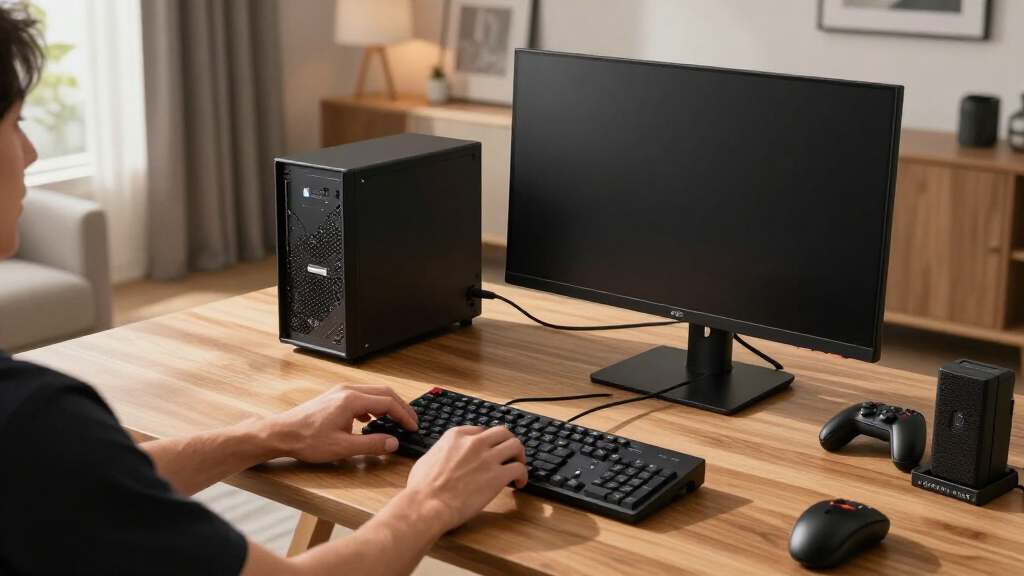
The ASRock BC-250 is a budget-friendly mini PC optimized for gaming, offering customizable performance through software tweaks and hardware configurations. Its release aims to attract cost-conscious gamers.
The ASRock BC-250 has been officially announced as an affordable mini PC designed for gaming enthusiasts. The device is notable for its customizable hardware and software options, aiming to deliver a cost-effective gaming experience. This development is significant as it targets budget-conscious consumers seeking compact gaming solutions.
The BC-250 features a compact printed case, integrated GPU with a default locked clock of 1500MHz, and supports hardware modifications such as CPU overclocking and GPU CU unlocking. A detailed setup guide has been circulated, highlighting performance tuning options like VRAM allocation adjustments, disabling unnecessary background processes, and overclocking the CPU to achieve higher frame rates.
Key software tools include cyan-skillfish-smu for GPU management and scripts for enabling additional GPU compute units. Users are advised to tune power settings, adjust fan curves, and disable certain daemons to optimize thermals and reduce lag. The device’s flexibility allows users to push its performance beyond factory settings, with some reports indicating stable operation at 40 GPU compute units, up from the default 24.
ASRock BC-250: Building the Budget Steam Machine
A compact gaming experiment with serious enthusiast potential. The BC-250 repurposes mining-era hardware into a configurable mini PC whose real value emerges through careful GPU, CPU, memory and thermal tuning.
Performance is a configuration problem
The BC-250 is not a conventional plug-and-play mini PC. Its appeal comes from exposing several optimization layers that can turn inexpensive hardware into a more capable Steam-focused system.
Manage and unlock the GPU
Community workflows use cyan-skillfish-smu and custom scripts to manage clocks and attempt activation of additional compute units.
Rebalance VRAM allocation
Adjusting memory allocation can reduce bottlenecks, but the best split depends on the game, operating system and total available memory.
Cut background overhead
Disabling unnecessary daemons and processes reserves more CPU time and memory bandwidth for games while reducing avoidable lag.
Raise CPU performance
Measured CPU overclocking may improve frame pacing, provided voltage, temperature and system stability remain within safe limits.
Shape the fan curve
A more deliberate fan profile helps prevent sustained clocks from collapsing under load inside the compact printed enclosure.
Find the stable ceiling
Power tuning should balance performance against heat, noise and reliability—not simply pursue the highest possible benchmark.
Where the BC-250 fits
It occupies an unusual space between a polished console, a conventional mini PC and a fully custom desktop. That makes it compelling—but only for the right owner.
| Decision factor | ASRock BC-250 | Entry mini PC | Game console | Budget desktop |
|---|---|---|---|---|
| Compact footprint | Strong | Strong | Moderate | Limited |
| Out-of-box simplicity | Low | High | Highest | Varies |
| Tuning freedom | Extensive | Limited | Minimal | Extensive |
| Upgrade path | Restricted | Restricted | Restricted | Best |
| Predictable stability | After testing | Generally | High | Build-dependent |
| Enthusiast value | Standout | Moderate | Low | Strong |
“This device is surprisingly capable for its price, especially once you tweak the GPU and CPU settings.”
Hacker News user · Community perspective
More speed, more responsibility
The opportunity is real, but so are the trade-offs. CU unlocking, overclocking and aggressive power settings can introduce instability, additional heat and possible warranty concerns.
Optimization priority map
Change one variable
Isolating each adjustment makes crashes, artifacts and regressions easier to diagnose.
Silicon variability
One unit may sustain 40 compute units while another supports only a partial unlock.
Thermal durability
Stable short benchmarks do not prove sustained reliability in a compact enclosure.
Save a recovery path
Document known-good settings and preserve a way to restore the stock configuration.
What prospective builders need to know
The BC-250 can be a persuasive budget project, but availability, firmware maturity and repeatable stability remain important parts of the buying decision.
Can it run modern games?
Yes, with realistic expectations. Software tuning, sensible graphics settings and stable hardware modifications can produce playable results in many modern titles.
Is unlocking every CU safe?
It is not risk-free. Unlocking can cause instability, thermal problems or warranty complications, and success may differ between individual boards.
Which software matters?
GPU management is central. Community material points to cyan-skillfish-smu plus custom scripts for clock control and compute-unit configuration.
Will it be widely available?
Details are still developing. Early indications favor online distribution, with community channels likely to remain important for setup support.
What are the main limitations?
Variability and thermals. Results depend on silicon quality, cooling, power configuration and the amount of testing an owner is willing to perform.
What could improve next?
Firmware and shared testing. Updates from ASRock and repeatable community profiles could make optimization more stable and accessible.
Implications for Budget Gaming Builds
The BC-250’s affordability combined with its high degree of customizability makes it a compelling choice for budget gamers and DIY enthusiasts. Its ability to be overclocked and optimized through software means users can extract more performance without additional hardware costs. This could shift the landscape of affordable gaming PCs, providing a new option for those who previously relied on low-end prebuilt systems or consoles.
As an affiliate, we earn on qualifying purchases.
Market Positioning and Technical Background
The BC-250 is part of ASRock’s push into compact gaming hardware, competing with other mini PCs and console alternatives. Its hardware is based on crypto-mining GPU boards, which have been repurposed for gaming. The device’s design allows for hardware modifications like CU unlocking and CPU overclocking, similar to other enthusiast-oriented mini PCs. Prior to this, similar hardware was used in niche markets, but ASRock’s official support and detailed guides aim to mainstream these modifications.
“This device is surprisingly capable for its price, especially once you tweak the GPU and CPU settings.”
— Hacker News user
As an affiliate, we earn on qualifying purchases.
Performance Stability and Hardware Compatibility
While initial reports suggest that unlocking all GPU compute units and overclocking can improve performance, it is not yet clear how stable these modifications are across different units. Variability in hardware quality means some devices may only support partial CU unlocking. Long-term thermal and power stability of overclocked configurations remains to be fully tested.
As an affiliate, we earn on qualifying purchases.
Upcoming Firmware Updates and Community Testing
Further testing by the community is expected to refine overclocking and CU unlocking procedures. ASRock may release firmware updates to improve stability and performance, and user reports will likely shape best practices for maximizing the BC-250’s capabilities. Official support channels and forums will be key for troubleshooting and sharing configurations.
As an affiliate, we earn on qualifying purchases.
Key Questions
Can the ASRock BC-250 run modern games effectively?
Yes, with software tuning and hardware modifications, the BC-250 can deliver playable frame rates on many modern titles, especially when overclocked and with optimized settings.
Is unlocking all GPU compute units safe?
While many users report stable operation after CU unlocking, it involves hardware modifications that may void warranties and carry risks of instability or thermal issues. Caution and thorough testing are advised.
What software is recommended for performance tuning?
Tools like cyan-skillfish-smu are recommended for GPU management, along with custom scripts for overclocking and CU unlocking. Proper configuration is essential for stability and thermal management.
Will the BC-250 be available internationally?
Availability details are still emerging, but initial reports suggest it will be marketed primarily through online channels, with community support playing a key role in its adoption.
What are the main limitations of the BC-250?
Hardware variability and potential stability issues after modifications are the main concerns. Its thermal performance and power consumption also depend heavily on user tuning.
Source: Hacker News
Fall Picks
fall essentials
As an affiliate, we earn on qualifying purchases.